Never anthropomorphize computers, they are inanimate objects. Never treat computers as if they have human feelings and emotions, they don't like it.
Recently in Computers Category
I am a bad blogger. I just updated my blog software and posted my 2010 New Year's Card. Then I decided to check out my RSS feed, and I was astonished to find my 2009 New Year's Card still on the page! My collected blog output for the whole year fit inside a single, short RSS web page.
In the entire year of 2009, I only wrote nine posts. And I'm paying $120 per year to my ISP, so I essentially paid about $13 per post. And my ISP, Dreamhost, is part of the problem, they wrecked my software so I couldn't post anything for two whole months. At least my old articles were still available, even if I couldn't post anything new.
So I have to get back to work writing. And that's the reason I am writing this trivial little notice, just to put something up and get things moving again. I have had to write this sort of apology before, when I wrote nothing for several months and my blog's entire front page was blank.
I am planning on reviving some of my oldest web pages that have been archived for years and posting them here on my blog. My old content deserves some place to be publicly archived. But I'm going to have to dig around my archives and find them, that might take some time as I have about 4Tb of archives. And that doesn't include my pre-blogging archives on floppies and other weird media.
And then there is another reason I wrote so little on my blog, I've been writing professionally. There is much greater satisfaction in getting paid for my writing, rather than paying to publish it myself on the blog. And I have the additional benefit of posting my professional writing here too, once The Register releases them from their exclusive rights. So I'll post a few of my old articles when I get a chance.
In the entire year of 2009, I only wrote nine posts. And I'm paying $120 per year to my ISP, so I essentially paid about $13 per post. And my ISP, Dreamhost, is part of the problem, they wrecked my software so I couldn't post anything for two whole months. At least my old articles were still available, even if I couldn't post anything new.
So I have to get back to work writing. And that's the reason I am writing this trivial little notice, just to put something up and get things moving again. I have had to write this sort of apology before, when I wrote nothing for several months and my blog's entire front page was blank.
I am planning on reviving some of my oldest web pages that have been archived for years and posting them here on my blog. My old content deserves some place to be publicly archived. But I'm going to have to dig around my archives and find them, that might take some time as I have about 4Tb of archives. And that doesn't include my pre-blogging archives on floppies and other weird media.
And then there is another reason I wrote so little on my blog, I've been writing professionally. There is much greater satisfaction in getting paid for my writing, rather than paying to publish it myself on the blog. And I have the additional benefit of posting my professional writing here too, once The Register releases them from their exclusive rights. So I'll post a few of my old articles when I get a chance.
I am hopping mad at Dreamhost, the ISP hosting this blog. They ruined my software setup, a configuration I've spent years refining. My files were moved to another server without prior warning, and Dreamhost's technicians broke everything. Years of my work on this blog are now damaged. It took me over a month to get things working again. As you can see, I had to change to a basic MovableType template just to get things working again. Man is that ugly, I have to change it. Well at least the blog software is working now, even if it is as ugly as hell.
Dreamhost was particularly uncooperative when I discovered problems with their new Quicktime Streaming Server setup. I have years of videos online, none of them worked, due to Dreamhost misconfiguring their server. It took me weeks to get someone to acknowledge the error and correct it. Now it's basically working. If anyone notices problems, particularly problems with videos, please let me know.
Dreamhost was particularly uncooperative when I discovered problems with their new Quicktime Streaming Server setup. I have years of videos online, none of them worked, due to Dreamhost misconfiguring their server. It took me weeks to get someone to acknowledge the error and correct it. Now it's basically working. If anyone notices problems, particularly problems with videos, please let me know.
I just heard the announcement that Microsoft will build a $500 Million data center in Iowa. This would not have happened if the Governor hadn't arranged tax breaks as an incentive.
Bill Gates, the World's Richest Man, does not need Corporate Welfare payments. Iowa taxpayers will be footing the bill for Microsoft. The data center will provide only 75 jobs, it is unlikely that any of them will go to Iowans. The data center will require massive amounts of electric power, straining Iowa's power infrastructure. This is an exceptionally bad decision by the Iowa State government.
Bill Gates, the World's Richest Man, does not need Corporate Welfare payments. Iowa taxpayers will be footing the bill for Microsoft. The data center will provide only 75 jobs, it is unlikely that any of them will go to Iowans. The data center will require massive amounts of electric power, straining Iowa's power infrastructure. This is an exceptionally bad decision by the Iowa State government.
I'm in a scanning frenzy. I bought a fancy HP ScanJet 8250 with a duplex feeder, so I could scan double-sided documents. I'm trying to turn boxes full of old paper records and computer documentation into a few discs of PDFs. But it has not been as easy as I had hoped.
I have struggled with this ScanJet 8250 for a couple of years now, when it works, it works well (which is almost never). It has some frustrating problems. If you attempt to automatically scan both sides of a folded letter, it will jam when it hits the folds. So if I want to scan normal business letters or bills, I have to manually feed each side. But with a stack of normal flat paper it works fairly well, although it has a tendency to jam. I could dump a hundred pages into the feeder, and if it jammed, it lost all the previous scans. I finally figured out I could scan to TIFFs, it saves the individual files as it goes. Hooray. If it jams, now I can just clear it and pick up where I left off.
I've been feeding (and unjamming) the scanner for the last day or two, and so far I've scanned a stack of paper about eight inches high. I had some old spiral-bound computer manuals, I unbound them and put them in the ADF. Even with all the troubles, I've scanned hundreds of pages with little effort. A 260 page manual with 140Mb of scans can compress down to an 8Mb PDF. So it's worth the effort (I guess) since I can get boxes full of papers onto a single disc.
I'm going through boxes of archives, looking for material to scan and discard. I found my old college calculus textbook, the author released it as a PDF and I downloaded it. That's one more huge book I won't have to scan, and won't have to carry around any more. I don't know why I even carried it around for 30 years, I have never looked at it once since that class was over. I guess it was my trophy for passing college calculus.
I'm trying to sort out what I don't need anymore, discarding old documentation (but scanning what I need to preserve) and separating the high value documents for permanent storage. My goal is to reduce the amount of books and paper I'm storing by 25%.
I have struggled with this ScanJet 8250 for a couple of years now, when it works, it works well (which is almost never). It has some frustrating problems. If you attempt to automatically scan both sides of a folded letter, it will jam when it hits the folds. So if I want to scan normal business letters or bills, I have to manually feed each side. But with a stack of normal flat paper it works fairly well, although it has a tendency to jam. I could dump a hundred pages into the feeder, and if it jammed, it lost all the previous scans. I finally figured out I could scan to TIFFs, it saves the individual files as it goes. Hooray. If it jams, now I can just clear it and pick up where I left off.
I've been feeding (and unjamming) the scanner for the last day or two, and so far I've scanned a stack of paper about eight inches high. I had some old spiral-bound computer manuals, I unbound them and put them in the ADF. Even with all the troubles, I've scanned hundreds of pages with little effort. A 260 page manual with 140Mb of scans can compress down to an 8Mb PDF. So it's worth the effort (I guess) since I can get boxes full of papers onto a single disc.
I'm going through boxes of archives, looking for material to scan and discard. I found my old college calculus textbook, the author released it as a PDF and I downloaded it. That's one more huge book I won't have to scan, and won't have to carry around any more. I don't know why I even carried it around for 30 years, I have never looked at it once since that class was over. I guess it was my trophy for passing college calculus.
I'm trying to sort out what I don't need anymore, discarding old documentation (but scanning what I need to preserve) and separating the high value documents for permanent storage. My goal is to reduce the amount of books and paper I'm storing by 25%.
I do a lot of tech support for my friends, I've worked in tech support for years. I have noticed there tend to be two types of tech support calls. There are calls about serious problems that need tech intervention. But more often, the calls are from someone who hasn't done a single thing to research their problem. These calls can be frustrating, my friend calls and says "I'm in Photoshop and I can't get the thingummy in the whatchamajigger" (that's a direct quote) and it takes me an inordinate amount of time to figure out he's trying to find a path command in the layer palette. Sometimes I just look in the program's help file, once I figure out what the question is, the solution is easy if you just look in the help files. I don't mind so much that the solution is trivial, I just mind that it takes so long to figure out the question.
I've recently been thinking of my first tech management job, I was Service Manager at ComputerLand of Glendale back around 1981. I told the boss I didn't feel qualified, he said, "don't worry kid, after 3 months you'll have seen it all and know it all." And he was right, the daily grind of repairs and tech support seemed like old hat after a few months. But there were ongoing tech problems, I remember one problem that seemed to take way too much tech effort, or at least, way too much of my effort. When the first memory cards for the IBM PC came out, the technicians could not figure out how to set the DIP switches. All day long, the techs would interrupt me with questions about setting the switches, when they could easily have figured it out for themselves. It was easy, you just set the switches to the binary address of where you wanted the memory to start. But none of the techs knew binary math, so they were always baffled.
I decided to close the shop one morning for a class to teach the techs how memory addresses worked and how to do the binary math. We went through all the fundamentals and they seemed to get it. We went through the manuals and worked out how the cards functioned. I demonstrated the formula to calculate the addresses. I described as many ways to solve the problem as I could figure out, and gave them all the tech support phone numbers I called when I couldn't figure it out. Then I gave them a written exam. The exam was just one question, I didn't even want the solution, I just wanted them to describe at least 4 places to look for the answer, "How do I configure Memory XYZ at location ABCD?" My point was to teach them how to find their own resources to solve problems, before asking me. But I was astonished when the techs handed in their tests. Every single one of their lists started the same way:
1. Ask Charles.
I've recently been thinking of my first tech management job, I was Service Manager at ComputerLand of Glendale back around 1981. I told the boss I didn't feel qualified, he said, "don't worry kid, after 3 months you'll have seen it all and know it all." And he was right, the daily grind of repairs and tech support seemed like old hat after a few months. But there were ongoing tech problems, I remember one problem that seemed to take way too much tech effort, or at least, way too much of my effort. When the first memory cards for the IBM PC came out, the technicians could not figure out how to set the DIP switches. All day long, the techs would interrupt me with questions about setting the switches, when they could easily have figured it out for themselves. It was easy, you just set the switches to the binary address of where you wanted the memory to start. But none of the techs knew binary math, so they were always baffled.
I decided to close the shop one morning for a class to teach the techs how memory addresses worked and how to do the binary math. We went through all the fundamentals and they seemed to get it. We went through the manuals and worked out how the cards functioned. I demonstrated the formula to calculate the addresses. I described as many ways to solve the problem as I could figure out, and gave them all the tech support phone numbers I called when I couldn't figure it out. Then I gave them a written exam. The exam was just one question, I didn't even want the solution, I just wanted them to describe at least 4 places to look for the answer, "How do I configure Memory XYZ at location ABCD?" My point was to teach them how to find their own resources to solve problems, before asking me. But I was astonished when the techs handed in their tests. Every single one of their lists started the same way:
1. Ask Charles.
One of my favorite obscure MacOS X 10.5 "Leopard" features is the customizable Finder bar. I took a screen cap of the folder with the graphics from my last blog entry.

Look closely under the word "Sony." There's a little round icon, it's not part of the MacOS X icon set. Look over on the left, it's the same little icon as my Downloads G5 folder. If you drag a folder to the Finder bar, it will stick; option-drag it away, it will disappear with a "poof." Click on the icon and you're instantly transported to the folder. I understand you can put other things on the Finder Bar, like apps or Applescripts, but I don't like too much clutter. It is incredibly convenient to put shortcuts there, it's much quicker than searching through the sidebar.
One of the reasons this looks so good is because of the beautiful icon. Its gray tone matches the Finder well, it isn't too intrusive, you'd hardly know it's there. I found it on a Japanese icon designer's website, I'd give him credit if I could remember his name. He made beautiful, subtle icons, which were all totally useless to me except this one.

Look closely under the word "Sony." There's a little round icon, it's not part of the MacOS X icon set. Look over on the left, it's the same little icon as my Downloads G5 folder. If you drag a folder to the Finder bar, it will stick; option-drag it away, it will disappear with a "poof." Click on the icon and you're instantly transported to the folder. I understand you can put other things on the Finder Bar, like apps or Applescripts, but I don't like too much clutter. It is incredibly convenient to put shortcuts there, it's much quicker than searching through the sidebar.
One of the reasons this looks so good is because of the beautiful icon. Its gray tone matches the Finder well, it isn't too intrusive, you'd hardly know it's there. I found it on a Japanese icon designer's website, I'd give him credit if I could remember his name. He made beautiful, subtle icons, which were all totally useless to me except this one.
I just bought a new old Mac. I saw an old Performa 6300 on Craig's List for $15. It had a combination of features I was looking for, it had USB and ethernet, and a floppy. I've looked for a USB floppy drive so I can load and archive some old floppies. But that would cost a lot more than $15. I can buy the whole computer for that price, and pull the data in and out of the Performa with a USB flash drive, or even hook it up on my home network and zap files between machines.
So I drove out in an ice-storm to pick up this old junker computer. Then it occurred to me, the City Sanitation Dept. will bill you more than $15 in disposal charges if you put this in the dump. I told the seller, I'm saving him more than $15 you'd have to pay to get rid of it, you should be paying me! He laughed and said there was a time when this computer was worth $2300 and he was firm on the $15. I said this is a Craig's List deal in cash, so I'd offer a firm $14, that way I could at least feel like I got a deal. We closed on $14.
I need another old Mac like I need a hole in my head, but I decided I needed an old OS 9 machine like the Performa, my Mac Quad G5 has lost the ability to run Classic, since the MacOS X 10.5 upgrade. Classic is dead. Some people have tried running emulators like Sheepshaver, but I just can't get it to work on my Quad. The HowTo files seem to focus on Mac Intel systems that could never run Classic. It seems odd for me to try to run an emulated OS 9 on my CPU that was running native PPC Classic just a few weeks ago.
So I guess it is time to put OS 9 in its grave. I need to migrate some old OS 9 media on SCSI drives. I have an old 80Mb Bernoulli Box, it's an odd cartridge drive, it was designed to work with the Mac Portable, which was notorious for its heavy lead-acid batteries. The Bernoulli drive has a lead acid battery too, but it's been sitting in a closet for about 10 years, I'm afraid to fire it up. But if it blows up when attached to an old $14 junk CPU, I wouldn't mind so much.
Then I have some other miscellaneous media, old 40Mb Syquest carts, 1Gb Jaz carts, I figure I could reduce a two full boxes of floppies and disks, and two boxes full of old hardware, down to maybe 3 or 4 DVDRs.
I need another Mac like I need a hole in my head. Let me see if I recall what old Macs I have, four of them: a IIcx, 8100/110, G3/400U, and a Dual-1Ghz "Wind Tunnel." But none of them had a floppy AND a communications port to move data to new Macs. So I guess I need one more Mac, in order to migrate and get rid of my old Mac junk. And soon I'll be paying the expensive disposal charges on this old crap.
So I drove out in an ice-storm to pick up this old junker computer. Then it occurred to me, the City Sanitation Dept. will bill you more than $15 in disposal charges if you put this in the dump. I told the seller, I'm saving him more than $15 you'd have to pay to get rid of it, you should be paying me! He laughed and said there was a time when this computer was worth $2300 and he was firm on the $15. I said this is a Craig's List deal in cash, so I'd offer a firm $14, that way I could at least feel like I got a deal. We closed on $14.
I need another old Mac like I need a hole in my head, but I decided I needed an old OS 9 machine like the Performa, my Mac Quad G5 has lost the ability to run Classic, since the MacOS X 10.5 upgrade. Classic is dead. Some people have tried running emulators like Sheepshaver, but I just can't get it to work on my Quad. The HowTo files seem to focus on Mac Intel systems that could never run Classic. It seems odd for me to try to run an emulated OS 9 on my CPU that was running native PPC Classic just a few weeks ago.
So I guess it is time to put OS 9 in its grave. I need to migrate some old OS 9 media on SCSI drives. I have an old 80Mb Bernoulli Box, it's an odd cartridge drive, it was designed to work with the Mac Portable, which was notorious for its heavy lead-acid batteries. The Bernoulli drive has a lead acid battery too, but it's been sitting in a closet for about 10 years, I'm afraid to fire it up. But if it blows up when attached to an old $14 junk CPU, I wouldn't mind so much.
Then I have some other miscellaneous media, old 40Mb Syquest carts, 1Gb Jaz carts, I figure I could reduce a two full boxes of floppies and disks, and two boxes full of old hardware, down to maybe 3 or 4 DVDRs.
I need another Mac like I need a hole in my head. Let me see if I recall what old Macs I have, four of them: a IIcx, 8100/110, G3/400U, and a Dual-1Ghz "Wind Tunnel." But none of them had a floppy AND a communications port to move data to new Macs. So I guess I need one more Mac, in order to migrate and get rid of my old Mac junk. And soon I'll be paying the expensive disposal charges on this old crap.
A minor storm has erupted in comments for an article I posted long ago, thanks to a link from
Andrew Orlowski
at El Reg. He unburied an article I wrote almost a year ago, an essay about DRM and the Church-Turing Thesis. I am still answering comments as they arrive, so I thought I should put a note here, to alert people that all the fun doesn't necessarily happen at the top of the blog.
Turing's math papers have always fascinated me, but everyone seems to have their own interpretation. I try to see it at its most fundamental. I remember seeing an article many years ago, describing the simplest possible Turing Machine. It consisted of a strip of paper and some flat stones that were white on one side, black on the other. The stones represented one bit, on or off. It was suggested that you use a roll of toilet paper, as it was conveniently marked in squares, one for each bit. The human operator flipped the stones and moved the strip of paper left and right, according to the algorithm. It was essentially a cellular automaton in 1 dimension.
And that's how I think Turing saw these problems. I am particularly fascinated by his papers on Morphogenesis, analyzing the spotted patterns in animal fur, and the variegation patterns in plants. Turing conceptualized the growth of the pattern as a 2 dimensional cellular automaton. But Turing always wanted everything to be written as functions, he considered a function as a fundamental unit of computing on a Turing Machine. If it's a function, it runs to completion, if it's not a function, it might be Turing-Incomplete and be incomputable.
Turing's dense forests of functions are way over my head. I wonder if there are even a handful of people who fully understand them. The papers I read that introduced me Turing's morphogenetic pattern functions admitted they barely scratched the surface.
Turing's math papers have always fascinated me, but everyone seems to have their own interpretation. I try to see it at its most fundamental. I remember seeing an article many years ago, describing the simplest possible Turing Machine. It consisted of a strip of paper and some flat stones that were white on one side, black on the other. The stones represented one bit, on or off. It was suggested that you use a roll of toilet paper, as it was conveniently marked in squares, one for each bit. The human operator flipped the stones and moved the strip of paper left and right, according to the algorithm. It was essentially a cellular automaton in 1 dimension.
And that's how I think Turing saw these problems. I am particularly fascinated by his papers on Morphogenesis, analyzing the spotted patterns in animal fur, and the variegation patterns in plants. Turing conceptualized the growth of the pattern as a 2 dimensional cellular automaton. But Turing always wanted everything to be written as functions, he considered a function as a fundamental unit of computing on a Turing Machine. If it's a function, it runs to completion, if it's not a function, it might be Turing-Incomplete and be incomputable.
Turing's dense forests of functions are way over my head. I wonder if there are even a handful of people who fully understand them. The papers I read that introduced me Turing's morphogenetic pattern functions admitted they barely scratched the surface.
Apple blogs had an outpouring of derision when a prominent, self-declared technology expert could not figure out why his iPhone stopped ringing. Of course this was because he'd flipped the Silence Ringer switch. John Gruber rushed to his defense with this comment:
But the icon will also appear if your screen is off. If your iPhone is sleeping and has been inactive more than 1 minute, flipping the Silence Ringer switch will turn on the screen, and the big icon of a bell with a slash through it will appear. However, if your iPhone is sleeping but has been used within the last 1 minute, you only get the buzz of tactile feedback, indicating the phone is in vibrate mode. So the only possible way to miss the visual feedback of the Silence Ringer icon is if you turn off your iPhone and then immediately start flipping the switch.
But to me, the bigger question is, what kind of idiot would buy a $400 phone and not know how to operate the buttons? There are only 4 hardware buttons on the iPhone. Apple went to considerable pains to make the Silence Ringer switch functions as obvious as possible, even to technology experts.
Update: Comments Disabled. I have blocked further comments on this subject, I almost never do this. I continue to receive a steady stream of comments on this post, it has become unmanageable. It was not my intention for this brief article to become the #1 Google search result for "iPhone won't ring." It was not my intention to sneer at users who could not figure out the problem. It was my intention to sneer at one pompous software "expert" who could not figure it out (I have sworn never to mention him by name on this blog, but follow the first link in this story and you will figure it out). I am gratified by the positive comments from readers who discovered here the solution to their problems. I have ignored the negative comments from people who were insulted. Thank you to all who took interest (and those who continue to discover this article).
It’s easy to laugh at, but I think it’s actually a non-obvious design. There’s no icon or visual indication as to what that switch does. You do get a small jolt of vibration when it’s engaged, but that doesn’t naturally imply “silent mode” to me. (Update: Yes, there’s also an on-screen icon, but that only helps if you toggle it while the screen is on.)
But the icon will also appear if your screen is off. If your iPhone is sleeping and has been inactive more than 1 minute, flipping the Silence Ringer switch will turn on the screen, and the big icon of a bell with a slash through it will appear. However, if your iPhone is sleeping but has been used within the last 1 minute, you only get the buzz of tactile feedback, indicating the phone is in vibrate mode. So the only possible way to miss the visual feedback of the Silence Ringer icon is if you turn off your iPhone and then immediately start flipping the switch.
But to me, the bigger question is, what kind of idiot would buy a $400 phone and not know how to operate the buttons? There are only 4 hardware buttons on the iPhone. Apple went to considerable pains to make the Silence Ringer switch functions as obvious as possible, even to technology experts.
Update: Comments Disabled. I have blocked further comments on this subject, I almost never do this. I continue to receive a steady stream of comments on this post, it has become unmanageable. It was not my intention for this brief article to become the #1 Google search result for "iPhone won't ring." It was not my intention to sneer at users who could not figure out the problem. It was my intention to sneer at one pompous software "expert" who could not figure it out (I have sworn never to mention him by name on this blog, but follow the first link in this story and you will figure it out). I am gratified by the positive comments from readers who discovered here the solution to their problems. I have ignored the negative comments from people who were insulted. Thank you to all who took interest (and those who continue to discover this article).
Yes, I bought an iPhone the first week. Yes, I was mighty irritated when they cut the price $200. Then Apple announced a rebate, a $100 gift certificate to the Apple Store. I thought about it a minute, decided I was half-satisfied, and considered it a glass half full.
Then I thought about it a little longer. I realized that $100 of retail goods at the Apple store is likely to be around $50 wholesale cost, so Apple is covering my $200 loss with about $50 cash. The glass is only one-quarter full, I am now 75% dissatisfied.
I've been there plenty of times. I always tell people, if you want to know when Apple is going to drop prices on something, wait until I buy it. Apple always seems to cut prices right after I buy something. I remember buying my PowerMac 8100/110, I bought it the week it was introduced, figuring it would be a long time before a price cut. It took almost three months to deliver the machine, and they cut the price $300 before I ever received it. No, I didn't get my $300 back.
I've seen it from the dealer's side too, when I worked in computer sales. Customers would sometimes express their irritation when their computers dropped in price, and I would use almost the exact same spiel that Steve Jobs used in his rebate announcement.
I remember when I worked at ComputerLand, around 1985, one of my favorite customers came in just before closing time. She was a young woman with punky purple dyed hair, a college student on a low budget, she'd bought an Apple //c last Christmas. She was so happy with it, she scrimped and saved for months and now she wanted to buy two more computers, one for her boyfriend and one for her mom. I was pleased to help her, a salesman loves nothing more than a happy repeat customer. She paid cash, I loaded them in her car, and left the office for the day with a smile on my face.
The next morning, I arrived at the office and sipped my coffee while reading the morning updates from ComputerLand Headquarters. I was stunned, as of this morning, Apple dropped the retail price of the //c by $200, about 1/3 of the price of the machine. I'd just screwed my customer out of $400. I immediately talked to the store manager, he had the same reaction, "oh crap." We decided we had to find a way to fix this deal, and we better have it in place fast, before she called to complain about it.
Apple traditionally had price protection for dealers, so if inventory in the dealer's warehouse was devalued by a price cut, Apple would write a check for the difference in the wholesale price. But they offered no price protection to buyers. I figured that we should just void the sale from yesterday, so officially the computers would still be in our warehouse, and ComputerLand would get a check for the price protection. Then we would sell the computers to her with a new receipt dated today, at the new lower price. We'd be screwing Apple but they'd never know. Everyone would be happy.
Just as I was on the phone getting final approval from Headquarters to rewrite this deal, the store manager got a phone call.. from the customer's mother. The manager transferred the call to me, so I could look good by proposing the solution we'd already worked out. She said her daughter was so distraught when she heard the news of the price cut, she'd been crying inconsolably for the last two hours, she was so broken up she was unable to speak on the phone. I told her I was surprised and upset when I learned of the price cut, and I'd just spent the last two hours working on a solution, and I was just about to call her. I described the deal, and said her daughter should come in right away and I would take care of her.
Within an hour, the poor girl came in to the store, her eyes were puffy and red, she was still sobbing and crying, but trying to put on a brave face. I told her how upset I was when I heard the news, and that I'd worked hard to recover her money. And besides, you don't think I was the sort of person who would do this deliberately, now do you? If I'd known the price was going to drop, I wouldn't have sold them to you until the next day. She cracked a weak smile, but she was still sobbing.
So I refunded her money and voided the sale, then rewrote the sale on a new ticket dated today, and handed her 4 hundred-dollar bills from the till, the same bills she'd paid with yesterday. I apologized to her for any hard feelings, and said that despite the hassles, she should be happier than ever, since she ultimately paid far less than she ever expected. She said she was happy with how we'd resolved the problem, and thanked me for working on her behalf. But I wondered, why was she still crying?
Then I thought about it a little longer. I realized that $100 of retail goods at the Apple store is likely to be around $50 wholesale cost, so Apple is covering my $200 loss with about $50 cash. The glass is only one-quarter full, I am now 75% dissatisfied.
I've been there plenty of times. I always tell people, if you want to know when Apple is going to drop prices on something, wait until I buy it. Apple always seems to cut prices right after I buy something. I remember buying my PowerMac 8100/110, I bought it the week it was introduced, figuring it would be a long time before a price cut. It took almost three months to deliver the machine, and they cut the price $300 before I ever received it. No, I didn't get my $300 back.
I've seen it from the dealer's side too, when I worked in computer sales. Customers would sometimes express their irritation when their computers dropped in price, and I would use almost the exact same spiel that Steve Jobs used in his rebate announcement.
There is always change and improvement, and there is always someone who bought a product before a particular cutoff date and misses the new price or the new operating system or the new whatever. This is life in the technology lane. If you always wait for the next price cut or to buy the new improved model, you'll never buy any technology product because there is always something better and less expensive on the horizon.I would usually try to put it a little more diplomatically than that, but the last sentence is almost verbatim from Apple sales training, and has been conventional wisdom for decades. Most customers would accept this logic, but once in a while, you get a case that is so egregious that you have to do something about it.
I remember when I worked at ComputerLand, around 1985, one of my favorite customers came in just before closing time. She was a young woman with punky purple dyed hair, a college student on a low budget, she'd bought an Apple //c last Christmas. She was so happy with it, she scrimped and saved for months and now she wanted to buy two more computers, one for her boyfriend and one for her mom. I was pleased to help her, a salesman loves nothing more than a happy repeat customer. She paid cash, I loaded them in her car, and left the office for the day with a smile on my face.
The next morning, I arrived at the office and sipped my coffee while reading the morning updates from ComputerLand Headquarters. I was stunned, as of this morning, Apple dropped the retail price of the //c by $200, about 1/3 of the price of the machine. I'd just screwed my customer out of $400. I immediately talked to the store manager, he had the same reaction, "oh crap." We decided we had to find a way to fix this deal, and we better have it in place fast, before she called to complain about it.
Apple traditionally had price protection for dealers, so if inventory in the dealer's warehouse was devalued by a price cut, Apple would write a check for the difference in the wholesale price. But they offered no price protection to buyers. I figured that we should just void the sale from yesterday, so officially the computers would still be in our warehouse, and ComputerLand would get a check for the price protection. Then we would sell the computers to her with a new receipt dated today, at the new lower price. We'd be screwing Apple but they'd never know. Everyone would be happy.
Just as I was on the phone getting final approval from Headquarters to rewrite this deal, the store manager got a phone call.. from the customer's mother. The manager transferred the call to me, so I could look good by proposing the solution we'd already worked out. She said her daughter was so distraught when she heard the news of the price cut, she'd been crying inconsolably for the last two hours, she was so broken up she was unable to speak on the phone. I told her I was surprised and upset when I learned of the price cut, and I'd just spent the last two hours working on a solution, and I was just about to call her. I described the deal, and said her daughter should come in right away and I would take care of her.
Within an hour, the poor girl came in to the store, her eyes were puffy and red, she was still sobbing and crying, but trying to put on a brave face. I told her how upset I was when I heard the news, and that I'd worked hard to recover her money. And besides, you don't think I was the sort of person who would do this deliberately, now do you? If I'd known the price was going to drop, I wouldn't have sold them to you until the next day. She cracked a weak smile, but she was still sobbing.
So I refunded her money and voided the sale, then rewrote the sale on a new ticket dated today, and handed her 4 hundred-dollar bills from the till, the same bills she'd paid with yesterday. I apologized to her for any hard feelings, and said that despite the hassles, she should be happier than ever, since she ultimately paid far less than she ever expected. She said she was happy with how we'd resolved the problem, and thanked me for working on her behalf. But I wondered, why was she still crying?
My first attempt at getting software running on my Sol is not encouraging. I believe the Sol is running correctly and loading the software from tape, but the programs do not execute. I loaded the classic game TARG from GAMEPAC 1 and immediately ran into trouble. Here's a picture of the Sol lab, right in the midst of trouble.

I hooked up a cassette player to my Sol, typed the command "XEQ TARG" and started playing the tape. A couple of minutes later, the tape is done loading, the program runs, and all I get is a memory dump that fills the screen with this:
90 90 90 90 90 90 90 90 90 90 90 90 90 90 90 90 90 90 90 90 90
90 90 90 90 90 90 90 90 90 90 90 90 90 90 90 90 90 90 90 90 90
90 90 90 90 90 90 90 90 90 90 90 90 90 90 90 90 90 90 90 90 90
90 90 90 90 90 90 90 90 90 90 90 90 90 90 90 90 90 90 90 90 90
This obviously isn't working right. Perhaps it is time to test my memory boards, I have two 16KRA boards, but let's keep it simple and just run one board for now. The boards are marked 1 and 2, I installed Board 1 but I just get the same memory dump.
Time to investigate more closely. I wonder what the code looks like loaded in the Sol memory. Sol apps run from the top of memory at Hex 00 00 and can be started with the command EX 0, you are literally executing the code starting at 00 00. I can load the program from tape with the GET command, and then look at memory before I execute. But there's no data there, it's blank.
I poked around and found a nice screen shot of a memory dump, if the memory is reset, a dump should show a nice little Hexadecimal pattern of FF 00 FF 00. But when I run DU 00 A0 all I get is FF FF FF FF. Aha, there is no memory at that location.
It appears that the memory board is not mapped correctly, so I'll have to reset the DIP switches. So it is time to RTFM. The 16KRA manual is a good place to start, there's a convenient PDF copy at the Sol20.org archives. I reconfigured the switches to run memory at address 00 00, but if I try to write to memory, I can only read FF FF back, it's not working. I reconfigured and tested the second 16KRA board with similar results. I tested various locations and found some usable memory at C9 00, this appears to be on the motherboard. But I need some memory at 00 00 to run programs from tape.
Well this is disappointing, it is far too much work to get some little 8080A programs running. I will have to determine why the RAM isn't working, I hope it's something simple like the power connector problem I solved earlier. I think these old static RAM boards used some higher voltages like 16v that may not be used by the CPU, so maybe there's just no power going to RAM even if the CPU runs OK. But I don't have a voltmeter to test the output, I guess I'll have to buy one.
The First Run of the Sol is a failure, oh well. I think I need to take a break. I think I'll go fly a kite.
I hooked up a cassette player to my Sol, typed the command "XEQ TARG" and started playing the tape. A couple of minutes later, the tape is done loading, the program runs, and all I get is a memory dump that fills the screen with this:
90 90 90 90 90 90 90 90 90 90 90 90 90 90 90 90 90 90 90 90 90
90 90 90 90 90 90 90 90 90 90 90 90 90 90 90 90 90 90 90 90 90
90 90 90 90 90 90 90 90 90 90 90 90 90 90 90 90 90 90 90 90 90
90 90 90 90 90 90 90 90 90 90 90 90 90 90 90 90 90 90 90 90 90
This obviously isn't working right. Perhaps it is time to test my memory boards, I have two 16KRA boards, but let's keep it simple and just run one board for now. The boards are marked 1 and 2, I installed Board 1 but I just get the same memory dump.
Time to investigate more closely. I wonder what the code looks like loaded in the Sol memory. Sol apps run from the top of memory at Hex 00 00 and can be started with the command EX 0, you are literally executing the code starting at 00 00. I can load the program from tape with the GET command, and then look at memory before I execute. But there's no data there, it's blank.
I poked around and found a nice screen shot of a memory dump, if the memory is reset, a dump should show a nice little Hexadecimal pattern of FF 00 FF 00. But when I run DU 00 A0 all I get is FF FF FF FF. Aha, there is no memory at that location.
It appears that the memory board is not mapped correctly, so I'll have to reset the DIP switches. So it is time to RTFM. The 16KRA manual is a good place to start, there's a convenient PDF copy at the Sol20.org archives. I reconfigured the switches to run memory at address 00 00, but if I try to write to memory, I can only read FF FF back, it's not working. I reconfigured and tested the second 16KRA board with similar results. I tested various locations and found some usable memory at C9 00, this appears to be on the motherboard. But I need some memory at 00 00 to run programs from tape.
Well this is disappointing, it is far too much work to get some little 8080A programs running. I will have to determine why the RAM isn't working, I hope it's something simple like the power connector problem I solved earlier. I think these old static RAM boards used some higher voltages like 16v that may not be used by the CPU, so maybe there's just no power going to RAM even if the CPU runs OK. But I don't have a voltmeter to test the output, I guess I'll have to buy one.
The First Run of the Sol is a failure, oh well. I think I need to take a break. I think I'll go fly a kite.
I located my Sol Archives in my storage vault, so I figured I would celebrate by recording the unboxing. Even the cardboard boxes are a trip through microcomputer history.
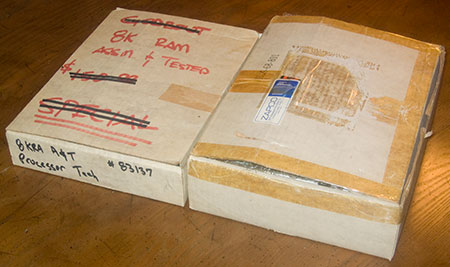
These two modest boxes enclose all my Sol programs and manuals. One box is labeled "Godbout 8K RAM Assm & Tested $150 SPECIAL" on the top, and "8KRA A&T Processor Tech." Well I don't have either of those products, but just seeing the name Godbout was trip down memory lane, they were one of the earliest manufacturers of S-100 memory boards. But let's see what is in the boxes.

Ah, there's my old cassette tapes, with all the major apps I purchased from Processor Tech and other companies, along with tapes of all the programs I wrote myself. Some of them have intriguing labels in my own handwriting like "3D Graphics." Ooh I wonder what that is. I'll find out soon enough. Let's open the second box and see what's inside.

Manuals. The Extended Cassette Basic manual was my favorite resource for years and years. I wrote a lot of programs in Extended Basic on my Sol, it was sufficiently close to ANSI Basic that I could write and test them locally and then upload them by modem to minicomputers on our campus network. But wait, there's more.
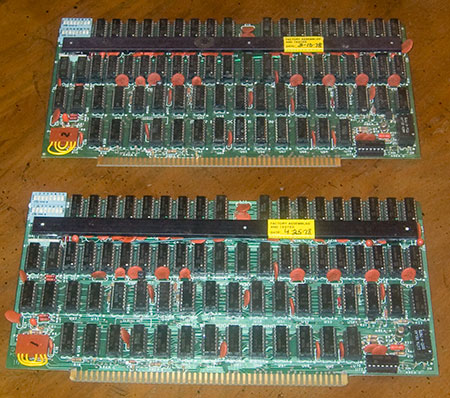
These are my two precious 16KRA memory boards. Larger programs like Extended Basic required more memory than the motherboard of the Sol contained, so bought new memory as I could afford it, finally bringing the total up to a massive 32k. These two boards have the date of manufacture on a label, 3/10/78 and 4/25/78, so I obviously bought these a couple of years after I built my Sol in 1976.
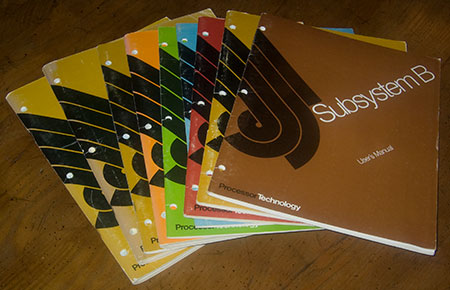
And now the final part of the archives, Sol manuals. There's one particularly good manual, the "Subsystem B User Manual." I don't know why I have this manual since I don't actually own a Subsystem B. I must have gotten it from my Sol dealer. Subsystem B was a set of circuit boards for other S-100 computers like the IMSAI or Altair, it would effectively turn your computer into a Sol. For a brief while, the Sol display and I/O system was a standard, but it was quickly surpassed by other systems with higher resolution and more features. Most of the Sol manuals have been scanned and archived on the web, but not this Subsystem B manual. This is definitely a rarity and may be the only surviving copy.
There are a few bits missing from my Sol archives that are not pictured here. Somewhere in my house is the huge black binder that contains all the assembly instructions. I also have a beautiful advertising poster for the Sol, but it's wrapped up in a bundle of other large artworks that I really don't want to open up right now.
So that's my Sol Archives. Now I have to plug in the memory boards and start fiddling around with the programs on tape. But that story will have to wait for another day.
These two modest boxes enclose all my Sol programs and manuals. One box is labeled "
Ah, there's my old cassette tapes, with all the major apps I purchased from Processor Tech and other companies, along with tapes of all the programs I wrote myself. Some of them have intriguing labels in my own handwriting like "3D Graphics." Ooh I wonder what that is. I'll find out soon enough. Let's open the second box and see what's inside.
Manuals. The Extended Cassette Basic manual was my favorite resource for years and years. I wrote a lot of programs in Extended Basic on my Sol, it was sufficiently close to ANSI Basic that I could write and test them locally and then upload them by modem to minicomputers on our campus network. But wait, there's more.
These are my two precious 16KRA memory boards. Larger programs like Extended Basic required more memory than the motherboard of the Sol contained, so bought new memory as I could afford it, finally bringing the total up to a massive 32k. These two boards have the date of manufacture on a label, 3/10/78 and 4/25/78, so I obviously bought these a couple of years after I built my Sol in 1976.
And now the final part of the archives, Sol manuals. There's one particularly good manual, the "Subsystem B User Manual." I don't know why I have this manual since I don't actually own a Subsystem B. I must have gotten it from my Sol dealer. Subsystem B was a set of circuit boards for other S-100 computers like the IMSAI or Altair, it would effectively turn your computer into a Sol. For a brief while, the Sol display and I/O system was a standard, but it was quickly surpassed by other systems with higher resolution and more features. Most of the Sol manuals have been scanned and archived on the web, but not this Subsystem B manual. This is definitely a rarity and may be the only surviving copy.
There are a few bits missing from my Sol archives that are not pictured here. Somewhere in my house is the huge black binder that contains all the assembly instructions. I also have a beautiful advertising poster for the Sol, but it's wrapped up in a bundle of other large artworks that I really don't want to open up right now.
So that's my Sol Archives. Now I have to plug in the memory boards and start fiddling around with the programs on tape. But that story will have to wait for another day.
While poking around in my vintage computer junk, I found some swag from my old job. I thought I should immortalize it with a photo on the web, and then throw it in the trash.

ComputerLand produced a lot of crappy promotional items, and this can cooler must have been one of the worst. Back in the early 1980s, every major computer manufacturer was dying to associate themselves with ComputerLand, so they'd fund almost any advertising gimmick that put their names together. This cooler has the Hewlett-Packard logo on the back, so I know HP paid for it, ComputerLand paid nothing. This is called "co-op" advertising. I think it barely qualifies as advertising. The world would be a better place without so much of this disposable crap.
Whenever I see some old bits of ComputerLand swag, I always think about the ultimate swag our company ever produced, a surfboard. One of our salesmen was a surfer dude, he somehow conned the boss into funding his new custom surfboard if he'd put a huge ComputerLand logo on it. Everyone would see him riding the Malibu waves on top of a ComputerLand logo, it would associate our company name with the cool surfer image. In return for funding his board, the salesman agreed to prominently display the logo at the beach. To maximize exposure, the salesman was allowed to come in late to work any time the surf was up, which happened with no advance notice, leaving the rest of us to carry his workload. After coming in to work late, he would display the board in our lobby. He must have been a hell of a salesman for the boss to agree to that deal.
ComputerLand produced a lot of crappy promotional items, and this can cooler must have been one of the worst. Back in the early 1980s, every major computer manufacturer was dying to associate themselves with ComputerLand, so they'd fund almost any advertising gimmick that put their names together. This cooler has the Hewlett-Packard logo on the back, so I know HP paid for it, ComputerLand paid nothing. This is called "co-op" advertising. I think it barely qualifies as advertising. The world would be a better place without so much of this disposable crap.
Whenever I see some old bits of ComputerLand swag, I always think about the ultimate swag our company ever produced, a surfboard. One of our salesmen was a surfer dude, he somehow conned the boss into funding his new custom surfboard if he'd put a huge ComputerLand logo on it. Everyone would see him riding the Malibu waves on top of a ComputerLand logo, it would associate our company name with the cool surfer image. In return for funding his board, the salesman agreed to prominently display the logo at the beach. To maximize exposure, the salesman was allowed to come in late to work any time the surf was up, which happened with no advance notice, leaving the rest of us to carry his workload. After coming in to work late, he would display the board in our lobby. He must have been a hell of a salesman for the boss to agree to that deal.
I have successfully restored my Sol-20 computer to working condition. I took special care to insure the repairs were correct, it was difficult, and at times I was certain the machine was completely dead, but ultimately, the restoration was a complete success. Here is a photo of the patient on the operating table, opened up and about to undergo surgery.

When I set up to take this picture, I was suddenly struck with a realization, this is the same chair I sat in 31 years ago when I assembled this computer. Somewhere I have a Polaroid photo of my desk with the Sol in mid-assembly, with this chair in the background. But I couldn't find the picture. Oh well. Anyway, I thought this was a good omen for the project.
At this point, I've cleaned up the computer with cans of compressed air and circuit board cleaning spray. It took me almost an hour to get it all clean, it was especially difficult getting the gunk off the top of the keyboard. It was really grubby and nicotine stained. I used to spend many hours smoking at the keyboard, dropping ashes right into the keys. I used to open it up, lift out the keyboard plane, and dump out the ashes once a week or so. The Sol keyboard seemed impervious to this kind of abuse. But now I had to clean that all up and make it shine.
Here is a closer view of the operating table, you can see the interior of the computer. There are thousands of tiny solder joints on that motherboard, and I made every single one of them. I recall it took about 200 hours to completely assemble the kit. That was pretty slow, but I'd never built any electronics kits before, I was a total novice.

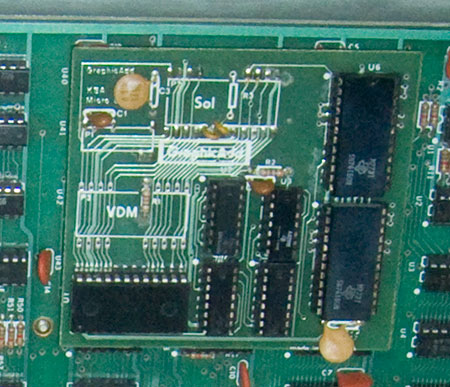
There is one particular component that makes this Sol rare and unique. It has a Graphic-Add daughterboard, which I used to create simple computer graphic images. Without the Graphic-Add, the Sol can only display text. I've never heard of any other Sol equipped with this circuitry.
And now the patient is under the knife. Or more accurately, under a dental pick. I'm picking out the old foam pads, you can see I've got some of them out, they're black and decomposing. Up at the top, you can see the circuit board contacts, shaped like a circle with a line through it. The pads push against the contacts, the mylar will bridge the gap and complete the circuit, indicating a key was pressed.
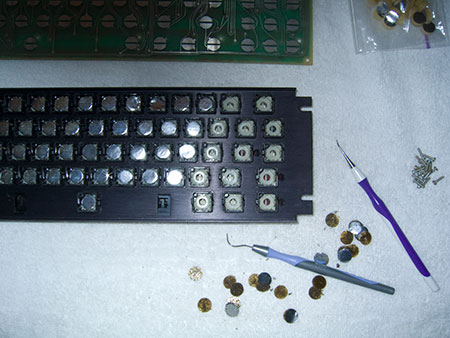
And here is the keyboard with all the pads replaced. They're shiny and new, just like the day it was built. Everything is ready to reassemble and test.

This is the point everything went all to hell.
I got the machine assembled and ready to test. I hooked it up to my TV through the video monitor input. I successfully tested the Sol in March 2002, I got a video signal and a cursor, indicating the CPU was operational. But today when I fired it up, I got nothing. No video, no cursor. The CPU was dead.
I was devastated, in shock. My long-planned restoration project was a total failure. In 2002 everything but the keyboard worked; now the keyboard was repaired but everything else was dead. I tried to deduce what happened. I noticed the LEDs on the keyboard wouldn't light up, so there must have been a problem with the power supply. Then I noticed the power supply fan was running, so there must be power, it's just not getting to the motherboard. I started by unplugging and reconnecting the main power connector on the motherboard. And instantly, the computer was restored to life. It was so simple once I figured it out. And here is the computer in operation.

This picture looks a bit fake, but I assure you it is 100% real. I had to enhance the contrast of the TV screen so the text was legible, but other than that, it is unaltered. So now the Sol is operating, the keyboard works, everything is ready to go. But go where?
The next step is reinstalling my memory cards and testing the software. I have a box full of Sol data tapes, my memory boards are in the box, but it's buried somewhere in my storage locker. It may take me a while to unbury it. I have tapes of games like Chess, Targ, and Trek80, and languages like Focal, Basic, and Logo. But even if I can never find my old software, there is an online archive where I can download everything I need. But I really need to find those tapes, they have all the programs I wrote in Basic, and the archive doesn't have programs to run my Graphics-Add. I have offered those programs to the archive, if and when I ever find them, and if the tapes are still readable.
And that is the primary goal of this project, to document and archive my unique pieces of Sol hardware and software, particularly some of the computer animations I exhibited in art shows in 1976. But that will have to wait for Phase 2 of this restoration project.
Today, I am giddy with excitement. Everything works, and I'm ready to rediscover my microcomputer roots. I can't wait.
When I set up to take this picture, I was suddenly struck with a realization, this is the same chair I sat in 31 years ago when I assembled this computer. Somewhere I have a Polaroid photo of my desk with the Sol in mid-assembly, with this chair in the background. But I couldn't find the picture. Oh well. Anyway, I thought this was a good omen for the project.
At this point, I've cleaned up the computer with cans of compressed air and circuit board cleaning spray. It took me almost an hour to get it all clean, it was especially difficult getting the gunk off the top of the keyboard. It was really grubby and nicotine stained. I used to spend many hours smoking at the keyboard, dropping ashes right into the keys. I used to open it up, lift out the keyboard plane, and dump out the ashes once a week or so. The Sol keyboard seemed impervious to this kind of abuse. But now I had to clean that all up and make it shine.
Here is a closer view of the operating table, you can see the interior of the computer. There are thousands of tiny solder joints on that motherboard, and I made every single one of them. I recall it took about 200 hours to completely assemble the kit. That was pretty slow, but I'd never built any electronics kits before, I was a total novice.
There is one particular component that makes this Sol rare and unique. It has a Graphic-Add daughterboard, which I used to create simple computer graphic images. Without the Graphic-Add, the Sol can only display text. I've never heard of any other Sol equipped with this circuitry.
And now the patient is under the knife. Or more accurately, under a dental pick. I'm picking out the old foam pads, you can see I've got some of them out, they're black and decomposing. Up at the top, you can see the circuit board contacts, shaped like a circle with a line through it. The pads push against the contacts, the mylar will bridge the gap and complete the circuit, indicating a key was pressed.
And here is the keyboard with all the pads replaced. They're shiny and new, just like the day it was built. Everything is ready to reassemble and test.
This is the point everything went all to hell.
I got the machine assembled and ready to test. I hooked it up to my TV through the video monitor input. I successfully tested the Sol in March 2002, I got a video signal and a cursor, indicating the CPU was operational. But today when I fired it up, I got nothing. No video, no cursor. The CPU was dead.
I was devastated, in shock. My long-planned restoration project was a total failure. In 2002 everything but the keyboard worked; now the keyboard was repaired but everything else was dead. I tried to deduce what happened. I noticed the LEDs on the keyboard wouldn't light up, so there must have been a problem with the power supply. Then I noticed the power supply fan was running, so there must be power, it's just not getting to the motherboard. I started by unplugging and reconnecting the main power connector on the motherboard. And instantly, the computer was restored to life. It was so simple once I figured it out. And here is the computer in operation.
This picture looks a bit fake, but I assure you it is 100% real. I had to enhance the contrast of the TV screen so the text was legible, but other than that, it is unaltered. So now the Sol is operating, the keyboard works, everything is ready to go. But go where?
The next step is reinstalling my memory cards and testing the software. I have a box full of Sol data tapes, my memory boards are in the box, but it's buried somewhere in my storage locker. It may take me a while to unbury it. I have tapes of games like Chess, Targ, and Trek80, and languages like Focal, Basic, and Logo. But even if I can never find my old software, there is an online archive where I can download everything I need. But I really need to find those tapes, they have all the programs I wrote in Basic, and the archive doesn't have programs to run my Graphics-Add. I have offered those programs to the archive, if and when I ever find them, and if the tapes are still readable.
And that is the primary goal of this project, to document and archive my unique pieces of Sol hardware and software, particularly some of the computer animations I exhibited in art shows in 1976. But that will have to wait for Phase 2 of this restoration project.
Today, I am giddy with excitement. Everything works, and I'm ready to rediscover my microcomputer roots. I can't wait.
It's like a dream come true, I suddenly acquired a set of new parts for my vintage Sol-20 microcomputer. I've written about this before, someone found that old article from 5 years ago in a web search, and asked me if I'd ever located the parts. I said I gave up, and do you have any? I've hunted unsuccessfully for 10 or 15 years. So he generously offered me a pack of parts, for free. Oh boy.

I swear this looks just like a bag of pills. They are little foam pads with foil on one side. These pads were used in the keyboard of the Sol, when you hit a key, it pressed on the foam, pushing the foil into contact with the circuit, then when you let go the foam pushed the key back up. It was an inexpensive design, it worked fairly well, but over the years the foam deteriorated, and today every single Sol is surely unusable due to rotted foam pads.
But now I have the parts I need to get my old Sol back up and running. This is going to be a tedious job, I have to painstakingly disassemble every keyswitch, pick out the rotted remnants of the old pads, clean up the circuit contacts, install the new pads, and put everything back in perfect order. Then my Sol should be restored to full function. I can't wait to see my old computer back in action after all these years.
I swear this looks just like a bag of pills. They are little foam pads with foil on one side. These pads were used in the keyboard of the Sol, when you hit a key, it pressed on the foam, pushing the foil into contact with the circuit, then when you let go the foam pushed the key back up. It was an inexpensive design, it worked fairly well, but over the years the foam deteriorated, and today every single Sol is surely unusable due to rotted foam pads.
But now I have the parts I need to get my old Sol back up and running. This is going to be a tedious job, I have to painstakingly disassemble every keyswitch, pick out the rotted remnants of the old pads, clean up the circuit contacts, install the new pads, and put everything back in perfect order. Then my Sol should be restored to full function. I can't wait to see my old computer back in action after all these years.
I was reminiscing about the good old days with a friend and I told him of my first "killer demo" back around 1979, he insisted I blog it, so here it is.
I used to work at a little computer store called Computers Plus in Dubuque, Iowa, selling Apple and Vector Graphic CP/M computers. My specialty was word processing with Wordstar and the complex form letter system MailMerge. But in those days, even basic word processing was brand new and a hard sell, people just didn't understand how powerful it was. The target market was usually professional secretaries who could bang out a perfect business letter in one pass on a Selectric typewriter, even fancy word processors could barely outperform a skilled typist. But I was determined to beat them at their own game, I would demonstrate just how fast a business letter could be produced.
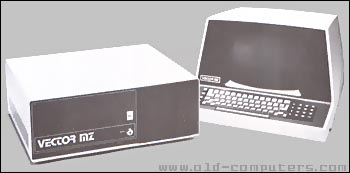
We had a fancy Vector Graphic MZ demo system with a powerful Z-80 CPU chip running at 4Mhz, a massive 48k of RAM, and two floppy disk drives. It was hooked up to a high speed daisy wheel printer, it could print about 50 characters per second. And the key element, me at the keyboard typing like a demon. I've been clocked at over 100 words per minute, and the Vector Graphic had a really good keyboard, so I could really crank out the text quickly.
I had Wordstar set up with a few macros so I could hit one key and it would create a perfectly formatted business letter, with the address, date, salutation, and "Sincerely, Charles Eicher" at the end, all I had to do was type the content. Usually I typed in something simple like "I present this letter for your consideration" and hit the Print command, and the daisy wheel printer would blaze into activity, hammering the letters out with a noise like a machine gun.
I would set up a sheet of paper in the printer, load Wordstar, then have the customer time me with a stopwatch, from the command to go until the time the finished letter popped out of the printer. Ready, set, GO, bang out the sample text, hit print, wham it's done. I could consistently do this within 15 seconds, including the time it took to type the text. Sometimes the customer couldn't believe what they'd seen, so I had to repeat the demonstration.
As I described this demo to my friend, I wondered how long it would take on modern equipment. I recall that well into the 1980s and the HP LaserJet era, a fast daisy wheel printer could beat a LaserJet on some documents, particularly screenplays with double-spaced text and lots of white space. But for full pages of text, the LaserJet would win the race.
So I just recreated my killer demo on my own system. I used Microsoft Word 2004 on my PowerMac Quad G5 2.5Ghz computer with 4.5Gb of RAM, a 1Tb RAID 0, the printer is an antiquated HP LaserJet 5MP. I figured the bottleneck would be the printer, it's at least 10 years old, but it has a fancy EtherJet module and lots of extra RAM, it should be comparable in speed to an average home-office laser printer. But it is a PostScript printer, which adds lots of processing overhead, so I used a standard Courier font that is resident in the printer, I won't have to transmit custom fonts to the printer. I type as fast as ever, and the sample sentence is so short, so this will be a test of the hardware, not my typing skills.
I set the stop watch and banged out the letter in mere seconds, hit print, and waited for the page to eject. And waited. Total time: 40 seconds. Isn't progress wonderful?
I used to work at a little computer store called Computers Plus in Dubuque, Iowa, selling Apple and Vector Graphic CP/M computers. My specialty was word processing with Wordstar and the complex form letter system MailMerge. But in those days, even basic word processing was brand new and a hard sell, people just didn't understand how powerful it was. The target market was usually professional secretaries who could bang out a perfect business letter in one pass on a Selectric typewriter, even fancy word processors could barely outperform a skilled typist. But I was determined to beat them at their own game, I would demonstrate just how fast a business letter could be produced.
We had a fancy Vector Graphic MZ demo system with a powerful Z-80 CPU chip running at 4Mhz, a massive 48k of RAM, and two floppy disk drives. It was hooked up to a high speed daisy wheel printer, it could print about 50 characters per second. And the key element, me at the keyboard typing like a demon. I've been clocked at over 100 words per minute, and the Vector Graphic had a really good keyboard, so I could really crank out the text quickly.
I had Wordstar set up with a few macros so I could hit one key and it would create a perfectly formatted business letter, with the address, date, salutation, and "Sincerely, Charles Eicher" at the end, all I had to do was type the content. Usually I typed in something simple like "I present this letter for your consideration" and hit the Print command, and the daisy wheel printer would blaze into activity, hammering the letters out with a noise like a machine gun.
I would set up a sheet of paper in the printer, load Wordstar, then have the customer time me with a stopwatch, from the command to go until the time the finished letter popped out of the printer. Ready, set, GO, bang out the sample text, hit print, wham it's done. I could consistently do this within 15 seconds, including the time it took to type the text. Sometimes the customer couldn't believe what they'd seen, so I had to repeat the demonstration.
As I described this demo to my friend, I wondered how long it would take on modern equipment. I recall that well into the 1980s and the HP LaserJet era, a fast daisy wheel printer could beat a LaserJet on some documents, particularly screenplays with double-spaced text and lots of white space. But for full pages of text, the LaserJet would win the race.
So I just recreated my killer demo on my own system. I used Microsoft Word 2004 on my PowerMac Quad G5 2.5Ghz computer with 4.5Gb of RAM, a 1Tb RAID 0, the printer is an antiquated HP LaserJet 5MP. I figured the bottleneck would be the printer, it's at least 10 years old, but it has a fancy EtherJet module and lots of extra RAM, it should be comparable in speed to an average home-office laser printer. But it is a PostScript printer, which adds lots of processing overhead, so I used a standard Courier font that is resident in the printer, I won't have to transmit custom fonts to the printer. I type as fast as ever, and the sample sentence is so short, so this will be a test of the hardware, not my typing skills.
I set the stop watch and banged out the letter in mere seconds, hit print, and waited for the page to eject. And waited. Total time: 40 seconds. Isn't progress wonderful?
I recently discovered a treasured artifact from my earliest days learning computer programming, an IBM System/360 Reference Data card, known as a "Green Card." This card dates back to about 1968, although I probably acquired it around 1970.
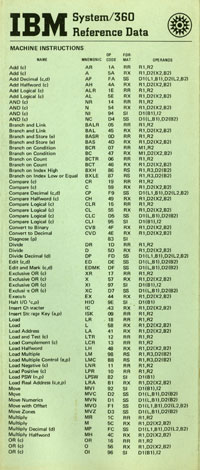
I scanned the card and I'm making it available for download as a PDF (11Mb). It is rather large, both in file size and in dimensions, it would print at full size at over 25 inches wide, although it folded into a nice 14 page format. You could easily tell who was an IBM/360 assembly language programmer because they always had a Green Card tucked in their shirt pocket, right behind their pocket protector.
I scanned the card and I'm making it available for download as a PDF (11Mb). It is rather large, both in file size and in dimensions, it would print at full size at over 25 inches wide, although it folded into a nice 14 page format. You could easily tell who was an IBM/360 assembly language programmer because they always had a Green Card tucked in their shirt pocket, right behind their pocket protector.
A covert informant at Microsoft sent me a top secret picture of Microsoft's forthcoming digital audio player, the "iPod Killer."

Special thanks to Shelley Powers.

Special thanks to Shelley Powers.
I have painstakingly scanned the original Lisa Sales Marketing Binder that was issued to Apple dealerships in 1983, and I am releasing it for download as a 204 page 33Mb PDF file. This was the sales literature I used when I sold Lisa computers at ComputerLand in Los Angeles, and I've kept it in storage for decades. Now it is time for this historic document to reappear and be reappraised.
This document was obviously produced on a Lisa, some pages were printed on a daisy wheel printer, some on a dot matrix, sometimes even a mixture of the two, using scissors and glue, and if you look really close, even some white-out and pen. The information was compiled from various technical and marketing departments, and includes scans of Apple's full-color brochures for the entire Lisa hardware and software line.
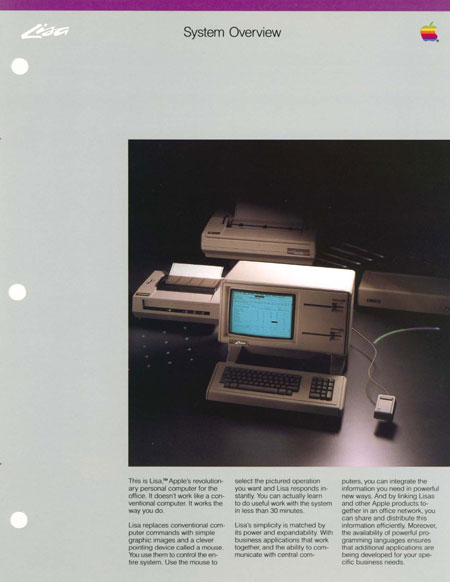
I thought the most interesting part of this binder was the section on the Lisa's rivals. Apple produced a competitive analysis of the Lisa vs. computer and software systems from IBM, DEC, Corvus, Fortune Systems, and Xerox. It is a snapshot of high-end office computing in 1983, just before the Macintosh was released.
Apple promised a lot more than it could deliver with the Lisa, but it created the model for all modern personal computers. Even today, the Lisa design is still the fundamental user interface used in every personal computer. A lot of computer technology has been released in the 23 years since the Lisa shipped, but in many ways, it has never been surpassed.
Update: Over the first weekend of this document's release, it was downloaded over 46,000 times! Thanks to everyone who was interested in this little slice of history, now this information will live on forever, distributed across the internet.
This document was obviously produced on a Lisa, some pages were printed on a daisy wheel printer, some on a dot matrix, sometimes even a mixture of the two, using scissors and glue, and if you look really close, even some white-out and pen. The information was compiled from various technical and marketing departments, and includes scans of Apple's full-color brochures for the entire Lisa hardware and software line.
I thought the most interesting part of this binder was the section on the Lisa's rivals. Apple produced a competitive analysis of the Lisa vs. computer and software systems from IBM, DEC, Corvus, Fortune Systems, and Xerox. It is a snapshot of high-end office computing in 1983, just before the Macintosh was released.
Apple promised a lot more than it could deliver with the Lisa, but it created the model for all modern personal computers. Even today, the Lisa design is still the fundamental user interface used in every personal computer. A lot of computer technology has been released in the 23 years since the Lisa shipped, but in many ways, it has never been surpassed.
Update: Over the first weekend of this document's release, it was downloaded over 46,000 times! Thanks to everyone who was interested in this little slice of history, now this information will live on forever, distributed across the internet.
I am offering the old Disinfotainment server for sale. I bought this machine in 1999 but due to several exceptional features, its performance has remained competitive with modern Macs, and it has been exceptionally reliable. I don't want to sell through eBay so I am offering it for sale directly through my website.

This is a "Yosemite" Blue & White PowerMac G3/400 U2W model, an original Rev 1 model with the rare Apple-supplied Adaptec 2940 Ultra 2 Wide SCSI card, and high speed SCSI hard disk drives. SCSI drives are legendary for their high quality and long lives. These drives have been bulletproof, and still have a long life expectancy. I added an Atlas 10K 8.5Gb hard drive, it has exceptionally high performance due to the 10k RPM speed. It also includes a 9Gb Viking II drive, and an IBM 18Gb drive, for a total formatted capacity of 34Gb. The Atlas 10K drive is an ideal boot drive, giving high performance in server functions. I only have 768Mb of RAM in the machine, but that seems adequate for server use. This machine would make an ideal web server, it can easily saturate a T1 line.
One other unusual feature in this Mac is a GeeThree Stealth Serial Port. This could be useful for remote monitoring of routers. Other than that, this Mac is pretty plain, it has a standard CDROM (4x I think), no CD burner, and no Zip drive or other options.
I can deliver this machine preformatted with MacOS X 10.4, and if you like, I can preconfigure Darwin Streaming Server. Somewhere in storage I have the original keyboard (in good condition, I never used it), and even the terribly unpopular "puck" mouse. You can have the keyboard and mouse if you want, but I doubt you'd want them.
It makes me sad to see such a wonderful piece of Mac hardware go unused, so I'd like to sell it to someone who will give it a good home and put it to good use. I'm not sure what this machine is really worth, I'm sure it's not worth a lot, so I'll consider any serious offer. You can contact me via email at ceicher (at) mac.com if you'd like more information.
This is a "Yosemite" Blue & White PowerMac G3/400 U2W model, an original Rev 1 model with the rare Apple-supplied Adaptec 2940 Ultra 2 Wide SCSI card, and high speed SCSI hard disk drives. SCSI drives are legendary for their high quality and long lives. These drives have been bulletproof, and still have a long life expectancy. I added an Atlas 10K 8.5Gb hard drive, it has exceptionally high performance due to the 10k RPM speed. It also includes a 9Gb Viking II drive, and an IBM 18Gb drive, for a total formatted capacity of 34Gb. The Atlas 10K drive is an ideal boot drive, giving high performance in server functions. I only have 768Mb of RAM in the machine, but that seems adequate for server use. This machine would make an ideal web server, it can easily saturate a T1 line.
One other unusual feature in this Mac is a GeeThree Stealth Serial Port. This could be useful for remote monitoring of routers. Other than that, this Mac is pretty plain, it has a standard CDROM (4x I think), no CD burner, and no Zip drive or other options.
I can deliver this machine preformatted with MacOS X 10.4, and if you like, I can preconfigure Darwin Streaming Server. Somewhere in storage I have the original keyboard (in good condition, I never used it), and even the terribly unpopular "puck" mouse. You can have the keyboard and mouse if you want, but I doubt you'd want them.
It makes me sad to see such a wonderful piece of Mac hardware go unused, so I'd like to sell it to someone who will give it a good home and put it to good use. I'm not sure what this machine is really worth, I'm sure it's not worth a lot, so I'll consider any serious offer. You can contact me via email at ceicher (at) mac.com if you'd like more information.
For many years, I've told people about how I first learned how to write computer programs by writing on Hollerith Cards with a pencil, but nobody ever believes me. But now, thanks to some research by local computer historian Douglas Jones, I have proof. This card was known as a "Mark Sense" card, you would fill in the little rectangles with a #2 pencil, and the optical card reader would sense the marks.
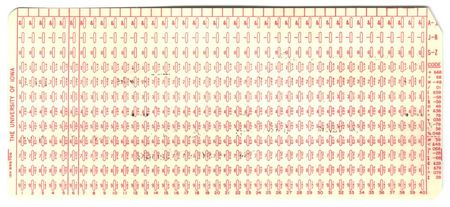
Sometime around 1968, my math teacher got a grant for some computer time on the University of Iowa mainframes and decided to teach a few of us how write simple FORTRAN programs. In those primitive times, computers used Hollerith cards for input, but obviously it was impractical for little kids to use keypunch machines. So we used Mark Sense cards, painstakingly filling out the little cards with a #2 pencil. It was quite difficult to use the cards accurately, we would often spend as much time correcting input errors in the cards as debugging the programs. It was incredibly frustrating to write a whole program correctly, and then receive no output because you filled in one wrong spot and wrote "PRINL" instead of "PRINT."

Sometime around 1968, my math teacher got a grant for some computer time on the University of Iowa mainframes and decided to teach a few of us how write simple FORTRAN programs. In those primitive times, computers used Hollerith cards for input, but obviously it was impractical for little kids to use keypunch machines. So we used Mark Sense cards, painstakingly filling out the little cards with a #2 pencil. It was quite difficult to use the cards accurately, we would often spend as much time correcting input errors in the cards as debugging the programs. It was incredibly frustrating to write a whole program correctly, and then receive no output because you filled in one wrong spot and wrote "PRINL" instead of "PRINT."
While I'm on a roll, I thought I'd complete the dead hardware trifecta, and whine about my dead inkjet printer. My Epson 1520 died in the stupidest possible way. The printer mechanism works fine, but the safety interlock is broken. The interlock is designed to shut down the printer when you open the lid, so you don't injure your fingers by sticking them into the mechanism while it's printing. Every time I turn on the printer and it complains the lid is open, and refuses to print.
I suppose I could disassemble the printer and bypass the interlock, but I think I'll just toss it in the trash. The 1520 is a wonderful printer, it's the last 11x17 CMYK printer Epson made, so it's perfect for prepress proofs. The new generation of 6 and 8 color printers are way too good for prepress proofs, they don't produce realistic CMYK proofs, they're too saturated and bright.
But there is no sense in beating a dead horse. Epson no longer makes drivers for this printer, you have to use CUPS, which is included free in MacOS X, but it isn't very color accurate. Time to send the old beast to the graveyard.
Fortunately my ancient HP Laserjet 5MP is still going strong. I don't even remember when I bought that printer, I think it dates back to the 1980s.
I suppose I could disassemble the printer and bypass the interlock, but I think I'll just toss it in the trash. The 1520 is a wonderful printer, it's the last 11x17 CMYK printer Epson made, so it's perfect for prepress proofs. The new generation of 6 and 8 color printers are way too good for prepress proofs, they don't produce realistic CMYK proofs, they're too saturated and bright.
But there is no sense in beating a dead horse. Epson no longer makes drivers for this printer, you have to use CUPS, which is included free in MacOS X, but it isn't very color accurate. Time to send the old beast to the graveyard.
Fortunately my ancient HP Laserjet 5MP is still going strong. I don't even remember when I bought that printer, I think it dates back to the 1980s.
My beautiful Sony sf300 20 inch CRT just died. This isn't too surprising, the CRT was acting cranky but I was hoping it would last a few more months before it died. This was the worst possible time for a sudden breakdown. I'm right in the middle of a project, so I had to run out and buy a replacement monitor. Saturday night at 8PM is not a good time to shop for a new monitor. The only place that was open was Best Buy, and I've never ever been satisfied with any product I bought at Best Buy. But I really didn't have much choice, so I bought a cheap 17 inch Samsung LCD.
I hate LCDs, I prefer a CRT for critical color work. Back when I bought the sf300, it was extremely expensive, a top-end monitor designed for color calibrated work. Its color was always very accurate, even up to the moment it died. I think I bought the sf300 around 1993 so I suppose it had a good, long life.
The Samsung LCDs are supposedly the same LCDs used in Apple Cinema Displays, but I've seen the big 30 inch Cinema display and the text is a hell of a lot clearer than this Samsung. You get what you pay for. And this is what is most disappointing, I had to spend money I was reserving for a new system. I've been thinking of buying a new PowerMac Quad G5 and a 30 inch Cinema Display, but I wanted to wait a couple more months. I had a great scheme, I can register as an Apple Developer for $500, and buy a quad G5 and a 30 inch display for a huge discount, I think I recall pricing out systems with discounts as high as $1800. So an Apple Developer registration really pays off if you plan on buying a high-end system, you spend $500 and get back $1800.
But this was an emergency, I wanted to get back up and running fast. I was prepared to buy just the 30 inch Cinema Display, even without the Developer discount, so I called the nearest Apple Store. If they had a video card capable of running the Cinema Display on my old MDD dual-1Ghz G4, I would have bought it and picked it up in the morning. But there is only one video card that can do the job, and they didn't have it. That Radeon 9800 Pro card costs $250, almost as much as this cheap Samsung LCD display. The fastest I could get a 9800 card was Tuesday, by mail order. Oh well, so much for that idea.
I was hoping I'd get over the next few weeks and then splurge on a new system, I figured I should buy one last PowerPC system to get me past the Mac Intel transition. I was hoping to move out of Iowa and buy the system once I got to a new residence, to avoid having to move more hardware, but now I'm not sure what to do. I don't really want to buy a $250 video card for an old machine, when that's almost 10% of the price of a new machine. So Monday, I guess I'll call up Apple and become an official developer, and get a new system, and then I can return this piece of crap LCD to Best Buy.
I hate LCDs, I prefer a CRT for critical color work. Back when I bought the sf300, it was extremely expensive, a top-end monitor designed for color calibrated work. Its color was always very accurate, even up to the moment it died. I think I bought the sf300 around 1993 so I suppose it had a good, long life.
The Samsung LCDs are supposedly the same LCDs used in Apple Cinema Displays, but I've seen the big 30 inch Cinema display and the text is a hell of a lot clearer than this Samsung. You get what you pay for. And this is what is most disappointing, I had to spend money I was reserving for a new system. I've been thinking of buying a new PowerMac Quad G5 and a 30 inch Cinema Display, but I wanted to wait a couple more months. I had a great scheme, I can register as an Apple Developer for $500, and buy a quad G5 and a 30 inch display for a huge discount, I think I recall pricing out systems with discounts as high as $1800. So an Apple Developer registration really pays off if you plan on buying a high-end system, you spend $500 and get back $1800.
But this was an emergency, I wanted to get back up and running fast. I was prepared to buy just the 30 inch Cinema Display, even without the Developer discount, so I called the nearest Apple Store. If they had a video card capable of running the Cinema Display on my old MDD dual-1Ghz G4, I would have bought it and picked it up in the morning. But there is only one video card that can do the job, and they didn't have it. That Radeon 9800 Pro card costs $250, almost as much as this cheap Samsung LCD display. The fastest I could get a 9800 card was Tuesday, by mail order. Oh well, so much for that idea.
I was hoping I'd get over the next few weeks and then splurge on a new system, I figured I should buy one last PowerPC system to get me past the Mac Intel transition. I was hoping to move out of Iowa and buy the system once I got to a new residence, to avoid having to move more hardware, but now I'm not sure what to do. I don't really want to buy a $250 video card for an old machine, when that's almost 10% of the price of a new machine. So Monday, I guess I'll call up Apple and become an official developer, and get a new system, and then I can return this piece of crap LCD to Best Buy.
Back in the early 1970s when I just started learning computer programming, using a computer was a much different process than we use today. First you'd write down your program on paper, then you'd type your program onto punched cards, then you'd hand the deck of cards to the computer operator. In a few hours, you could pick up a printout of your program's results. Quite often your program wouldn't work and all you'd get was a couple pages of incomprehensible error messages. To learn what the error messages meant, you'd go to the desk at the back of the keypunch room, where a 60 foot long rack contained all the documentation for the IBM 360 computer series. Imagine a room with an entire 60 foot long wall lined with tables, and on top, 60 feet of documentation in racks placed side to side.

Trying to find useful, relevant data in this rack was like trying to find a single page in a book 60 feet thick. In fact, that's exactly what it was, and even worse, there were dozens of indexes spread throughout the 60 linear feet of documents, one index could send you to another index, which then referred to specific pages, which might then refer you to updates or errata inserted erratically throughout the rack. When the room was busy, there would often be several people reading different sections of the rack, taking notes, then moving to a different section, taking more notes, etc. Some sections of the rack were more useful than others, and it was common to see people standing in line behind someone, waiting to use that section of the rack.
There were only a few people who knew the entirety of the documentation, a few Comp Sci grad students who had to maintain the racks by inserting the monthly updates and errata. It must have been extremely tedious to insert updated pages throughout the 60 foot rack, but in the process, they learned where all the useful information was.
These same grad students also worked in the "debug room," which was a small office where you could ask for help interpreting your program errors. People would line up in the hall outside the office, waiting to seek advice from "the debugger." The debugger had a short rack on his desk containing a master index of the big 60 foot documentation rack. He would look at your program printout, and if the problem was not obvious, he'd look through the index, and refer you back to a specific document in the big rack. Then you'd go back and read some more documentation, figure out what went wrong, then you'd punch a few cards to correct your program error, search through your card deck to switch a few cards, and resubmit your program. And the cycle would start all over again.
The one thing I remember most vividly about the debug room was a big sign hanging on the wall, it was the first thing you'd see upon entering the room. The sign was written on a computer pen plotter, in an oddly machine-like character set, it said:
At the risk of offending a dear friend, I will use him as a case in point. I have a friend who often asks me for technical support, but his phone calls sometimes take hours, primarily due to his vague descriptions of his problems. He'll phone me up and say things like "I'm trying to print, but I press the whatchamacallit and nothing happens." No, I'm not using the word "whatchamacallit" as an euphemism, he really does say "whatchamacallit." When I object to his vague descriptions, he says I'm supposed to anticipate what he is doing because I know the programs so well. This is precisely NOT how to get good help. If I don't know precisely what you're doing wrong, how can I tell you how to do it right?
To use a computer and get good results, you must operate it with precision. But first, you must think with precision. This is no different than any other complex task in life. Human beings are not used to thinking with precision. This is why it is easier to fix computers than to assist users in operating them. Computers always give you a precise report on what they are doing. Users often don't know what they are doing.
After decades of providing tech support to thousands of computer users, I made an observation that I have formulated as a new law, I call it "The Law of Infinite Stupidity." It states:
Trying to find useful, relevant data in this rack was like trying to find a single page in a book 60 feet thick. In fact, that's exactly what it was, and even worse, there were dozens of indexes spread throughout the 60 linear feet of documents, one index could send you to another index, which then referred to specific pages, which might then refer you to updates or errata inserted erratically throughout the rack. When the room was busy, there would often be several people reading different sections of the rack, taking notes, then moving to a different section, taking more notes, etc. Some sections of the rack were more useful than others, and it was common to see people standing in line behind someone, waiting to use that section of the rack.
There were only a few people who knew the entirety of the documentation, a few Comp Sci grad students who had to maintain the racks by inserting the monthly updates and errata. It must have been extremely tedious to insert updated pages throughout the 60 foot rack, but in the process, they learned where all the useful information was.
These same grad students also worked in the "debug room," which was a small office where you could ask for help interpreting your program errors. People would line up in the hall outside the office, waiting to seek advice from "the debugger." The debugger had a short rack on his desk containing a master index of the big 60 foot documentation rack. He would look at your program printout, and if the problem was not obvious, he'd look through the index, and refer you back to a specific document in the big rack. Then you'd go back and read some more documentation, figure out what went wrong, then you'd punch a few cards to correct your program error, search through your card deck to switch a few cards, and resubmit your program. And the cycle would start all over again.
The one thing I remember most vividly about the debug room was a big sign hanging on the wall, it was the first thing you'd see upon entering the room. The sign was written on a computer pen plotter, in an oddly machine-like character set, it said:
Computers never make mistakes. All "computer errors" are human errors.Even today, this is the hardest thing for computer users to understand. If a computer does not give you the results you expected, it is because you gave it bad instructions. Computers follow your instructions faithfully, and will accurately produce the incorrect answer that you incorrectly specified. In those olden days, computers were not so fault-tolerant, if your program had errors, it would stop and produce nothing but an error message. But modern computer programs anticipate that their users might be idiots, and are designed to gracefully handle even the most stupid, nonsensical requests. I suspect this is a very bad thing. It allows people to get results even if they are imprecise. I think it would be better to be strict, returning no results in response to vague inputs.
At the risk of offending a dear friend, I will use him as a case in point. I have a friend who often asks me for technical support, but his phone calls sometimes take hours, primarily due to his vague descriptions of his problems. He'll phone me up and say things like "I'm trying to print, but I press the whatchamacallit and nothing happens." No, I'm not using the word "whatchamacallit" as an euphemism, he really does say "whatchamacallit." When I object to his vague descriptions, he says I'm supposed to anticipate what he is doing because I know the programs so well. This is precisely NOT how to get good help. If I don't know precisely what you're doing wrong, how can I tell you how to do it right?
To use a computer and get good results, you must operate it with precision. But first, you must think with precision. This is no different than any other complex task in life. Human beings are not used to thinking with precision. This is why it is easier to fix computers than to assist users in operating them. Computers always give you a precise report on what they are doing. Users often don't know what they are doing.
After decades of providing tech support to thousands of computer users, I made an observation that I have formulated as a new law, I call it "The Law of Infinite Stupidity." It states:
There are a finite number of ways to do something right. But there are an infinite number of ways to do something wrong.
Kevin Marks recently posted an argument against Digital Rights Management on his weblog and apparently has submitted it to a working group in the British House of Parliament. When I read his argument, I was astounded. The entire argument is founded on an error, a miscomprehension of a fundamental theorem of Computer Science.
I could summarize Marks' statement into two basic arguments:
1. DRM is futile, it can always be broken.
2. DRM is a perversion of justice.
Marks opens his argument with a huge misstatement of facts:
To cut to the core of The Turing Myth, there has come to be a widespread misunderstanding that The Turing Thesis means that any sufficiently powerful computer can emulate any other computer. The Turing Thesis is much narrower, in brief, it states that any computable algorithm can be executed by a Turing Machine. This in no way implies that any computer can emulate any other computer. Perhaps Turing inadvertently started this misunderstanding by a bad choice of nomenclature; he labeled his hypothetical computer a "Universal Machine," which we now call a "Turing Machine." However, a Turing Machine is not a universal device except in regards to a limited spectrum of computing functions.
One joker restated the Turing Thesis as "a computer is defined as a device that can run computer programs." This may seem obvious now, but in Turing's day, computers were in their infancy and the applications (and limitations) of computers were not obvious. As one example of these limits, there is a widespread category of "incomputable algorithms" that cannot be computed by any computer, let alone a Turing Machine. For example, a computer cannot algorithmically produce a true random number, it can only calculate pseudo-random numbers. This fundamental application of The Turing Thesis has founded a whole field of quantum cryptography, encoding methods based on incomputable physical processes, such as random decay of atomic particles. Quantum cryptographic DRM would be unbreakable, no matter how much computer power could be applied to breaking it.
I contacted Marks to inform him of the Turing Myth, in the hopes that he might amend his argument, since it all springs forth from a fallacy. He responded briefly by emphasizing the case of emulating MAME, and cited Moore's Law. Apparently Marks is arguing that since computers are always increasing in power, any modern computer can break older DRM systems that are based on simpler computers. He also appears to argue that emulated computers can simulate the output device, and incorporate a device to convert it on the fly to an unencrypted format, for recording.
Unfortunately, Marks chose a terrible example. The original game systems that are emulated by MAME had no DRM whatsoever. It was inconceivable to the game manufacturers that anyone would go to the trouble and expense to reverse-engineer their devices. The code inside these game systems was designed to run on a specific hardware set, any identical hardware set (or emulated hardware set) could run the unprotected code. At best, these devices used "security by obscurity," which any computer scientist will tell you is no security whatsoever.
Ultimately, DRM systems must not be so cumbersome as to be a nuisance to the intended user. This has lead to a variety of weaker DRM systems that were easily broken, for example, the CSS encryption in DVDs. However, this is no proof that truly unbreakable DRM is impossible or unworkable. As computer power and mathematical research advances, truly unbreakable DRM will become widespread.
Having dispensed with Marks' first premise, let us move on to the second, that DRM is a "perversion of justice." I cannot speak to British Law, as does Marks, however it seems to me that his arguments invoke the aura of British heroes like Turing and Queen Anne, to pander to unsophisticated British Parliamentarians. While his remarks are addressed to Parliament, he has attempted to argue from "mathematical truth" that DRM is futile. I would have expected that his legal argument would have attempted to base itself on more universal international copyright agreements, such as the Berne Convention. But I will not quibble over the scope of the argument, and instead attempt to deal with the argument itself. Marks states:
I can find no legal basis that would prohibit the use of prior restraint in private contracts. It would seem to me that this would be a common occurence. For example, I might sign a Nondisclosure Agreement when dealing with a private company, agreeing that I would not disclose their secrets. A company might even distribute encrypted private documents to NDA signatories.
Ultimately, Marks' arguments do not hold up to scrutiny. They are based on false premises, and thus cannot lead to valid conclusions. Let me close by following Marks' answers to the questions posed by Parliament:
Whether DRM distorts traditional tradeoffs in copyright law. I submit that it does not. It merely changes the timing of the protection afforded by copyright law. It merely prevents infringement before it occurs, rather than forcing the copyright-holder to pursue legal remedies after the infringement occurs.
Whether new types of content sharing license (such as Creative Commons or Copyleft) need legislation changes to be effective. Current copyright laws are effective in protecting individual artists as well as corporate interests. Amendments to private distribution contracts such as CC or Copyleft are unproven in court. There is no compelling reason to change current copyright laws.
How copyright deposit libraries should deal with DRM issues. Since all DRM-encumbered materials originated as unprotected source material, it is up to the owner to archive this material as they see fit. Certainly the creators and owners have no reason to lock up all existing versions of their source material, this would impede any future repurposing of their content. Since a public archive of copyrighted material has no impact on the continued existence of original source material, it is up to the libraries to establish their own methods for preservation of DRM playback systems.
How consumers should be protected when DRM systems are discontinued. How were consumers protected when non-DRM systems were discontinued? They were not. I cannot play back Edison Cylinder recordings with modern equipment, yet I could continue to play them back on original Edison Phonographs. Vendors can not be required to insure their formats continue forever, this would stifle innovation.
To what extent DRM systems should be forced to make exceptions for the partially sighted and people with other disabilities. Disabilities are as varied as the multitude of people who have them, no DRM system could possibly accommodate all disabled persons. Some accomodations make no sense, for example, an exhibit of paintings or photography will always be inaccessible to the blind. "Accessibility" is a slippery slope, there will always be someone who complains they need further exceptions. Forcing owners to provide exceptions for disabilities will only lead to increasingly costly demands for accommodations upon content providers, which would stifle their ability to provide products for mass audiences.
What legal protections DRM systems should have from those who wish to circumvent them. DRM systems should be afforded protections available under whatever private contracts they license their work, just as the law exists today. End-users who are entitled to Fair Use already have the ability to request source material from the owners.
Whether DRM systems can have unintended consequences on computer functionality. This is a design issue, not a legal or political issue. Nobody can doubt that any computer program can have unintended consequences.
The role of the UK Parliament... I abstain. Parliament is not my bailiwick.
In summary, I believe that Marks' argument is based on two fallacies, and that his conclusions are based on a political wish, not a legal or technical argument. DRM is a compromise, some people (even me) may consider it a poor compromise, but I cannot see any technical or legal reason to burden content providers with even more ill-conceived compromises.
I could summarize Marks' statement into two basic arguments:
1. DRM is futile, it can always be broken.
2. DRM is a perversion of justice.
Marks opens his argument with a huge misstatement of facts:
Firstly, the Church-Turing thesis, one of the basic tenets of Computer Science, which states that any general purpose computing device can solve the same problems as any other. The practical consequences of this are key - it means that a computer can emulate any other computer, so a program has no way of knowing what it is really running on. This is not theory, but something we all use every day, whether it is Java virtual machines, or Pentiums emulating older processors for software compatibility.Unfortunately, Marks has completely misstated the Church-Turing Thesis. It is a general misconception that the Church-Turing Thesis states that any computer program can be emulated by any other computer. This fallacy has come to be known as "The Turing Myth." This is a rather abstract matter, there is a short mathematical paper (PDF file) that fully debunks the misstatement Marks uses as the fundamental basis of his argument.
How does this apply to DRM? It means that any protection can be removed. For a concrete example, consider MAME - the Multi Arcade Machine Emulator - which will run almost any video game from the last 30 years. It's hard to imagine a more complete DRM solution than custom hardware with a coin slot on the front, yet in MAME you just have to press the 5 key to tell it you have paid.
To cut to the core of The Turing Myth, there has come to be a widespread misunderstanding that The Turing Thesis means that any sufficiently powerful computer can emulate any other computer. The Turing Thesis is much narrower, in brief, it states that any computable algorithm can be executed by a Turing Machine. This in no way implies that any computer can emulate any other computer. Perhaps Turing inadvertently started this misunderstanding by a bad choice of nomenclature; he labeled his hypothetical computer a "Universal Machine," which we now call a "Turing Machine." However, a Turing Machine is not a universal device except in regards to a limited spectrum of computing functions.
One joker restated the Turing Thesis as "a computer is defined as a device that can run computer programs." This may seem obvious now, but in Turing's day, computers were in their infancy and the applications (and limitations) of computers were not obvious. As one example of these limits, there is a widespread category of "incomputable algorithms" that cannot be computed by any computer, let alone a Turing Machine. For example, a computer cannot algorithmically produce a true random number, it can only calculate pseudo-random numbers. This fundamental application of The Turing Thesis has founded a whole field of quantum cryptography, encoding methods based on incomputable physical processes, such as random decay of atomic particles. Quantum cryptographic DRM would be unbreakable, no matter how much computer power could be applied to breaking it.
I contacted Marks to inform him of the Turing Myth, in the hopes that he might amend his argument, since it all springs forth from a fallacy. He responded briefly by emphasizing the case of emulating MAME, and cited Moore's Law. Apparently Marks is arguing that since computers are always increasing in power, any modern computer can break older DRM systems that are based on simpler computers. He also appears to argue that emulated computers can simulate the output device, and incorporate a device to convert it on the fly to an unencrypted format, for recording.
Unfortunately, Marks chose a terrible example. The original game systems that are emulated by MAME had no DRM whatsoever. It was inconceivable to the game manufacturers that anyone would go to the trouble and expense to reverse-engineer their devices. The code inside these game systems was designed to run on a specific hardware set, any identical hardware set (or emulated hardware set) could run the unprotected code. At best, these devices used "security by obscurity," which any computer scientist will tell you is no security whatsoever.
Ultimately, DRM systems must not be so cumbersome as to be a nuisance to the intended user. This has lead to a variety of weaker DRM systems that were easily broken, for example, the CSS encryption in DVDs. However, this is no proof that truly unbreakable DRM is impossible or unworkable. As computer power and mathematical research advances, truly unbreakable DRM will become widespread.
Having dispensed with Marks' first premise, let us move on to the second, that DRM is a "perversion of justice." I cannot speak to British Law, as does Marks, however it seems to me that his arguments invoke the aura of British heroes like Turing and Queen Anne, to pander to unsophisticated British Parliamentarians. While his remarks are addressed to Parliament, he has attempted to argue from "mathematical truth" that DRM is futile. I would have expected that his legal argument would have attempted to base itself on more universal international copyright agreements, such as the Berne Convention. But I will not quibble over the scope of the argument, and instead attempt to deal with the argument itself. Marks states:
The second principle is the core one of jurisprudence - that due process is a requirement before punishment. I know the Prime Minister has defended devolving summary justice to police constables, but the DRM proponents want to devolve it to computers. The fine details of copyright law have been debated and redefined for centuries, yet the DRM advocates assert that the same computers you wouldn't trust to check your grammar can somehow substitute for the entire legal system in determining and enforcing copyright law.It appears that Marks' fundamental complaint with DRM is that it puts restrictions in place that prevents infringement before it occurs. Current copyright laws only allow the valid copyright-holders to sue for damages after infringement occurs. Marks asserts this prior restraint is a violation of due process. However, he is mistaken, the DRM end-user has already waived his rights. When a user purchases a product with DRM, he is entering into a private contract with the seller, he explicitly accepts these restraints. If the user does not wish to subject himself to these restrictions, he merely needs to reject the product and not purchase it, and not enter into that contract with the seller.
I can find no legal basis that would prohibit the use of prior restraint in private contracts. It would seem to me that this would be a common occurence. For example, I might sign a Nondisclosure Agreement when dealing with a private company, agreeing that I would not disclose their secrets. A company might even distribute encrypted private documents to NDA signatories.
Ultimately, Marks' arguments do not hold up to scrutiny. They are based on false premises, and thus cannot lead to valid conclusions. Let me close by following Marks' answers to the questions posed by Parliament:
Whether DRM distorts traditional tradeoffs in copyright law. I submit that it does not. It merely changes the timing of the protection afforded by copyright law. It merely prevents infringement before it occurs, rather than forcing the copyright-holder to pursue legal remedies after the infringement occurs.
Whether new types of content sharing license (such as Creative Commons or Copyleft) need legislation changes to be effective. Current copyright laws are effective in protecting individual artists as well as corporate interests. Amendments to private distribution contracts such as CC or Copyleft are unproven in court. There is no compelling reason to change current copyright laws.
How copyright deposit libraries should deal with DRM issues. Since all DRM-encumbered materials originated as unprotected source material, it is up to the owner to archive this material as they see fit. Certainly the creators and owners have no reason to lock up all existing versions of their source material, this would impede any future repurposing of their content. Since a public archive of copyrighted material has no impact on the continued existence of original source material, it is up to the libraries to establish their own methods for preservation of DRM playback systems.
How consumers should be protected when DRM systems are discontinued. How were consumers protected when non-DRM systems were discontinued? They were not. I cannot play back Edison Cylinder recordings with modern equipment, yet I could continue to play them back on original Edison Phonographs. Vendors can not be required to insure their formats continue forever, this would stifle innovation.
To what extent DRM systems should be forced to make exceptions for the partially sighted and people with other disabilities. Disabilities are as varied as the multitude of people who have them, no DRM system could possibly accommodate all disabled persons. Some accomodations make no sense, for example, an exhibit of paintings or photography will always be inaccessible to the blind. "Accessibility" is a slippery slope, there will always be someone who complains they need further exceptions. Forcing owners to provide exceptions for disabilities will only lead to increasingly costly demands for accommodations upon content providers, which would stifle their ability to provide products for mass audiences.
What legal protections DRM systems should have from those who wish to circumvent them. DRM systems should be afforded protections available under whatever private contracts they license their work, just as the law exists today. End-users who are entitled to Fair Use already have the ability to request source material from the owners.
Whether DRM systems can have unintended consequences on computer functionality. This is a design issue, not a legal or political issue. Nobody can doubt that any computer program can have unintended consequences.
The role of the UK Parliament... I abstain. Parliament is not my bailiwick.
In summary, I believe that Marks' argument is based on two fallacies, and that his conclusions are based on a political wish, not a legal or technical argument. DRM is a compromise, some people (even me) may consider it a poor compromise, but I cannot see any technical or legal reason to burden content providers with even more ill-conceived compromises.
A few days ago, I got a frantic email message from a programmer and blogger I know. She mass-mailed her whole circle of friends with a desperate message, something like "The crossbeam's gone out of skew on the treadle, and it will take several days of work to get the server back working again! I won't be able to answer email until I get this solved! I am having a REALLY BAD DAY!"
You have got to be kidding me, a bad day? Surely this is the sort of technical challenge that some people live for. It is all a matter of perspective. This is when you get to show your true mettle, solving a technical problem that few other people could understand, let alone solve. It should be a great day!
You have got to be kidding me, a bad day? Surely this is the sort of technical challenge that some people live for. It is all a matter of perspective. This is when you get to show your true mettle, solving a technical problem that few other people could understand, let alone solve. It should be a great day!
QWest, as the local telecommunications monopoly, has given me so much grief over such a long time, it is hard for me to remember a time when QWest didn't suck. But today, QWest actually delivered something I spent months begging them to deliver, but was refused. And it clearly shows that QWest sucks more than they ever sucked before.
If you have followed my blog in recent months, you know that I moved my office, and when I arrived at the new location, I discovered that QWest DSL was not available. It never even occurred to me to check availability before moving, since DSL is deployed throughout this entire city.. except in THIS neighborhood.
I did a lot of research, pushing my complaints up through middle levels of QWest management, and was consistently told that DSL would not be available, they COULD provide it, but would NOT provide it. Reports from QWest's DSL technicians indicated there was a new DSLAM installed a mere 8 blocks from my home, but QWest would not connect any users to it. The service was available, DSL techs were ready to install it, but management would not permit anyone to purchase the service and connect to the new DSLAM. The last manager I spoke to at QWest was almost psychotically rude, she took special pains to be as abusive as possible to me, despite my attempts to be as polite as possible (after all, I was begging them for service).
So today, this morning at 9AM, as I was just getting up and making coffee, a bit fuzzy after a late night of work, I get a phone call. Oh joy, it's a QWest telemarketer asking if they can look at my account and see if they can find any way to "serve me better." I bite my tongue to suppress the urge to blurt out all the DSL backstory, and tell the guy, "Look, I never use this land line, I use my cell phone for all my calling, I'm thinking of disconnecting it entirely. The only thing you could do for me is to hook me up with DSL." The guy says he'll check availability, I told him don't bother, I just spent 4 months trying to get DSL and QWest always told me no. He looks it up in his computer, surprise surprise, DSL is available in my location! I refused to believe it, so I went to my computer, looked it up on their website, yes it is available!
Now instead of being happy I can get DSL again, I am absolutely infuriated. It proved that QWest could have hooked me up 4 months ago, but they refused for no reason whatsoever. I'm probably going to move out of here within 2 or 3 months, so I will only be using this service for a short time, when I could have been using it all along.
Now that I am scheduled for DSL installation on December 5, I will be able to restore BlogTV service. I needed DSL with high upstream bandwidth and 2 static IPs, in order to deliver video from my QuickTime Streaming Server. This was impossible with my current cable modem connection. But it is not worth it to restore service if I'm just going to move in a couple of months and go through this all over again. It is time for me to move this blog and the QTSS server to a professional hosting service.
If there is one thing I learned doing years of customer service, the worst thing you can ever do is screw your customers in a way that makes your them look bad in front of THEIR customers. And that is exactly what QWest has done to me. They refused to deliver DSL when they could have, causing my archives of video stories to stop working. Years of my work were taken down, making me look bad. I recently noticed a couple of articles about video blogging cited my website, even after the video server went down. But when readers clicked on the links to my videos, they got nothing but an error message, I looked like an idiot, and the article writers looked like an idiot too, for citing a dead link. This is the sort of thing that makes me totally dispirited about publishing ANYTHING.
But no more. I am now determined to be totally free from QWest and their incompetence. I will be using QWest for my home connectivity, but only for the short term. I am determined to move this blog to a bulletproof hosting service NOT through QWest. And I am determined to resume writing and posting videos as often as possible once the transition is complete. I have several long videos recorded and ready to post, as soon as I can get the video server up and online. But it's going to take a bit longer, if I'm going to do this right. So bear with me, this transition may be a little rough, but this blog will be better than ever. I promise.
If you have followed my blog in recent months, you know that I moved my office, and when I arrived at the new location, I discovered that QWest DSL was not available. It never even occurred to me to check availability before moving, since DSL is deployed throughout this entire city.. except in THIS neighborhood.
I did a lot of research, pushing my complaints up through middle levels of QWest management, and was consistently told that DSL would not be available, they COULD provide it, but would NOT provide it. Reports from QWest's DSL technicians indicated there was a new DSLAM installed a mere 8 blocks from my home, but QWest would not connect any users to it. The service was available, DSL techs were ready to install it, but management would not permit anyone to purchase the service and connect to the new DSLAM. The last manager I spoke to at QWest was almost psychotically rude, she took special pains to be as abusive as possible to me, despite my attempts to be as polite as possible (after all, I was begging them for service).
So today, this morning at 9AM, as I was just getting up and making coffee, a bit fuzzy after a late night of work, I get a phone call. Oh joy, it's a QWest telemarketer asking if they can look at my account and see if they can find any way to "serve me better." I bite my tongue to suppress the urge to blurt out all the DSL backstory, and tell the guy, "Look, I never use this land line, I use my cell phone for all my calling, I'm thinking of disconnecting it entirely. The only thing you could do for me is to hook me up with DSL." The guy says he'll check availability, I told him don't bother, I just spent 4 months trying to get DSL and QWest always told me no. He looks it up in his computer, surprise surprise, DSL is available in my location! I refused to believe it, so I went to my computer, looked it up on their website, yes it is available!
Now instead of being happy I can get DSL again, I am absolutely infuriated. It proved that QWest could have hooked me up 4 months ago, but they refused for no reason whatsoever. I'm probably going to move out of here within 2 or 3 months, so I will only be using this service for a short time, when I could have been using it all along.
Now that I am scheduled for DSL installation on December 5, I will be able to restore BlogTV service. I needed DSL with high upstream bandwidth and 2 static IPs, in order to deliver video from my QuickTime Streaming Server. This was impossible with my current cable modem connection. But it is not worth it to restore service if I'm just going to move in a couple of months and go through this all over again. It is time for me to move this blog and the QTSS server to a professional hosting service.
If there is one thing I learned doing years of customer service, the worst thing you can ever do is screw your customers in a way that makes your them look bad in front of THEIR customers. And that is exactly what QWest has done to me. They refused to deliver DSL when they could have, causing my archives of video stories to stop working. Years of my work were taken down, making me look bad. I recently noticed a couple of articles about video blogging cited my website, even after the video server went down. But when readers clicked on the links to my videos, they got nothing but an error message, I looked like an idiot, and the article writers looked like an idiot too, for citing a dead link. This is the sort of thing that makes me totally dispirited about publishing ANYTHING.
But no more. I am now determined to be totally free from QWest and their incompetence. I will be using QWest for my home connectivity, but only for the short term. I am determined to move this blog to a bulletproof hosting service NOT through QWest. And I am determined to resume writing and posting videos as often as possible once the transition is complete. I have several long videos recorded and ready to post, as soon as I can get the video server up and online. But it's going to take a bit longer, if I'm going to do this right. So bear with me, this transition may be a little rough, but this blog will be better than ever. I promise.
Sometimes you can change a bit and suddenly everything is different. I literally changed one binary bit, I poked one button on my computer, and years of misery ended instantly.
If you are one of the few people who have ever been in my office, you probably remember one thing in particular: it is unbearably HOT. Computers kick out a lot of waste heat, my PowerMac is especially hot. This particular model is known by the nickname "wind tunnel," it is notorious for the noise of the high powered fans it uses to vent all the heat. And all the heat goes out into my tiny office.
I recently moved into a new apartment, and relocated all my computer equipment into my new office in the second bedroom. When I put the utilities account in my name, the company said the August bill for last year was only $50, but when I got my first bill, it was $150! Either the previous tenant was exceptionally frugal and never ran the air conditioning, or else my computers were using a lot more power than I ever suspected.
I did a bit of research, discussed the problem with a few people, and the general opinion was that the computers didn't really consume that much electricity, the big energy cost was the extra air conditioning to cool the excess heat the computers generate.
In the course of this discussion, someone suggested I look at an old software hack for my machine, called CHUD. It is an old Apple developer utility that adds "processor nap mode," it sleeps the processor between cycles during times of low CPU demand, reducing power consumption and waste heat output. I installed it and miraculously the chip temperature dropped by nearly 30 degrees Centigrade, and the exhaust heat dropped to tolerable levels. I just poked the button and suddenly my office was cool again! The air conditioning stopped running all the time, I haven't received my latest utility bill yet but I expect it to be considerably lower.
I rarely reboot my computer, so about a week later when I installed some new software and restarted, I didn't think anything about it. But about an hour later, I felt like I had a fever, I was burning up. At first I thought I caught a cold or flu, but then I checked the computer's temperature sensors and discovered it was running hot again. Nap Mode isn't persistent across reboots, you have to poke the button after every reboot. That's not such a big deal since I usually run for weeks and even months without rebooting.
But alas, this story has a sudden surprise ending, unexpected even by me. As I was writing this story, in the background I was installing the latest update to MacOS X, version 1.4.3. Unfortunately, Nap Mode is now disabled, and my office is getting hot again. I am trying to get CHUD to work again, but it appears to be impossible. Oh well, it was nice while it lasted.
Update Nov 1, 2005: I got it working, and my office is cool again. A few years ago, I wrote a new variant of Murphy's Law I call "The Idiot's Law," and this is a perfect example. I asked for help with CHUD from the Accelerate Your Mac website. They published my plea for help, and then suddenly Nap Mode spontaneously started working again. The Idiot's Law: Whenever you ask for tech help in a public forum, your problem suddenly resolves itself in a way that makes you look like an idiot.
If you are one of the few people who have ever been in my office, you probably remember one thing in particular: it is unbearably HOT. Computers kick out a lot of waste heat, my PowerMac is especially hot. This particular model is known by the nickname "wind tunnel," it is notorious for the noise of the high powered fans it uses to vent all the heat. And all the heat goes out into my tiny office.
I recently moved into a new apartment, and relocated all my computer equipment into my new office in the second bedroom. When I put the utilities account in my name, the company said the August bill for last year was only $50, but when I got my first bill, it was $150! Either the previous tenant was exceptionally frugal and never ran the air conditioning, or else my computers were using a lot more power than I ever suspected.
I did a bit of research, discussed the problem with a few people, and the general opinion was that the computers didn't really consume that much electricity, the big energy cost was the extra air conditioning to cool the excess heat the computers generate.
In the course of this discussion, someone suggested I look at an old software hack for my machine, called CHUD. It is an old Apple developer utility that adds "processor nap mode," it sleeps the processor between cycles during times of low CPU demand, reducing power consumption and waste heat output. I installed it and miraculously the chip temperature dropped by nearly 30 degrees Centigrade, and the exhaust heat dropped to tolerable levels. I just poked the button and suddenly my office was cool again! The air conditioning stopped running all the time, I haven't received my latest utility bill yet but I expect it to be considerably lower.
I rarely reboot my computer, so about a week later when I installed some new software and restarted, I didn't think anything about it. But about an hour later, I felt like I had a fever, I was burning up. At first I thought I caught a cold or flu, but then I checked the computer's temperature sensors and discovered it was running hot again. Nap Mode isn't persistent across reboots, you have to poke the button after every reboot. That's not such a big deal since I usually run for weeks and even months without rebooting.
But alas, this story has a sudden surprise ending, unexpected even by me. As I was writing this story, in the background I was installing the latest update to MacOS X, version 1.4.3. Unfortunately, Nap Mode is now disabled, and my office is getting hot again. I am trying to get CHUD to work again, but it appears to be impossible. Oh well, it was nice while it lasted.
Update Nov 1, 2005: I got it working, and my office is cool again. A few years ago, I wrote a new variant of Murphy's Law I call "The Idiot's Law," and this is a perfect example. I asked for help with CHUD from the Accelerate Your Mac website. They published my plea for help, and then suddenly Nap Mode spontaneously started working again. The Idiot's Law: Whenever you ask for tech help in a public forum, your problem suddenly resolves itself in a way that makes you look like an idiot.
I just upgraded the server to MovableType 3.2. It wasn't quite as painless as some upgraders have claimed. I had one little glitch, but that's mostly because my configuration is rather old and crufty, it goes back to the early days of MT, I think even before version 2. Oh well, everything should be running OK now (with the exception of the video server, which is still down).
I am considering moving this blog to a ISP-hosted server, so I can use their video server. I am just waiting for a response from their tech support, to see if I can point my current domain to their server. I think it might be time for me to buy a real domain name for this blog, but I don't want to break any old links, so I'm trying to set up a clever way to forward all the old links to any new domain I register. I know how to do it, I just don't know if the ISP will allow me to do it.
I am considering moving this blog to a ISP-hosted server, so I can use their video server. I am just waiting for a response from their tech support, to see if I can point my current domain to their server. I think it might be time for me to buy a real domain name for this blog, but I don't want to break any old links, so I'm trying to set up a clever way to forward all the old links to any new domain I register. I know how to do it, I just don't know if the ISP will allow me to do it.
I just rented a new apartment, and while arranging the utilities hookups, I discovered that it's not certified for DSL availability! I wouldn't have rented this apartment if I had known I couldn't get DSL, I guess I should have checked it out in advance. But it never occurred to me that such a common service would be unavailable in the middle of a metropolitan area.
QWest says the apartment might be OK for DSL, but they won't know for sure until they send a lineman to hook up the phones and check the lines. So I might be stuck with a cable modem, which could make it impossible to run this server properly. I might have to migrate the server contents to a professional hosting service, which would not be cheap since there aren't many affordable hosts for QuickTime Streaming Server, one of the key features of this site.
I expect the server to go offline temporarily within the next week, while I move the CPU to my new apartment. There is a possibility that this server may be offline longer than expected, or resume service with some high-bandwidth features disabled. Stay tuned for more developments.
Update August 2, 2005: QWest officially says DSL is not available at my location because I am too far from their switching facility, so they did not even bother to send a lineman to test my lines. However, there are multiple reports from QWest customers on the same block as my apartment that DO have DSL. There is even one report that QWest installed a new DSLAM only 8 blocks from my apartment, so I am definitely not too far away to get service. Everyone says QWest DSL is available, except QWest. I'm still trying to get QWest to recognize that they built new facilities specifically to expand service in my area, but they just don't believe me. The problem is, the QWest offices are in Seattle and Denver, they know nothing about the local network here in Iowa.
Update August 3, 2005: I called QWest DSL tech support under my old account, to see if they could do anything for me. The techs said they can look up my new location in their "circuit database" and it shows my apartment is qualified for DSL, and there is an available "pair" (copper wires) ready to install the service, IF I can get a QWest lineman to go out and check the line quality and give the approval. And they're sure it would work, IF we can just get the "line conditioning" work done. But he also says that the QWest sales database will NOT show the location as OK for DSL, so they won't even send out a lineman to check it out, and on top of that, QWest Sales says they won't do line conditioning anymore. I am at an impasse. QWest CAN sell me DSL, but they WON'T. This is ridiculous.
QWest says the apartment might be OK for DSL, but they won't know for sure until they send a lineman to hook up the phones and check the lines. So I might be stuck with a cable modem, which could make it impossible to run this server properly. I might have to migrate the server contents to a professional hosting service, which would not be cheap since there aren't many affordable hosts for QuickTime Streaming Server, one of the key features of this site.
I expect the server to go offline temporarily within the next week, while I move the CPU to my new apartment. There is a possibility that this server may be offline longer than expected, or resume service with some high-bandwidth features disabled. Stay tuned for more developments.
Update August 2, 2005: QWest officially says DSL is not available at my location because I am too far from their switching facility, so they did not even bother to send a lineman to test my lines. However, there are multiple reports from QWest customers on the same block as my apartment that DO have DSL. There is even one report that QWest installed a new DSLAM only 8 blocks from my apartment, so I am definitely not too far away to get service. Everyone says QWest DSL is available, except QWest. I'm still trying to get QWest to recognize that they built new facilities specifically to expand service in my area, but they just don't believe me. The problem is, the QWest offices are in Seattle and Denver, they know nothing about the local network here in Iowa.
Update August 3, 2005: I called QWest DSL tech support under my old account, to see if they could do anything for me. The techs said they can look up my new location in their "circuit database" and it shows my apartment is qualified for DSL, and there is an available "pair" (copper wires) ready to install the service, IF I can get a QWest lineman to go out and check the line quality and give the approval. And they're sure it would work, IF we can just get the "line conditioning" work done. But he also says that the QWest sales database will NOT show the location as OK for DSL, so they won't even send out a lineman to check it out, and on top of that, QWest Sales says they won't do line conditioning anymore. I am at an impasse. QWest CAN sell me DSL, but they WON'T. This is ridiculous.
I solved a minor oddity with my iPod Mini. Every time I put my Mac to sleep with the iPod attached via USB2, when I wake the machine, I get an error message that one of the drives (the iPod obviously) was not disconnected properly. This actually corrupted the iPod disk once, but that's not such a big deal, just reformat, reload, and it's back in operation.
I finally figured out that iPods require a native USB2 port. My PowerMac MDD dual-1Ghz only has USB1 so I added an Adaptec USB2 card. Unfortunately, that isn't good enough, you must have a USB2 port that is built in to the machine, an aftermarket USB2 card won't work. The iPod Mini only comes with a USB2 cable, so I bought the inexpensive iPod Firewire cable, not the expensive dual FireWire/USB2 cable, just the plain old FireWire cable.
Now everything works fine. When my Mac goes to sleep, the iPod automatically disconnects, and reconnects when the CPU wakes from sleep. I must have read this somewhere, I don't recall where, it's pretty obscure, so I figured I'd post it so if someone is Googling for info, they could find it out easily.
I finally figured out that iPods require a native USB2 port. My PowerMac MDD dual-1Ghz only has USB1 so I added an Adaptec USB2 card. Unfortunately, that isn't good enough, you must have a USB2 port that is built in to the machine, an aftermarket USB2 card won't work. The iPod Mini only comes with a USB2 cable, so I bought the inexpensive iPod Firewire cable, not the expensive dual FireWire/USB2 cable, just the plain old FireWire cable.
Now everything works fine. When my Mac goes to sleep, the iPod automatically disconnects, and reconnects when the CPU wakes from sleep. I must have read this somewhere, I don't recall where, it's pretty obscure, so I figured I'd post it so if someone is Googling for info, they could find it out easily.
I am about to lose my oldest email address, an account I have maintained for over 10 years. I just received notice from my ISP that they have lost control of the domain name that contains my address (how did that happen?!?) so I will have to move my account to a new domain. I have other email addresses, so I guess I will discontinue that account entirely. This means I'll probably lose contact with some people that only know my old address, but on the other hand, this account is so old and well-known that it attracts a ton of spam. So you win some, you lose some.
My email address ceicher@inav.net will be deactivated as of July 31. You can continue to contact me at my other account, I'll have to put it up here in a slightly cryptic format so spammers don't harvest it from my website: email me at (ceicher) and then insert the @ symbol, and then the domain (mac.com).
This is all getting a bit complicated. My server is being relocated as of July 15, so this server will go down just 3 days from now. [Update: the telco hasn't yet pulled the plug as of Monday so I might still be online for a while longer.] I haven't been able to arrange for new hosting, so it might be a while before I get the server back online. This message isn't going to get out to everyone in time, so I hope it will be cached by Google in the meantime, in case anyone searches for my address. I'm going through a bit of a rough transition, but things should be back in place next month, with luck. We Apologize For The Inconvenience.
My email address ceicher@inav.net will be deactivated as of July 31. You can continue to contact me at my other account, I'll have to put it up here in a slightly cryptic format so spammers don't harvest it from my website: email me at (ceicher) and then insert the @ symbol, and then the domain (mac.com).
This is all getting a bit complicated. My server is being relocated as of July 15, so this server will go down just 3 days from now. [Update: the telco hasn't yet pulled the plug as of Monday so I might still be online for a while longer.] I haven't been able to arrange for new hosting, so it might be a while before I get the server back online. This message isn't going to get out to everyone in time, so I hope it will be cached by Google in the meantime, in case anyone searches for my address. I'm going through a bit of a rough transition, but things should be back in place next month, with luck. We Apologize For The Inconvenience.
The Disinfotainment server was down for the last couple of hours due to the complete failure of my Belkin UPS. It died and shut down with absolutely no warning. I test the battery every month and it showed no signs of any problems, and then suddenly, poof, everything in my office shuts down all at once. This is not how a UPS is supposed to work, if the battery fails, it shouldn't take down the main power circuit, it should just fail to provide power during a blackout. I don't understand how this could happen.
I pulled the UPS and had to plug everything back into the wall sockets, which is a bit risky since thunderstorm season is approaching. I've got to get this unit back up and running as soon as possible. And now I discover this expensive UPS doesn't have replaceable batteries, which is the whole reason I bought it in the first place. So I guess I'll have to rip it apart and find some aftermarket batteries. I'm sure these batteries aren't unique, someone has to manufacture them for Belkin. What a pain in the ass.
Update: I changed the title of this item from "Belkin Sucks" to "Belkin Doesn't Suck" based on new information. I opened up the UPS case to look inside, and the batteries are not replaceable. That sucks. But the batteries apparently aren't the problem, it looks like the transformer overheated and partially melted. That really sucks. Then I called Belkin, and it turns out my unit has a 3 year warranty, they're honoring the warranty just on my word, without me even having to dig through my files to find my original receipt. My old UPS is discontinued, so they're replacing it with a brand new model and giving me another 3 years warranty. Best of all, they're shipping the new unit today, I'll have it in a few days, then I can send the old unit back to Belkin for recycling and full credit against the new model. Yay!
Update Again: The replacement UPS arrived today, a week after I contacted Belkin. That time in transit is typical for shipment by ground (I don't think you're allowed to ship lead-acid batteries via air). It cost me $26 to send the dead UPS back, ouch. Anyway, the server should go down for a few hours sometime soon while I rewire the power plugs.
I pulled the UPS and had to plug everything back into the wall sockets, which is a bit risky since thunderstorm season is approaching. I've got to get this unit back up and running as soon as possible. And now I discover this expensive UPS doesn't have replaceable batteries, which is the whole reason I bought it in the first place. So I guess I'll have to rip it apart and find some aftermarket batteries. I'm sure these batteries aren't unique, someone has to manufacture them for Belkin. What a pain in the ass.
Update: I changed the title of this item from "Belkin Sucks" to "Belkin Doesn't Suck" based on new information. I opened up the UPS case to look inside, and the batteries are not replaceable. That sucks. But the batteries apparently aren't the problem, it looks like the transformer overheated and partially melted. That really sucks. Then I called Belkin, and it turns out my unit has a 3 year warranty, they're honoring the warranty just on my word, without me even having to dig through my files to find my original receipt. My old UPS is discontinued, so they're replacing it with a brand new model and giving me another 3 years warranty. Best of all, they're shipping the new unit today, I'll have it in a few days, then I can send the old unit back to Belkin for recycling and full credit against the new model. Yay!
Update Again: The replacement UPS arrived today, a week after I contacted Belkin. That time in transit is typical for shipment by ground (I don't think you're allowed to ship lead-acid batteries via air). It cost me $26 to send the dead UPS back, ouch. Anyway, the server should go down for a few hours sometime soon while I rewire the power plugs.
I haven't posted anything for a while, and at times like this I like to hunt around for some old work in my archives. So here's a computer graphics project from 1992 that I'm rather proud of. It is deceptively simple, but that is part of any artist's repertoire, to make the difficult things seem simple.
I was first introduced to stereograms when I was a young child, my family would visit my Grandmother and she would always bring out her Victorian era stereogram viewer and old stereo photo cards showing exotic sights from around the world. Perhaps this was a bit ironic since my Grandmother was totally blind. She became blind as an adult, so perhaps she was sharing the same images she viewed as a child.
I learned to draw stereograms by hand in a perspective drawing class in my first year of art school, an arcane procedure that confounded most drawing students, but I enjoyed it immensely. Each year, a collector of stereograms came to the art building and set up a stall to sell individual stereo photo cards, I used to spend hours looking through his collection, but since I was a starving artist, I never had enough money to buy any of them. When I first got access to 3D computer graphics hardware in art school, my first project was to produce stereograms. Unfortunately, the hardware was primitive and low resolution, and the depth effects were difficult to perceive. I remember how difficult it was to get my professor to come over to the art school and see my first stereograms, since the only graphics terminals were in the Computer Science building, and artists of that time wanted nothing to do with computers. I finally managed to get him to come over for a demo, I produced stereograms of bright arcs swooping through space, an homage to a famous sculpture by Alexsandr Rodchenko. The professor devastated me with the remark "oh, that's just technical." That was when I decided to drop out of art school. It would be 15 years before that professor jumped on the bandwagon, and tried to make his reputation as a guru of 3D Virtual Reality. And of course, by then he had completely forgotten that I was the first artist to ever show him a stereoscopic VR image.
After dropping out of art school, it would be amost 10 years before I could afford my own computer equipment capable of rendering stereograms. I did some primitive stereoscopy experiments with Paracomp Swivel 3D, but the first application capable of doing the job properly was Specular Infini-D. One of the demo images in the Infini-D application was an animation called "virtual gear." I viewed it and was immediately irritated, it was just a disk spinning on its axis, not a gear at all.
Now if you're going to call your demo "virtual gear," you have a historic precedent to live up to. One of the most famous interactive computer graphics experiments of all time was Dr. Ivan Sutherland's Virtual Gears. Sutherland set up an interactive graphics display showing two gears, you could grab one gear with a light pen and rotate it, and the second gear would move, meshing teeth with the first, moving as perfectly as real gears would.
Gears are a graphics cliche that annoys me continually. Gears are overused as an iconic image, and are almost always badly designed. I can't count how many times I've seen animated gears that would not work in reality. The gears don't mesh, or are combined in mechanisms that would jam. I've even seen gears that counterrotate against each other, if they were real gears, all the gear teeth would be stripped away.
My Grandfather was an amazing tinkerer, and was always constructing clever little gadgets with gears and pulleys. My favorite gift from my Grandfather is a college textbook from the late 19th century entitled "Principles of Mechanism." The book shows how to design gear and pulley mechanisms, and shows how to distribute power throughout an entire factory from a single-shaft waterwheel. I always enjoyed the strange diagrams and mechanisms, and was astonished how much advanced calculus went into the design of even simple gear teeth. So when I saw the Infini-D image, I immediately thought back to "Principles of Mechanism" and decided I could do better. I would design a properly meshing set of gears that was accurately based on real physics. To make it a challenge, I would make the gears different diameters with a gear ratio other than 1:1. And to add realism, I would produce it as a ray-traced 3D animation. Click on the image below to see the finished animation pop up in a new window.

In order to design the gears properly, I had to sit down and work through quite a bit of the physics of gear design. I discovered some interesting things about gear ratios, if I designed two different diameter gears with the right ratio of teeth, both gears would return to a symmetric position after only a half rotation of the largest gear. This would allow me to produce a fully rotating animation loop without having to animate the full rotation, I could just loop the same frames twice, saving half the rendering time. Look closely at the animation, the slots in the two gears match up after the left gear rotates only 180 degrees. There are 60 frames in this animation, but it takes 120 frames to complete one full cycle. I saved 50% of the rendering time.
And it was good thing I discovered this trick, the animation took 48 hours to render on my Macintosh IIcx. I borrowed a Radius 68040 coprocessor board and the animation rendered in about 24 hours. When I bought a new PowerMac 8100/110, the render took about 20 minutes. I haven't benchmarked this file since then, but I suspect it would render in about 30 seconds on my current dual 1Ghz G4 computer (if I could get Infini-D to run at all).
My stereoscopic rigging in Infini-D took months of fine tuning to get it to work perfectly. About that time, Specular Inc. started releasing inexpensive accessory packs for Infini-D, selling for about $100. I had previously contributed some work to Specular, producing a procedural texture generator for cloudy skies, the "Sky Library" which you see in the background of this stereogram. Sky Library was Specular's most popular software download, and they knew of me and my work, so I started negotiating with them to sell my camera rigging as a software accessory pack, with an inexpensive plastic stereogram viewer included. I sent them several animated stereographic demos including Virtual Gears, high-resolution Iris inkjet printouts of various stereograms (which were very expensive to produce in 1992), and a freestanding stereo viewer. They had never seen stereograms and did not understand how the viewer worked, they tried to hang the metal legs over their ears, so I sent them a videotape showing how it stood up on the metal legs. I worked for months, trying to get their interest in releasing my work as a product, but they told me there was no market for my rigging, and they didn't want to release it. I persisted, but eventually they stopped returning my calls.
A few weeks later, I received a mailing of the Specular Infini-D users' newsletter, and was astonished at what I found. The newsletter's feature article was about setting up stereographic camera rigging in Infini-D. The article used all the methods I had taught them, but the setup was all wrong. They had taken all my careful design, published the core concepts, but missed all the mathematical subtleties that made the images work as a stereogram. And to add insult to injury, I did not get any credit at all, they claimed they invented it all by themselves.
I was first introduced to stereograms when I was a young child, my family would visit my Grandmother and she would always bring out her Victorian era stereogram viewer and old stereo photo cards showing exotic sights from around the world. Perhaps this was a bit ironic since my Grandmother was totally blind. She became blind as an adult, so perhaps she was sharing the same images she viewed as a child.
I learned to draw stereograms by hand in a perspective drawing class in my first year of art school, an arcane procedure that confounded most drawing students, but I enjoyed it immensely. Each year, a collector of stereograms came to the art building and set up a stall to sell individual stereo photo cards, I used to spend hours looking through his collection, but since I was a starving artist, I never had enough money to buy any of them. When I first got access to 3D computer graphics hardware in art school, my first project was to produce stereograms. Unfortunately, the hardware was primitive and low resolution, and the depth effects were difficult to perceive. I remember how difficult it was to get my professor to come over to the art school and see my first stereograms, since the only graphics terminals were in the Computer Science building, and artists of that time wanted nothing to do with computers. I finally managed to get him to come over for a demo, I produced stereograms of bright arcs swooping through space, an homage to a famous sculpture by Alexsandr Rodchenko. The professor devastated me with the remark "oh, that's just technical." That was when I decided to drop out of art school. It would be 15 years before that professor jumped on the bandwagon, and tried to make his reputation as a guru of 3D Virtual Reality. And of course, by then he had completely forgotten that I was the first artist to ever show him a stereoscopic VR image.
After dropping out of art school, it would be amost 10 years before I could afford my own computer equipment capable of rendering stereograms. I did some primitive stereoscopy experiments with Paracomp Swivel 3D, but the first application capable of doing the job properly was Specular Infini-D. One of the demo images in the Infini-D application was an animation called "virtual gear." I viewed it and was immediately irritated, it was just a disk spinning on its axis, not a gear at all.
Now if you're going to call your demo "virtual gear," you have a historic precedent to live up to. One of the most famous interactive computer graphics experiments of all time was Dr. Ivan Sutherland's Virtual Gears. Sutherland set up an interactive graphics display showing two gears, you could grab one gear with a light pen and rotate it, and the second gear would move, meshing teeth with the first, moving as perfectly as real gears would.
Gears are a graphics cliche that annoys me continually. Gears are overused as an iconic image, and are almost always badly designed. I can't count how many times I've seen animated gears that would not work in reality. The gears don't mesh, or are combined in mechanisms that would jam. I've even seen gears that counterrotate against each other, if they were real gears, all the gear teeth would be stripped away.
My Grandfather was an amazing tinkerer, and was always constructing clever little gadgets with gears and pulleys. My favorite gift from my Grandfather is a college textbook from the late 19th century entitled "Principles of Mechanism." The book shows how to design gear and pulley mechanisms, and shows how to distribute power throughout an entire factory from a single-shaft waterwheel. I always enjoyed the strange diagrams and mechanisms, and was astonished how much advanced calculus went into the design of even simple gear teeth. So when I saw the Infini-D image, I immediately thought back to "Principles of Mechanism" and decided I could do better. I would design a properly meshing set of gears that was accurately based on real physics. To make it a challenge, I would make the gears different diameters with a gear ratio other than 1:1. And to add realism, I would produce it as a ray-traced 3D animation. Click on the image below to see the finished animation pop up in a new window.
In order to design the gears properly, I had to sit down and work through quite a bit of the physics of gear design. I discovered some interesting things about gear ratios, if I designed two different diameter gears with the right ratio of teeth, both gears would return to a symmetric position after only a half rotation of the largest gear. This would allow me to produce a fully rotating animation loop without having to animate the full rotation, I could just loop the same frames twice, saving half the rendering time. Look closely at the animation, the slots in the two gears match up after the left gear rotates only 180 degrees. There are 60 frames in this animation, but it takes 120 frames to complete one full cycle. I saved 50% of the rendering time.
And it was good thing I discovered this trick, the animation took 48 hours to render on my Macintosh IIcx. I borrowed a Radius 68040 coprocessor board and the animation rendered in about 24 hours. When I bought a new PowerMac 8100/110, the render took about 20 minutes. I haven't benchmarked this file since then, but I suspect it would render in about 30 seconds on my current dual 1Ghz G4 computer (if I could get Infini-D to run at all).
My stereoscopic rigging in Infini-D took months of fine tuning to get it to work perfectly. About that time, Specular Inc. started releasing inexpensive accessory packs for Infini-D, selling for about $100. I had previously contributed some work to Specular, producing a procedural texture generator for cloudy skies, the "Sky Library" which you see in the background of this stereogram. Sky Library was Specular's most popular software download, and they knew of me and my work, so I started negotiating with them to sell my camera rigging as a software accessory pack, with an inexpensive plastic stereogram viewer included. I sent them several animated stereographic demos including Virtual Gears, high-resolution Iris inkjet printouts of various stereograms (which were very expensive to produce in 1992), and a freestanding stereo viewer. They had never seen stereograms and did not understand how the viewer worked, they tried to hang the metal legs over their ears, so I sent them a videotape showing how it stood up on the metal legs. I worked for months, trying to get their interest in releasing my work as a product, but they told me there was no market for my rigging, and they didn't want to release it. I persisted, but eventually they stopped returning my calls.
A few weeks later, I received a mailing of the Specular Infini-D users' newsletter, and was astonished at what I found. The newsletter's feature article was about setting up stereographic camera rigging in Infini-D. The article used all the methods I had taught them, but the setup was all wrong. They had taken all my careful design, published the core concepts, but missed all the mathematical subtleties that made the images work as a stereogram. And to add insult to injury, I did not get any credit at all, they claimed they invented it all by themselves.
I was idly surfing a web link showing nostalgic old photos of computer equipment from as far back as the 1940s, and I was astonished to see a faded, dusty old photo of a device I recognized, the first computer graphics machine I ever used, the Vanguard Motion Analyzer.
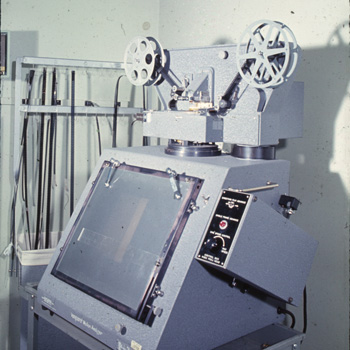
I remember seeing the Vanguard Motion Analyzer when I was just a little kid in junior high school, it must have been around 1970 or '71. I was in the math club and we were permitted to use the University of Iowa's timeshare computers. One of the local hackers liked me because a little kid like me was useful when we went dumpster diving for timeshare passwords, I could easily squeeze into the big dumpsters behind the computer center. We got into a lot of mischief together.
My hacker buddy invited me to sneak into his workplace for a demonstration I would never forget. This visit would have to be a secret, because the job was a classified project for the Department of Defense. Nobody was supposed to know the University had contracts with the DoD, this was at the peak of student protests against the Vietnam War, the students would have a fit if they knew about his work. So one day after school, I rode my bicycle over to his office containing the Vanguard Motion Analyzer for a demonstration.
The VMA is an incredible piece of analog computing technology. It is essentially a Movieola, a device for viewing 35mm films through a rear projection screen. But this is no ordinary Movieola, it has a clever arrangement of mirrors and prisms so the image can be precisely zoomed and rotated. It also has a special electromechanical film transport so the film can be moved back and forth, one frame at a time. There were two clips at the top of the screen to hold a sheet of translucent graph paper. A sliding clear plastic bar could be moved up and down the screen, to help align the image's horizon (or other reference points) perfectly level, for more accurate data plotting. Films could be played through the glass plate, viewed through the paper, and the operator would manually plot the position of objects on the graph paper.
My friend's job was classified because he was plotting boresight films, high-speed 35mm films of artillery projectiles in flight. These films were used to calibrate new types of artillery guns or shells. A boresight film might record a tracer shell's flight taking a fraction of a second, but the film would last for many seconds if played at regular speed, and you could clearly see the projectile moving slowly across the screen. The film would advance one frame at a time, he'd plot the shell's position on the graph paper, advance another frame, plot another position, again and again. Then he'd input the plotted data on IBM punch cards. He let me plot a few data points, and it looked like the most tedious damn job I ever saw. But the high-speed films of flying artillery shells were absolutely fascinating, and perhaps for the first time, I got an idea of the mathematics behind the visual images of the world we see with our own eyes. If I had never seen this demonstration, I might never have ended up working in computer graphics.
I can see the goals of the project more clearly, now that I've spent years working on computer graphics. The boresight films were probably taken from more than one point of view, and the computer was used for a "stereographic reconstruction," a way to calculate a 3D path through space from combining two 2D paths. The data was needed to calculate "artillery tables," to calibrate the gun so the gunner could accurately hit the target.
Artillery tables are the reason the computer was invented in the first place. A unique table had to be calculated for every large-bore artillery gun, since they all had slightly different characteristics due to variations in manufacture. The tables were produced by an army of clerks, calculating manually with logarithm tables and slide rules, tediously working out the path for each type of shell, at every angle of elevation of degrees and even arc-seconds. But during the military buildup before World War II, artillery for ships was produced in such quantities that the clerks could not keep up with demand. Obviously an automated method of calculating the tables was needed, so a clever mathematician at Iowa State University, John Atanasoff, invented the first programmable digital computer. But when WWII started, Atanasoff abandoned his work and joined the Naval Ordinance Laboratory.
Other major advancements in computing were directly inspired by artillery targeting problems. Battleships often used "artillery computers," which were massive mechanical analog computers with the artillery tables built in to the mechanism. Eventually, advanced models were developed to target moving ships. Other applications soon followed; Norbert Wiener developed methods of targeting moving aircraft with radar operated anti-aircraft artillery, using analog computers with feedback to continuously aim the gun ahead of the aircraft, as appropriate for the speed and height of the target. Weiner's new science of Cybernetics caused an explosion of new ideas, and lead the way to the modern computing age.
But let's return to the Vietnam era and the Vanguard. Eventually, rumors about my friend's project leaked out, but were obviously misunderstood due to the incomprehensible technology. Rumors spread that the University had a secret contract with the CIA. Student protesters were up in arms, holding protests in front of the building, accusing the University of helping the Military-Industrial Complex to build killing machines. And they were right. So one night, the Weathermen went down to the office, and blew it up with dynamite, totally destroying the entire building. And that was the end of the project.
I remember seeing the Vanguard Motion Analyzer when I was just a little kid in junior high school, it must have been around 1970 or '71. I was in the math club and we were permitted to use the University of Iowa's timeshare computers. One of the local hackers liked me because a little kid like me was useful when we went dumpster diving for timeshare passwords, I could easily squeeze into the big dumpsters behind the computer center. We got into a lot of mischief together.
My hacker buddy invited me to sneak into his workplace for a demonstration I would never forget. This visit would have to be a secret, because the job was a classified project for the Department of Defense. Nobody was supposed to know the University had contracts with the DoD, this was at the peak of student protests against the Vietnam War, the students would have a fit if they knew about his work. So one day after school, I rode my bicycle over to his office containing the Vanguard Motion Analyzer for a demonstration.
The VMA is an incredible piece of analog computing technology. It is essentially a Movieola, a device for viewing 35mm films through a rear projection screen. But this is no ordinary Movieola, it has a clever arrangement of mirrors and prisms so the image can be precisely zoomed and rotated. It also has a special electromechanical film transport so the film can be moved back and forth, one frame at a time. There were two clips at the top of the screen to hold a sheet of translucent graph paper. A sliding clear plastic bar could be moved up and down the screen, to help align the image's horizon (or other reference points) perfectly level, for more accurate data plotting. Films could be played through the glass plate, viewed through the paper, and the operator would manually plot the position of objects on the graph paper.
My friend's job was classified because he was plotting boresight films, high-speed 35mm films of artillery projectiles in flight. These films were used to calibrate new types of artillery guns or shells. A boresight film might record a tracer shell's flight taking a fraction of a second, but the film would last for many seconds if played at regular speed, and you could clearly see the projectile moving slowly across the screen. The film would advance one frame at a time, he'd plot the shell's position on the graph paper, advance another frame, plot another position, again and again. Then he'd input the plotted data on IBM punch cards. He let me plot a few data points, and it looked like the most tedious damn job I ever saw. But the high-speed films of flying artillery shells were absolutely fascinating, and perhaps for the first time, I got an idea of the mathematics behind the visual images of the world we see with our own eyes. If I had never seen this demonstration, I might never have ended up working in computer graphics.
I can see the goals of the project more clearly, now that I've spent years working on computer graphics. The boresight films were probably taken from more than one point of view, and the computer was used for a "stereographic reconstruction," a way to calculate a 3D path through space from combining two 2D paths. The data was needed to calculate "artillery tables," to calibrate the gun so the gunner could accurately hit the target.
Artillery tables are the reason the computer was invented in the first place. A unique table had to be calculated for every large-bore artillery gun, since they all had slightly different characteristics due to variations in manufacture. The tables were produced by an army of clerks, calculating manually with logarithm tables and slide rules, tediously working out the path for each type of shell, at every angle of elevation of degrees and even arc-seconds. But during the military buildup before World War II, artillery for ships was produced in such quantities that the clerks could not keep up with demand. Obviously an automated method of calculating the tables was needed, so a clever mathematician at Iowa State University, John Atanasoff, invented the first programmable digital computer. But when WWII started, Atanasoff abandoned his work and joined the Naval Ordinance Laboratory.
Other major advancements in computing were directly inspired by artillery targeting problems. Battleships often used "artillery computers," which were massive mechanical analog computers with the artillery tables built in to the mechanism. Eventually, advanced models were developed to target moving ships. Other applications soon followed; Norbert Wiener developed methods of targeting moving aircraft with radar operated anti-aircraft artillery, using analog computers with feedback to continuously aim the gun ahead of the aircraft, as appropriate for the speed and height of the target. Weiner's new science of Cybernetics caused an explosion of new ideas, and lead the way to the modern computing age.
But let's return to the Vietnam era and the Vanguard. Eventually, rumors about my friend's project leaked out, but were obviously misunderstood due to the incomprehensible technology. Rumors spread that the University had a secret contract with the CIA. Student protesters were up in arms, holding protests in front of the building, accusing the University of helping the Military-Industrial Complex to build killing machines. And they were right. So one night, the Weathermen went down to the office, and blew it up with dynamite, totally destroying the entire building. And that was the end of the project.
Long ago when I worked at a retail computer store, our store had a minimum profit margin on computer sales of 20% (that alone should tell you this is a LONG time ago). All the salesmen had to obey the rule of not selling a computer at less than 20% profit. I had a fancy HP-35 calculator so I could quickly add delta +20%, delta +21% if I wanted a 21% profit, etc. The other salesmen used standard calculators. They always tried to grab my customers, somehow their quotes for the same products would be less, and my customers would buy from some OTHER sales guy for less than I'd quoted them the day before. It was infuriating. And the boss was especially infuriated because none of the salesmen could meet their margin quotas, so he started withholding their commission on low profit deals, which just added to the vicious circle of pissed offedness.
So one day, I caught a salesman doing a calculation, and I was shocked what I saw. He calculated 20% margin on a product by multiplying cost times 1.2 to get the retail price. So I asked him, if I sell a product for $100 at 20% profit margin, what's the cost? He shot back the correct answer, $80. I said ok, now type $80 into your calculator and multiply it times 1.2. Answer, $96. Oopsie.
I reported to the boss what I had seen. He hit the ceiling. When he calmed down, he made me go around the sales floor with him, and he demanded that every single salesman go through the same routine. What's the cost of goods on a $100 sale at 20%? Now use your calculator to compute 20% margin on an $80 item. Oopsie, $96 is wrong. Every single salesman was a math moron, they ALL were calculating it the wrong way. And then I had to teach them the proper calculator method while Mr. Tyrant Boss watched over us, and he was not satisfied until every salesman demonstrated an ability to calculate the correct profit margin TWICE on his own. The correct formula to calculate a retail price with 20% margin is 1.25 times cost. None of the salesmen believed this was correct until I made them multiply 80 * 1.25 and it came out to 100. Some of the cleverest salesmen asked me how I'd calculate an arbitrary profit margin, like 21%. So I had to demonstrate that too.
Over the next few weeks, my sales skyrocketed. My own customers were no longer able to undercut my prices merely by asking a different salesman to quote the same equipment. This was a huge relief because in the past, I'd do all the prep work and the other sales guy would walk off with all MY profits with no effort except to multiply times 1.2.
So one day, I caught a salesman doing a calculation, and I was shocked what I saw. He calculated 20% margin on a product by multiplying cost times 1.2 to get the retail price. So I asked him, if I sell a product for $100 at 20% profit margin, what's the cost? He shot back the correct answer, $80. I said ok, now type $80 into your calculator and multiply it times 1.2. Answer, $96. Oopsie.
I reported to the boss what I had seen. He hit the ceiling. When he calmed down, he made me go around the sales floor with him, and he demanded that every single salesman go through the same routine. What's the cost of goods on a $100 sale at 20%? Now use your calculator to compute 20% margin on an $80 item. Oopsie, $96 is wrong. Every single salesman was a math moron, they ALL were calculating it the wrong way. And then I had to teach them the proper calculator method while Mr. Tyrant Boss watched over us, and he was not satisfied until every salesman demonstrated an ability to calculate the correct profit margin TWICE on his own. The correct formula to calculate a retail price with 20% margin is 1.25 times cost. None of the salesmen believed this was correct until I made them multiply 80 * 1.25 and it came out to 100. Some of the cleverest salesmen asked me how I'd calculate an arbitrary profit margin, like 21%. So I had to demonstrate that too.
Over the next few weeks, my sales skyrocketed. My own customers were no longer able to undercut my prices merely by asking a different salesman to quote the same equipment. This was a huge relief because in the past, I'd do all the prep work and the other sales guy would walk off with all MY profits with no effort except to multiply times 1.2.
I've been seriously bummed that I've been unable to implement the latest new antispam tricks since I'm on MacOS X and I'm basically stuck with Mail.app's plain vanilla spam filters. I used to maintain a tip sheet on spam filtering for MacOS X using procmail and SpamBouncer, but that technique was obsoleted in MacOS X 10.2 when Apple removed Mail.app's support for unix mbox format. The only way to use to procmail filtering with MacOS X was to set up your own mail server, I'd rather not bother with that.
But now I'm all excited that someone figured out how to add mbox support back into Mail.app. I'm going to give it a whirl and see if I can't patch together some new spam filtering tricks, maybe I'll try SpamAssassin instead of Spambouncer.
For the last 2 months, I've been trying to figure out why my QWest 640/512 DSL line has been performing at about 500/130. This has severely impeded my ability to serve BlogTV streaming video, aside from the general annoyance of having about 25% of my former upload speed.
The problems started when my old ISP went out of business and I suddenly had to switch to QWest.net. I told QWest to preserve my existing 640/512 account, and they said they would. But I immediately noticed a decrease in performance, and "opened a ticket" with tech support, which means they are supposed to investigate and call me back with results. They never did get back to me. I waited since December 10th, I've repeatedly tried to call their tech support line, but I've never been able to get through, I usually give up after 45 minutes.
I spent 4 hours on the phone with QWest today. I started, as usual, by spending 45 minutes on hold waiting for tech support to answer. I gave up and called the sales office, they told me my account was 640/256, which was not what I ordered. Then he made some weasely remarks about the 640/256 really being a 640/512-256 account, and that if I wasn't getting 512 I should be talking to tech support (like I hadn't already tried that). I told him I couldn't get through, so he started a conference call, we both waited on hold for about 20 minutes and finally got through. But I warned Mr. Salesguy that the tech guys were going to blame sales, just like the sales guys pointed the finger at the techs. I call this a "mutual finger-pointing exercise," everyone points the finger at everyone else. And that's exactly what happened.
The tech guy immediately said that he'd been working tech at QWest for 6 years and they had never offered 640/512k accounts. I told him they surely did, because I had one. He got really huffy and told me they don't offer them any more. I asked him, which was it, they don't offer them NOW, or they NEVER did? I insisted that they DID sell 640/512, I had it up until 60 days ago and I'd like my account restored to its previous speed. He started yelling at me about what would happen if I went into a car dealership and wanted to buy a Studebaker? WTF? I was thinking of telling him about a friend of mine, he collects Studebakers, and how there is limited production of new Studebaker Avantis, but I decided against it because that would go nowhere with Mr. Angry Tech Guy. Instead, I demanded to talk to his supervisor.
So now I get ahold of a reasonable, knowledgable tech supervisor, I could immediately tell he'd been doing this for decades, a real old telco guy. At this point, I'd been on the phone for over 3 hours. As soon as I started explaining the situation, the battery in my phone died, we got disconnected. Arghh!
Fortunately the Supervisor called me back and I picked up on my other phone with a fresh battery. He explained that QWest used to offer 640/512 with CAP protocol, but now they switched to DMT protocols, which offered more reliability but only at 256 instead of 512. I told him I'd like to switch back to CAP but he said it couldn't be done. QWest has a standing order to switch customers off CAP if they make the slightest change to their services, and that CAP is no longer available. I objected, I said that if my ISP hadn't gone under, I'd still be using CAP and I'd still have 512 upstream, so I didn't see any reason why I couldn't be restored to the old protocol. He sympathized but said this was impossible. However, he did say there's light at the end of the tunnel.
Apparently QWest has been experimenting wth a new 1500/1000 DSL protocol, and are about to offer it at the same price as the old 640/256 line, if the phone line is of sufficient quality. There is no guarantee I'll get full speed, there isn't even a guarantee they'll offer it in my neighborhood. So there is a possibility that sometime this month, I'll get new higher speed services at the same old cost. But if not, I'll have to pay twice as much for 640/640 SDSL. Gee, let me guess which of those two plans will happen.
The problems started when my old ISP went out of business and I suddenly had to switch to QWest.net. I told QWest to preserve my existing 640/512 account, and they said they would. But I immediately noticed a decrease in performance, and "opened a ticket" with tech support, which means they are supposed to investigate and call me back with results. They never did get back to me. I waited since December 10th, I've repeatedly tried to call their tech support line, but I've never been able to get through, I usually give up after 45 minutes.
I spent 4 hours on the phone with QWest today. I started, as usual, by spending 45 minutes on hold waiting for tech support to answer. I gave up and called the sales office, they told me my account was 640/256, which was not what I ordered. Then he made some weasely remarks about the 640/256 really being a 640/512-256 account, and that if I wasn't getting 512 I should be talking to tech support (like I hadn't already tried that). I told him I couldn't get through, so he started a conference call, we both waited on hold for about 20 minutes and finally got through. But I warned Mr. Salesguy that the tech guys were going to blame sales, just like the sales guys pointed the finger at the techs. I call this a "mutual finger-pointing exercise," everyone points the finger at everyone else. And that's exactly what happened.
The tech guy immediately said that he'd been working tech at QWest for 6 years and they had never offered 640/512k accounts. I told him they surely did, because I had one. He got really huffy and told me they don't offer them any more. I asked him, which was it, they don't offer them NOW, or they NEVER did? I insisted that they DID sell 640/512, I had it up until 60 days ago and I'd like my account restored to its previous speed. He started yelling at me about what would happen if I went into a car dealership and wanted to buy a Studebaker? WTF? I was thinking of telling him about a friend of mine, he collects Studebakers, and how there is limited production of new Studebaker Avantis, but I decided against it because that would go nowhere with Mr. Angry Tech Guy. Instead, I demanded to talk to his supervisor.
So now I get ahold of a reasonable, knowledgable tech supervisor, I could immediately tell he'd been doing this for decades, a real old telco guy. At this point, I'd been on the phone for over 3 hours. As soon as I started explaining the situation, the battery in my phone died, we got disconnected. Arghh!
Fortunately the Supervisor called me back and I picked up on my other phone with a fresh battery. He explained that QWest used to offer 640/512 with CAP protocol, but now they switched to DMT protocols, which offered more reliability but only at 256 instead of 512. I told him I'd like to switch back to CAP but he said it couldn't be done. QWest has a standing order to switch customers off CAP if they make the slightest change to their services, and that CAP is no longer available. I objected, I said that if my ISP hadn't gone under, I'd still be using CAP and I'd still have 512 upstream, so I didn't see any reason why I couldn't be restored to the old protocol. He sympathized but said this was impossible. However, he did say there's light at the end of the tunnel.
Apparently QWest has been experimenting wth a new 1500/1000 DSL protocol, and are about to offer it at the same price as the old 640/256 line, if the phone line is of sufficient quality. There is no guarantee I'll get full speed, there isn't even a guarantee they'll offer it in my neighborhood. So there is a possibility that sometime this month, I'll get new higher speed services at the same old cost. But if not, I'll have to pay twice as much for 640/640 SDSL. Gee, let me guess which of those two plans will happen.
Comments were temporarily disabled due to my botched attempt to install MT-Blacklist to block comment spam. But I removed the software and now everything is working correctly.
The problem isn't with MT-blacklist, it's with Perl. I'm missing an important library and Perl wants to upgrade to a whole new Perl version instead of just installing the one piece I need. Perl sucks.
The problem isn't with MT-blacklist, it's with Perl. I'm missing an important library and Perl wants to upgrade to a whole new Perl version instead of just installing the one piece I need. Perl sucks.
If you've been unable to access this website at any time over the past 2 or 3 weeks, it is because I'm in DSL Hell again. My ISP, Internet Navigator, has been unable to keep my DSL line working for more than 48 continuous hours. Lately the line has been dropping out for 5 to 10 minutes every 12 hours. I've complained to my ISP so frequently that they're now ignoring my problems, and blaming them on QWest, which I guarantee is not responsible for this fiasco. QWest's lines check out 100% reliable, all the problems are at Internet Navigator.
There really is no excuse for this level of service, nor is there any excuse for INAV techs giving me a response like "you're the only one with this problem, we aren't hearing this complaint from our hundreds of other DSL users."
The irony of all this is that I switched to DSL because I was fed up with the unreliability of my old cable modem provider. I decided tha it would be better to have a more expensive, slower connection but with more reliability. Unfortunately, the new DSL line is more expensive, slower, AND less reliable. Three strikes, you're out.
I'm continuing to work on the problem, but at this point, it looks like I'll have to switch to a different ISP. The only way I can get the same level of service (well, the same as I'm supposed to be getting now) will be at QWest's own ISP, at a price increase of about 30%. This DSL line is already exceeding my budget, now it's going to break the bank. I'm screwed.
There really is no excuse for this level of service, nor is there any excuse for INAV techs giving me a response like "you're the only one with this problem, we aren't hearing this complaint from our hundreds of other DSL users."
The irony of all this is that I switched to DSL because I was fed up with the unreliability of my old cable modem provider. I decided tha it would be better to have a more expensive, slower connection but with more reliability. Unfortunately, the new DSL line is more expensive, slower, AND less reliable. Three strikes, you're out.
I'm continuing to work on the problem, but at this point, it looks like I'll have to switch to a different ISP. The only way I can get the same level of service (well, the same as I'm supposed to be getting now) will be at QWest's own ISP, at a price increase of about 30%. This DSL line is already exceeding my budget, now it's going to break the bank. I'm screwed.
Microsoft is about to kill the Web. Due to a court injunction against their illegal unlicensed embedding technology, stolen from Eolas, they are now forced to alter Internet Explorer 6. For years, programmers like me have been forced to work around IE's ActiveX embedding, using stupid tricks to make our QuickTime videos work in both standards-compliant browsers, as well as the standard-breaking IE. And now I have to go in and remove all of that junk, and replace it with even more convoluted junk. This is going to take a lot of effort to repair, for me and everyone who ever wrote a web page with an embedded object.
But the biggest problem will be with old web pages that are no longer actively maintained. Nobody is going to fix those web pages. Microsoft is going to make unilateral changes that will kill huge sections of the Web. Microsoft is pure evil, this is just more proof, if you haven't been convinced already.
But the biggest problem will be with old web pages that are no longer actively maintained. Nobody is going to fix those web pages. Microsoft is going to make unilateral changes that will kill huge sections of the Web. Microsoft is pure evil, this is just more proof, if you haven't been convinced already.
I was astonished at an article I found today entitled "Microsoft: Hated Because it is Misunderstood." Since this article is likely to disappear from its current location, I have preserved it in a .pdf file and am providing it for download. This article is most astonishing to me because people, even so-called computer experts, actually believe this is the way computers are supposed to work. Contrary to Mr. Expert's assertion, people hate Microsoft because they understand it all too well; it is pure evil.
I will skip over the author's astonishing assertion that people hate Microsoft because they don't give away enough swag, and his recycling of the old theme, "nobody ever got fired for recommendingIBM Microsoft." The author then launches his FUD campaign by asserting that products like Unix are just as insecure as Microsoft Windows, citing the example that SCO was taken offline by a denial-of-service attack. This "expert" does not seem to understand that the only way to take down an unbreakable OS is by a denial-of-service attack. It's like finding you can't break into someone's house, so instead, you cut the electric wires and water pipes into the house for revenge.
But my real beef with this article is the list of "expert" recommendations on how to keep your Microsoft computer troublefree and eliminate threats from viruses. The author asserts that "I'm on current Microsoft products, and I hardly ever crash." I'm on current MacOS X products, and I never crash. Never ever. I reboot my machine once every few months, when I install system updates. Let us examine his recommendations in detail, and contrast it with a non-evil OS.
MacOS X has a built-in firewall, but I don't bother to use it because MacOS X doesn't open hundreds of network ports that allow hackers to enter your machine, they are closed by default. MacOS X doesn't run inherently dangerous protocols like ActiveX or RPC that allow crackers to easily exploit an opened port.
Long ago, I formulated a new Murphy's Law, I call it The Expert Law, "whenever you hire a computer expert, you suddenly get new problems only a computer expert can solve." Robert Cringely calls this problem the IT Department Full Employment Act. Microsoft depends on "experts" to recommend its software, the endless Windows bugs in the software they set up guarantees these "experts" a lucrative income.
I am reminded of an incident from many years ago in the early days of IBM PC when I worked for ComputerLand. One customer had continual problems with his MSDOS-based software, one of the salesmen went onsite once a week to repair his software. One week the salesman was out sick, and the customer called up with a frantic request for help, his computer was broken again. I went onsite, and was surprised to see the customer location, one of the most expensive mansions in Beverly Hills. I investigated the problem, and discovered that a simple modification to the CONFIG.SYS file was necessary for a permanent fix. Furthermore, I found that the salesman had applied an inadequate modification that would die about once a week, requiring reinstallation. When the salesman returned to work the following week, he screamed at me, "how dare you fix my customer's computer! I was making $250 a week off him! You killed the goose that laid the golden egg!" This was the very day I formulated The Expert Law.
I'm not posting this essay just to rant against Microsoft and their corrupt practices. I'm trying to point out that Microsoft "experts" are living on a completely different plane of existence. If you stay in a smelly outhouse long enough, you won't notice the stink anymore, but only a sick mind like our "expert" would try to convince people that the stench is actually sweet perfume. This is not how it should be. But this is the way it will always be, unless people stop giving their money to a company that makes such obviously inferior, insecure products. Unfortunately, with the current Windows Monopoly, users feel they have no choice but to buy Windows. It is the job of every responsible computer professional to inform users that there viable alternatives to Microsoft.
Please stay tuned for part 2 of this essay, entitled "Microsoft is Still Pure Evil," where I will explain how Microsoft continues to violate the terms of the antitrust judgement, and is deliberately blocking Mac users from accessing cross-platform web content that could easily be accessible if Microsoft wasn't actively trying to prevent it.
Microsoft's First Customer |

I will skip over the author's astonishing assertion that people hate Microsoft because they don't give away enough swag, and his recycling of the old theme, "nobody ever got fired for recommending
But my real beef with this article is the list of "expert" recommendations on how to keep your Microsoft computer troublefree and eliminate threats from viruses. The author asserts that "I'm on current Microsoft products, and I hardly ever crash." I'm on current MacOS X products, and I never crash. Never ever. I reboot my machine once every few months, when I install system updates. Let us examine his recommendations in detail, and contrast it with a non-evil OS.
• Limit the number of applications on your desktop.I ran System Profiler and I counted 550 different applications on my machine, not including Unix apps I installed with Fink, which must number in the hundreds. There must be something inherently wrong with Microsoft Windows if it cannot run properly with multiple apps installed, even inactive apps loaded on a disk drive. This is a fundamental difference between Apple and Microsoft. Apple believes that all applications should integrate seamlessly with each other; Microsoft believes that you only need one application to do your work, Microsoft Office, integrated applications are a waste of time. You must do your work the way Microsoft says you should, not the way you want to do it. Microsoft has forgotten that machines were designed to serve mankind; mankind was not intended to be enslaved to machines and do things the way machines want them to be done.
• Deploy new operating systems on new hardware.The server that provided this web page to you is a PowerMac G3/400, first shipped in January 1999, it's almost 5 years old. It is running the latest version of MacOS X. I also tried running the latest version of MacOS X Server on it, performance was excellent even though it ran tons of services I didn't need. But a 5 year old Wintel box is a doorstop. Microsoft deliberately makes their newest software bloated and slow, in order to force you to buy new hardware just to get the same level of performance you used to enjoy. In contrast, each new release of MacOS X has increased performance, even on older hardware. This is the ultimate source of pure evil within Microsoft, each operating system update is designed to make Bill Gates and his cronies rich, not to assist customers in getting their work done more quickly, cheaply and effectively.
• Keep software up to date (including your firewalls).Much of the current round of viruses and worms on Windows was propagated by customers who were falsely informed by Microsoft Critical Updates that their OS was completely up to date with the latest security patches. Yesterday, Microsoft announced 5 new security patches. Keeping your Windows system up to date could become a full-time job.
MacOS X has a built-in firewall, but I don't bother to use it because MacOS X doesn't open hundreds of network ports that allow hackers to enter your machine, they are closed by default. MacOS X doesn't run inherently dangerous protocols like ActiveX or RPC that allow crackers to easily exploit an opened port.
• Do regular security audits (including trivial password checks).These recommendations are only suitable for companies with a full-time IT staff, it would be difficult, if not impossible for an average home computer user to implement such security measures. Microsoft's "expert" solution requires expensive user-level practices. Wouldn't it be better to fix the inherent security problems in the OS, rather than put the burden on the user? Even if you hire an IT consultant to implement these password security measures, it is unlikely to increase security. Cracked passwords are not the primary source of Windows insecurity.
• Consider smart cards for verified access.
Long ago, I formulated a new Murphy's Law, I call it The Expert Law, "whenever you hire a computer expert, you suddenly get new problems only a computer expert can solve." Robert Cringely calls this problem the IT Department Full Employment Act. Microsoft depends on "experts" to recommend its software, the endless Windows bugs in the software they set up guarantees these "experts" a lucrative income.
I am reminded of an incident from many years ago in the early days of IBM PC when I worked for ComputerLand. One customer had continual problems with his MSDOS-based software, one of the salesmen went onsite once a week to repair his software. One week the salesman was out sick, and the customer called up with a frantic request for help, his computer was broken again. I went onsite, and was surprised to see the customer location, one of the most expensive mansions in Beverly Hills. I investigated the problem, and discovered that a simple modification to the CONFIG.SYS file was necessary for a permanent fix. Furthermore, I found that the salesman had applied an inadequate modification that would die about once a week, requiring reinstallation. When the salesman returned to work the following week, he screamed at me, "how dare you fix my customer's computer! I was making $250 a week off him! You killed the goose that laid the golden egg!" This was the very day I formulated The Expert Law.
• Don't copy entire software images from old PCs to new ones; leave that to hardware OEMs, who have testing and procedures to make sure the imaging is done right.I am baffled by this assertion. I can only attribute it to the notorious "Windows rot." Many people think they must reformat and reinstall Windows every few months to correct subtle system errors. I know several people who have bought new Wintel computers just to avoid a reformat/reinstall cycle. But MacOS X users have utilities like Carbon Copy Cloner that can simply and effectively copy system images from machine to machine. MacOS X doesn't require customized installations and drivers for each different machine, I know many university computer labs that can remotely install the same cloned MacOS on any of their diverse machines with just a few clicks. This is another fundamental difference between Mac and Wintel, Macs are a seamlessly unified hardware/software solution, Windows must be customized for each hardware configuration.
• Don't upgrade memory on existing systems; even the slightest mismatch between memory chips can lead to instabiity.This is the most astonishing of all these "expert" recommendations, I haven't heard anything like this since Bill Gates said 64k of RAM should be enough for anyone. Wintel systems continually require memory upgrades to keep pace with the latest bloatware, if you cannot upgrade memory then you obviously must buy a new CPU. This is how the minds of Windows "experts" work, instead of buying a new $25 memory stick, you need a new $2500 machine plus a new $25 memory stick. Of course you must install the proper RAM for your hardware, but if users cannot upgrade their memory without introducing instability, there is something fundamentally wrong with your hardware platform. I've used mixed memory brands in all my Mac machines. Using mismatched RAM (i.e. same speed but different CAS Latency) on a Mac will merely cause a slight performance reduction, it will not cause instability.
Oh, and you may want to avoid products from vendors who taunt hackers (the word "bulletproof" comes to mind).The words "Trustworthy Computing" come to mind. Over a year ago, Microsoft announced it was suspending all development of new features for 30 days to put all their efforts towards a plugging security holes, they called it the Trustworthy Computing Initiative. 60 days later, the initiative was suspended, but obviously the security problems are worse than ever. And somehow Microsoft has morphed their usage of the term Trustworthy Computing to mean .NET, a digital rights management system. DRM is a misnomer, it is really a system of mistrust. Untrusted users cannot access DRM content without the explicit granting of permission, under the control of Microsoft .NET servers. The only "trustworthy" computers will be Microsoft systems. Yet those same Microsoft computers are almost completely open to any cracker that wants to access your files. Even Microsoft's primary .NET servers have leaked confidential customer information. Anyone who runs applications requiring a high level of security would be insane to use Microsoft applications. Recently a security analyst told me that many IT companies are insuring themselves against computer intrusion, they consider it an inevitable occurence on any corporate computer network with Microsoft computers. It is cheaper to pay exorbitant insurance rates and pay millions of dollars in damages than to spend millions to secure their systems. Is this how Trustworthy Computing is supposed to work?
I'm not posting this essay just to rant against Microsoft and their corrupt practices. I'm trying to point out that Microsoft "experts" are living on a completely different plane of existence. If you stay in a smelly outhouse long enough, you won't notice the stink anymore, but only a sick mind like our "expert" would try to convince people that the stench is actually sweet perfume. This is not how it should be. But this is the way it will always be, unless people stop giving their money to a company that makes such obviously inferior, insecure products. Unfortunately, with the current Windows Monopoly, users feel they have no choice but to buy Windows. It is the job of every responsible computer professional to inform users that there viable alternatives to Microsoft.
Please stay tuned for part 2 of this essay, entitled "Microsoft is Still Pure Evil," where I will explain how Microsoft continues to violate the terms of the antitrust judgement, and is deliberately blocking Mac users from accessing cross-platform web content that could easily be accessible if Microsoft wasn't actively trying to prevent it.
I just discovered a solution to my longest term Adobe Acrobat bug, it's been a huge annoyance and a huge time-waster for years. I like to scan a lot of pages and import them into Acrobat, but they always sort in the wrong order and you have to manually resort them. Everyone complains about this on both Wintel and Mac platforms, but now there's a fix for MacOS X.
I like to scan everything as uncompressed TIFFs and name them in numeric order, like 001.tif, 002.tif, etc. I can do image adjustments in Photoshop, once I get the brightness and contrast right for one document, I can just batch process all the rest with the same settings. I have ImageMagick installed, so I can transform a whole folder full of TIFFs with the command "mogrify -format jpeg -quality 30 *.tif" and it is incredibly fast. But when you try to insert them all into a PDF in Acrobat, the images import in the wrong order. You can use the little Move Up/Move Down buttons to move things into the right order, but hell, isn't this supposed to be automatic? It takes a huge amount of time to manually resort a hundred page document, I should be able to do this with one click.
But help is on the way. There's a new Acrobat plugin, InsertSorted, which inserts PDFs in the correct order. The problem is that you've got TIFFs or JPEGs as source material, and InsertSorted only imports PDFs. So the trick is to convert your image files to individual 1-page PDFs first. In Acrobat 6 Pro, use the command Advanced>Open All. This opens every image and resaves it as a PDF. Then you can use InsertSorted and grab them all in the right order with just one click.
This trick is going to save me days of work each month. Special thanks go to Lawrence You for inventing this trick.
I like to scan everything as uncompressed TIFFs and name them in numeric order, like 001.tif, 002.tif, etc. I can do image adjustments in Photoshop, once I get the brightness and contrast right for one document, I can just batch process all the rest with the same settings. I have ImageMagick installed, so I can transform a whole folder full of TIFFs with the command "mogrify -format jpeg -quality 30 *.tif" and it is incredibly fast. But when you try to insert them all into a PDF in Acrobat, the images import in the wrong order. You can use the little Move Up/Move Down buttons to move things into the right order, but hell, isn't this supposed to be automatic? It takes a huge amount of time to manually resort a hundred page document, I should be able to do this with one click.
But help is on the way. There's a new Acrobat plugin, InsertSorted, which inserts PDFs in the correct order. The problem is that you've got TIFFs or JPEGs as source material, and InsertSorted only imports PDFs. So the trick is to convert your image files to individual 1-page PDFs first. In Acrobat 6 Pro, use the command Advanced>Open All. This opens every image and resaves it as a PDF. Then you can use InsertSorted and grab them all in the right order with just one click.
This trick is going to save me days of work each month. Special thanks go to Lawrence You for inventing this trick.
I was just helping an old friend diagnose a hardware problem via email, and I was suddenly reminded of a funny tech support call from way back around 1980 when I worked at a tiny Apple dealership in the middle of nowhere.
One day, I got a call from a frantic customer, he could not get his Apple II to boot. Every time he turned it on, it went right to the ROM debugger, which isn't supposed to be normally accessible. This was a really good problem, so I decided to mess with the customer a little bit. The call went something like this:
One day, I got a call from a frantic customer, he could not get his Apple II to boot. Every time he turned it on, it went right to the ROM debugger, which isn't supposed to be normally accessible. This was a really good problem, so I decided to mess with the customer a little bit. The call went something like this:
Me: Now let me guess, your computer desk is a total mess, right?
Customer: Um, yeah...
M: And you've got books and crap sitting right next to your computer, right?
C: Um, yeah...
M: And you have a joystick, right?
C: Uhh, yeah.. How do you know this?
M: Just hold on. You have a bunch of crap sitting on top of your joystick, right?
C: Uhh, yeah??
M: Unbury your joystick and turn on your computer.
C: <ping, brrrttttt sound of computer booting> Hey, it works! What the hell was that?!?
M: There was something on your desk holding down the joystick button while booting, which forces it to boot into the ROM.
C: Well, how did you know that?
M: Because the same thing happened to me last week!
I think I might have accidentally started the MSNBot Boycott when I made some comments on on JWZ's blog. I posted the exclusion rules to put in your robots.txt, to keep Microsoft from crawling your site. I set it up on my site immediately, but I discovered that the MSNBot ignores the robots.txt rules, they scanned my site anyway. MS claims it's a bug. Yeah right. As usual, Microsoft thinks the rules don't apply to them.
I've had difficulty finding out the precise capacity of a DVD-R disk, but thanks to an obscure footnote in the DVD Studio Pro documentation, now I know. A DVD-R holds 4,699,979,766 bytes. I use Toast to burn discs, it only reports disc size in blocks, and I've never figured out how big a block is. I'm sure it's documented somewhere but I sure can't find it.
I like doing DVD-R backups but it's always a hassle to create archives just the right size. I like to use as much of the disk as possible, with no unused space. But since the files you're burning never precisely add up to 4,699,979,766 bytes, there's always some unused space left over. It can take a considerable amount of effort to find a proper mix of file sizes to make a full DVD image. This particular problem may seem like a lot of extra effort expended chasing after efficiency, but the problem has also occupied some of the great mathematical minds of our time. It is known as the Bin-Packing Problem. It has been mathematically proven that there is no optimal bin packing algorithm, so I feel a lot better when I have trouble with the same problem when preparing DVD-R images.
I like doing DVD-R backups but it's always a hassle to create archives just the right size. I like to use as much of the disk as possible, with no unused space. But since the files you're burning never precisely add up to 4,699,979,766 bytes, there's always some unused space left over. It can take a considerable amount of effort to find a proper mix of file sizes to make a full DVD image. This particular problem may seem like a lot of extra effort expended chasing after efficiency, but the problem has also occupied some of the great mathematical minds of our time. It is known as the Bin-Packing Problem. It has been mathematically proven that there is no optimal bin packing algorithm, so I feel a lot better when I have trouble with the same problem when preparing DVD-R images.
I was horrified by an obscure bug I discovered when I was working in Photoshop the other day. I opened Photoshop, created a new file, and when I saved it, the default folder where I had last saved files was open, and I just hit return like always. Then I stopped to think, hey wait a minute, I just threw that folder in the Trash! So I looked in the trash, and indeed, inside the trashed folder, there was my newly created Photoshop file. I pulled it out and saved it in a safe place.
This is not how an Open/Save dialog box is supposed to work. Yes, it's supposed to remember the folder you last saved to, as a matter of convenience. But MacOS X apps should never save files into the Trash. It just does not make sense.
Update: Thanks to Vince Mease, I discovered that this bug is not at the OS level, it does not occur with Apple applications, only 3rd party apps. Apple's apps work correctly, but many non-Apple programs do not understand that you aren't supposed to save to hidden folders like .Trash
This is not how an Open/Save dialog box is supposed to work. Yes, it's supposed to remember the folder you last saved to, as a matter of convenience. But MacOS X apps should never save files into the Trash. It just does not make sense.
Update: Thanks to Vince Mease, I discovered that this bug is not at the OS level, it does not occur with Apple applications, only 3rd party apps. Apple's apps work correctly, but many non-Apple programs do not understand that you aren't supposed to save to hidden folders like .Trash
I scanned some photographs of some of my earliest computer graphics experiments, they are very primitive but I still like them a lot.

This image was produced sometime around 1975, using my hand-built SOL-20 computer with a Graphic-Add display board, giving an amazingly high resolution of 128x64 (or something like that). I wrote programs in BASIC to draw bezier curves, and output via assembly-language graphics routines. It was a lot of work for such low rez output. I photographed the image on the 9" monitor with a Polaroid SX-70 camera, you can see the curvature of the screen if you look closely. Somewhere in storage I have some better quality photos of this image, with some 3D sculptures made from this pattern. I traced the curves on tracing paper, cut layers of wood, then glued them together like a topographic map. My display of photos and sculptures was the first exhibit of computer graphics at my university's art school.
This image was produced sometime around 1975, using my hand-built SOL-20 computer with a Graphic-Add display board, giving an amazingly high resolution of 128x64 (or something like that). I wrote programs in BASIC to draw bezier curves, and output via assembly-language graphics routines. It was a lot of work for such low rez output. I photographed the image on the 9" monitor with a Polaroid SX-70 camera, you can see the curvature of the screen if you look closely. Somewhere in storage I have some better quality photos of this image, with some 3D sculptures made from this pattern. I traced the curves on tracing paper, cut layers of wood, then glued them together like a topographic map. My display of photos and sculptures was the first exhibit of computer graphics at my university's art school.
I heard that some MacOS X users are looking for D-Link USB hubs. Apparently the MacOS X 10.2.5 updated USB drivers have bad mojo, using a D-Link hub is a known workaround. I have one of the magic D-Link hubs, it's been sitting in a drawer for years, but now I suddenly need an extra port so I hooked it up and everything works well.
There's only one problem with my USB scheme, I ran out of power outlets and I had to plug the hub's power block in to the circuit without a battery backup. My CPU has reserve power during an outage, but my USB hub would go down so I'd be unable to type or use the mouse to save my work.
There's only one problem with my USB scheme, I ran out of power outlets and I had to plug the hub's power block in to the circuit without a battery backup. My CPU has reserve power during an outage, but my USB hub would go down so I'd be unable to type or use the mouse to save my work.
I just did something perilous, I did a complete backup of my webserver. I hate doing backups because it's always the time when an error could do the most damage. The only time I ever had a catastrophic data loss was when I did a backup of all my personal data. I used to put all my data into an early PDA-like product written in Hypercard. I was really organized, I lived my life through my online scheduler, and then one day I did a backup and it died right in the middle of the backup. Both the backup and the original went poof and I was never organized again. Since then I've had extreme skepticism about putting valuable personal data into any volatile storage media.
Due to the radical changes on this website, I decided I should set up a proper backup scheme. I set up the Retrospect client-server apps, it works great. I set a script to back up my web server to my desktop PowerMac's CDR, but it didn't verify, I wonder what went wrong. I suppose I should read the Retrospsect manual sometime. But it works OK backing up over the network to hard disk, my archive is only about 480Mb and will fit on a CDR so I'll just back up the server up over the net and put the local archive file on a CDR with Toast. I suppose I'd go to the trouble to get this all working properly if I believed in regular backups.
Due to the radical changes on this website, I decided I should set up a proper backup scheme. I set up the Retrospect client-server apps, it works great. I set a script to back up my web server to my desktop PowerMac's CDR, but it didn't verify, I wonder what went wrong. I suppose I should read the Retrospsect manual sometime. But it works OK backing up over the network to hard disk, my archive is only about 480Mb and will fit on a CDR so I'll just back up the server up over the net and put the local archive file on a CDR with Toast. I suppose I'd go to the trouble to get this all working properly if I believed in regular backups.
Jen has the fix for MovableType Bookmarklets, which don't work properly in Safari without some minor modification. I'm posting this mostly to see if TrackBack works, let's see if Jen's blog lists my referral.
I got a renewal notice from today, demanding $40 for another year's license for their Radio software. I refuse to pay another $40 for 12 more months of abuse by Dave Winer, as far as I'm concerned he personally owes me a $40 refund. So I'm migrating my old Radio blog with help of Bill Kearney's Radio Exporter. I've got all my old content imported into this site's archives, now I never have to deal with Userland and Winer ever again.

Apple's new Safari browser works well enough to be my primary browser, but I wouldn't switch until an ad blocking system was implemented. I heard the latest 1.0bv73 version had popup blocking, but that isn't sufficient. I poked around the web and was surprised to see that Safari supports the same ad blocking techniques as Mozilla, using a css stylesheet.
I noticed Safari's Preferences>Advanced>Style Sheet allows you to set your own style sheet but I didn't immediately realize this was where you put your ad blocker. I downloaded one of the more popular Mozilla ad block userContent.css stylesheets, saved it in my home directory and activated it in the prefs, and ad blocking was activated. I've been editing the file in BBEdit but so far I've had a hard time improving on it. There are some tricks for blocking Flash files but they don't seem to work in Safari. Even so, I'm switching over to Safari because the ad blocking is now good enough to satisfy me in everyday use, and bookmark management is better than any other browser I've used.
Update 6/12/03: It appears this little summary is getting linked around the web, but my link to the stylesheet example at FloppyMoose.com is undergoing a temporary outage. Now you can download the stylesheet I'm using for my own ad blocking, I'll host it on my own site for a permanent reference. If anyone can improve on this stylesheet, I'd love to hear about it, so leave a comment.
Update 4/11/04: FloppyMoose has updated his ad blocking style sheets, with improvements, so check out his site and download the latest version.
I noticed Safari's Preferences>Advanced>Style Sheet allows you to set your own style sheet but I didn't immediately realize this was where you put your ad blocker. I downloaded one of the more popular Mozilla ad block userContent.css stylesheets, saved it in my home directory and activated it in the prefs, and ad blocking was activated. I've been editing the file in BBEdit but so far I've had a hard time improving on it. There are some tricks for blocking Flash files but they don't seem to work in Safari. Even so, I'm switching over to Safari because the ad blocking is now good enough to satisfy me in everyday use, and bookmark management is better than any other browser I've used.
Update 6/12/03: It appears this little summary is getting linked around the web, but my link to the stylesheet example at FloppyMoose.com is undergoing a temporary outage. Now you can download the stylesheet I'm using for my own ad blocking, I'll host it on my own site for a permanent reference. If anyone can improve on this stylesheet, I'd love to hear about it, so leave a comment.
Update 4/11/04: FloppyMoose has updated his ad blocking style sheets, with improvements, so check out his site and download the latest version.
I have a Powermac "wind tunnel" machine and I just received my new replacement power supply kit from Apple. Actually, I got two kits, they double-shipped. I called Apple, and of course they double billed too. It's not so bad since it's only a $20 overcharge I'll get back, but these new quiet power supplies and fan kits are rather scarce, and someone is waiting for one of these kits. And I want my $20 back.
This replacement is about as deep as you can go into the guts of the machine, I have to strip everything out to get at the power supply and fan brackets. What a pain. I hope the noise reduction is worth it. I'm thinking of getting one of the Verax fan kits for further noise reduction, but I'll see how this swapout goes first. At least I will have the case completely stripped so I can see where I could do further sound dampening.
But the big question is, will this fix my floating ground problems? I've totally rewired my office numerous times and I've never been able to get the electrical interference out of my computer/TV system. I get big white bands across my TV every time I try to capture video. I've tried to get rid of this problem for months.
Update: I've got the new power supply installed, and it's definitely quieter. It seems to have a low throbbing sound at medium fan speed, it's a beating sound of the two different size fans running at a harmonic. Yep, I think I'll get the Verax fan kit, and maybe some Dynamat dampening panels too. And I've solved the floating ground problems by putting my CPUs on cheater plugs (only 29 cents each). Now everything in my "MacTiVo" rig is working together without interference, maybe I can keep it all working once I get everything back in the cabinets. I had it all working once before, and the grounding failed the moment I got it back in the cabinet.
This replacement is about as deep as you can go into the guts of the machine, I have to strip everything out to get at the power supply and fan brackets. What a pain. I hope the noise reduction is worth it. I'm thinking of getting one of the Verax fan kits for further noise reduction, but I'll see how this swapout goes first. At least I will have the case completely stripped so I can see where I could do further sound dampening.
But the big question is, will this fix my floating ground problems? I've totally rewired my office numerous times and I've never been able to get the electrical interference out of my computer/TV system. I get big white bands across my TV every time I try to capture video. I've tried to get rid of this problem for months.
Update: I've got the new power supply installed, and it's definitely quieter. It seems to have a low throbbing sound at medium fan speed, it's a beating sound of the two different size fans running at a harmonic. Yep, I think I'll get the Verax fan kit, and maybe some Dynamat dampening panels too. And I've solved the floating ground problems by putting my CPUs on cheater plugs (only 29 cents each). Now everything in my "MacTiVo" rig is working together without interference, maybe I can keep it all working once I get everything back in the cabinets. I had it all working once before, and the grounding failed the moment I got it back in the cabinet.
I finally got a new battery-backup power supply, so I had to shut down the server just to plug it in. Ooh I hate losing a good uptime, I was up 51 days. And I find it particularly galling to lose uptime just to replace power supplies. At least I had an opportunity to install some system updates, I'd been procrastinating because the updates required a restart and I didn't want to lose the uptime. I was surprised to see I was still running MacOS X 10.2.1. I really should update Movable Type as well. I've been procrastinating on that upgrade too.
I got a new Belkin F6C120-UNV with a pretty good capacity of 1200 volt-amps. I'd been avoiding it because the ads all show a huge odd shape with tons of plastic, but this unit was just a nice little square metal box. It has a USB port to connect to a server for monitoring. Belkin's battery monitor program "Bulldog 3" is MacOS X compatible, but the program can't see my UPS. Apple System Profiler can see the UPS and read the USB ID. I don't know what's wrong, but it's either a software glitch or else the unit is DOA. Remind me not to install new hardware on a weekend when tech support is closed.
On a brighter note, it looks like the battery backup has eliminated the ground interference that's been plaguing me. Now I can get all my TiVo and DSS gear back in the cabinets. I can even get my printers running again, I had them unplugged and some of the interference went away. It turned out that interference came from a corroded old Isobar surge protector the printers were plugged into. It would generate interference as long as it was plugged in, even if nothing was plugged into it. I hated to throw out that Isobar, it was a really expensive unit, the best surge protector I used to sell.
And there's the rub. I used to sell this stuff and I know what cheap crap it is and the big profits it generates. An average surge suppressor costs $5 wholesale and sells for $30. They were the highest markup item I sold, always at least 50% profit and usually 80%. Sometimes we'd sell people a surge suppressor with their computer and make more profit on the $30 surge suppressor than on the $2500 computer. We used to call this sort of high-profit item "point builders' because it "built up points," it increased profit over a base sale. I got sick of this game and just sold these items at a reasonable markup, or threw them in for free and absorbed the cost by charging a few bucks more for the computer.
Update: I got the USB monitoring to work after discovering the Belkin Bulldog installer is severely flawed. It must be run as root, the scripts do not sudo correctly. Belkin does not know how to write a proper installer for Unix.
I got a new Belkin F6C120-UNV with a pretty good capacity of 1200 volt-amps. I'd been avoiding it because the ads all show a huge odd shape with tons of plastic, but this unit was just a nice little square metal box. It has a USB port to connect to a server for monitoring. Belkin's battery monitor program "Bulldog 3" is MacOS X compatible, but the program can't see my UPS. Apple System Profiler can see the UPS and read the USB ID. I don't know what's wrong, but it's either a software glitch or else the unit is DOA. Remind me not to install new hardware on a weekend when tech support is closed.
On a brighter note, it looks like the battery backup has eliminated the ground interference that's been plaguing me. Now I can get all my TiVo and DSS gear back in the cabinets. I can even get my printers running again, I had them unplugged and some of the interference went away. It turned out that interference came from a corroded old Isobar surge protector the printers were plugged into. It would generate interference as long as it was plugged in, even if nothing was plugged into it. I hated to throw out that Isobar, it was a really expensive unit, the best surge protector I used to sell.
And there's the rub. I used to sell this stuff and I know what cheap crap it is and the big profits it generates. An average surge suppressor costs $5 wholesale and sells for $30. They were the highest markup item I sold, always at least 50% profit and usually 80%. Sometimes we'd sell people a surge suppressor with their computer and make more profit on the $30 surge suppressor than on the $2500 computer. We used to call this sort of high-profit item "point builders' because it "built up points," it increased profit over a base sale. I got sick of this game and just sold these items at a reasonable markup, or threw them in for free and absorbed the cost by charging a few bucks more for the computer.
Update: I got the USB monitoring to work after discovering the Belkin Bulldog installer is severely flawed. It must be run as root, the scripts do not sudo correctly. Belkin does not know how to write a proper installer for Unix.
I've been struggling with the strangest bug for over a month, every time I launch Adobe Acrobat, it immediately quits. I finally checked the Adobe customer forums and found the most obscure solution I've heard in a long time. During a recent MacOS X upgrade, Apple supplied new language .plists and the Acrobat language preferences got scrambled. The solution is to go to MacOS X's System Preferences:International and modify the Languages list. You can make any change, exchange the order of the bottom two languages, hit Edit and remove unused langauges, etc. and new correct prefs will be written. Now Acrobat will launch again. Oh boy am I happy to have Acrobat running again.
I decided to totally rewire my computer and video systems, since I am desperate to eliminate some electronic interference between my TiVo and my PowerMac. "Hum bars" and other interference patterns are the bane of any electronics rig, and they can be difficult to eliminate. I had everything all working a few weeks ago, then I merely put it all back in the cabinet without disturbing the cables and suddenly the interference is back again. It's driving me crazy.
But this time, I think I have the solution. Some Mac audio geeks say the new MDD PowerMacs have ground loop problems when connected to external audio devices. The solution is a cheap $15 ground loop isolator from Radio Shack (part #270-054). I bought a couple and I'll put them inline in the audio at various places in my Mac/TiVo rig, and see how that works.
So the server may be up and down over the next couple of days, and I hate resetting the server and losing my uptime. One of the crazy strategies that was suggested to eliminate the ground loops was to run all the Mac systems ungrounded, using a 2-prong cheater plug. That was obviously unsuccessful and now it's just a hazard. Now I have to rewire the power plugs. I haven't replaced my backup battery power supply either, that will cost at least another $150. I decided that the new Belkin UPS looked good, since they released MacOS X drivers for power management.
I've totally refurbished my office, and cleaned everything. I have a new high powered vacuum with a HEPA filter, it's great. It sifts such fine microscopic particles that you can almost completely eliminate all dust from a room. But the 4HP motor pushes out so much exhaust that the room is practically a hurricane of dust, and you've just got a little straw to suck it up, so it takes a few repeated passes to get it all. But it is astonishing to see how much fine dust that computers and CRTs will attract. It's important to clean this fine dust because when you work at a CRT and keyboard, the static charge also accumulates on YOU, your hands and face become statically charged and attract dust just like the CRT. You get dust in your eyes and nose, causing irritation. If you get eyestrain from working at a computer for hours, this is part of the reason. So go clean your desk and CRT.
But this time, I think I have the solution. Some Mac audio geeks say the new MDD PowerMacs have ground loop problems when connected to external audio devices. The solution is a cheap $15 ground loop isolator from Radio Shack (part #270-054). I bought a couple and I'll put them inline in the audio at various places in my Mac/TiVo rig, and see how that works.
So the server may be up and down over the next couple of days, and I hate resetting the server and losing my uptime. One of the crazy strategies that was suggested to eliminate the ground loops was to run all the Mac systems ungrounded, using a 2-prong cheater plug. That was obviously unsuccessful and now it's just a hazard. Now I have to rewire the power plugs. I haven't replaced my backup battery power supply either, that will cost at least another $150. I decided that the new Belkin UPS looked good, since they released MacOS X drivers for power management.
I've totally refurbished my office, and cleaned everything. I have a new high powered vacuum with a HEPA filter, it's great. It sifts such fine microscopic particles that you can almost completely eliminate all dust from a room. But the 4HP motor pushes out so much exhaust that the room is practically a hurricane of dust, and you've just got a little straw to suck it up, so it takes a few repeated passes to get it all. But it is astonishing to see how much fine dust that computers and CRTs will attract. It's important to clean this fine dust because when you work at a CRT and keyboard, the static charge also accumulates on YOU, your hands and face become statically charged and attract dust just like the CRT. You get dust in your eyes and nose, causing irritation. If you get eyestrain from working at a computer for hours, this is part of the reason. So go clean your desk and CRT.
My new Wacom Intuos2 tablet has an odd bug that the manufacturer cannot duplicate. When I click in the topmost row of the screen, the menu will not pop up. I have to slide down at least one pixel before clicking in order to get a menu. This is not how the Mac GUI works. One of the best mouse GUI features is that you can just slide your mouse to the top of the screen and keep going, the pointer will stop at the top of the screen and you're ready to click. This allows you to hit menus much more sloppily, with a larger target, with one quick motion. Now I have to take two actions to do one menu task. It's driving me nuts. Wacom can't duplicate the error, they're investigating my report. I'm not holding my breath for a fix.
Do not buy any APC product, you will regret it. I just had a most unpleasant experience with APC, regarding a battery backup unit I purchased. About 2 years ago, I bought an APC Office 280 unit for about $30 at Staples. The unit was always a little troublesome, the recharger to buzzed about once an hour, but I figured that was normal, I didn't know because I'd never owned a backup power unit before. It wasn't normal. The one time I had a power outage, about 2 months after I bought the unit, the battery lasted about 30 seconds. Now I am informed it should have lasted at least 5 to 10 minutes. Finally, after about 18 months, the Replace Battery light came on and it totally failed. I thought the unit had a one year warranty, so I tried to find a replacement battery through the APC website. It didn't exist. So I threw it in a closet and forgot about it.
Today I found the original packaging and discovered it had a 2 year warranty. I called APC and they informed me that the UPS I bought had an expected battery life of 3 to 4 years, but that model was discontinued 4 years ago. The UPS I bought had been sitting on somebody's warehouse shelf for at least 2 years, the battery had already rotted away before I ever purchased it.
I told APC that the unit did not meet the Implied Waranty of Merchantibility, since it was defective when I purchased it. They said I should have returned it under warranty if I had problems. I told them I didn't know it was defective until now, their story about the unit being 4 years old when I bought it explained everything.
APC presented me with two options: replace the battery for $45, far more than I spent for it in the first place, or buy a "trade up" that costs $60. I said this was not acceptable when the unit was defective when purchased. APC blamed Staples, and absolutely refused to replace the battery or even offer it at a discount. The manager I spoke to said I was unreasonable, that it was like buying a new car with a full tank of gas and insisting the dealer replace the gas when it ran out. I vehemently disagreed, and said it was like purchasing a 2003 Toyota and when you take delivery, they've switched it with an identical-looking 2001 Toyota that's been sitting in the back lot, rusting and rotting away.
Anyone who is considering the purchase of any APC product should be aware that they do not stand behind their products. Any APC product you buy may already be nearly dead when you purchase it. APC will use any excuse to refuse any request for replacement, their favorite excuse is to blame the vendor. Do not buy any APC product, you will regret it.
Today I found the original packaging and discovered it had a 2 year warranty. I called APC and they informed me that the UPS I bought had an expected battery life of 3 to 4 years, but that model was discontinued 4 years ago. The UPS I bought had been sitting on somebody's warehouse shelf for at least 2 years, the battery had already rotted away before I ever purchased it.
I told APC that the unit did not meet the Implied Waranty of Merchantibility, since it was defective when I purchased it. They said I should have returned it under warranty if I had problems. I told them I didn't know it was defective until now, their story about the unit being 4 years old when I bought it explained everything.
APC presented me with two options: replace the battery for $45, far more than I spent for it in the first place, or buy a "trade up" that costs $60. I said this was not acceptable when the unit was defective when purchased. APC blamed Staples, and absolutely refused to replace the battery or even offer it at a discount. The manager I spoke to said I was unreasonable, that it was like buying a new car with a full tank of gas and insisting the dealer replace the gas when it ran out. I vehemently disagreed, and said it was like purchasing a 2003 Toyota and when you take delivery, they've switched it with an identical-looking 2001 Toyota that's been sitting in the back lot, rusting and rotting away.
Anyone who is considering the purchase of any APC product should be aware that they do not stand behind their products. Any APC product you buy may already be nearly dead when you purchase it. APC will use any excuse to refuse any request for replacement, their favorite excuse is to blame the vendor. Do not buy any APC product, you will regret it.
DSL service was down all weekend, due to a defective Cisco 678 router. I got a replacement promptly, but there was nobody at my ISP who knew how to configure it until today. Internet Navigator gets a major thumbs-down for their weekend response. If you stick your junior techs with weekend duty, you still need to have the the senior techs on call. I understand that everyone needs their weekend time off, but hey, 5 minutes on the phone would have saved me 2 days of downtime.
When people talk in abstract terms about methods for programming computers, I always describe how Diamond Cutters work. A diamond will cleave cleanly along a plane alligned with the crystal structure, it only takes a small tap to cut the stone. But if you apply the pressure in the wrong direction, it will shatter the whole stone. When a cutter receives a huge raw diamond, he will study it for days, learning the stone's raw structure, and plan how it will cleave into efficient sections for the production of smaller cut diamonds. After lengthy deliberation, the diamond cutter will decide where to inscribe a small groove on the diamond, to mark the cleavage planes. He places a wedge in the groove, and then with one carefully controlled tap of a mallet, the job is done.
A friend in Japan asked me what I thought about the future of blogging in Japan. I thought about it for around 5 seconds and suddenly realized that I don't know if Movable Type, or any blog software supports Japanese language encodings. So now I'm curious, I have to find out.
Movable Type runs in Perl, and there is a Perl extension for Japanese language encodings, so it should be possible to add Japanese support to MT, if it isn't in there already. I know the RSS XML specs have a language tag, but some blog programs (like the notoriously buggy Radio ) can't handle anything but ASCII.
So I must do some experiments. I really should set up a Japanese language blog on this server, but there are a few major maintenance tasks I should do first. I can't do an experiment without taking everything apart and putting it back together properly. And this blog sure isn't put together properly. I have a feeling this is going to all blow up in my face.
Update: I found a few Movable Type blogs in Japanese, they're using UTF-8. Looks like only a few minor changes to the page templates to add the encoding flags, and it's all set. The RSS feed even works in Amphetadesk/Mozilla, it decodes and displays nicely. It works!
Movable Type runs in Perl, and there is a Perl extension for Japanese language encodings, so it should be possible to add Japanese support to MT, if it isn't in there already. I know the RSS XML specs have a language tag, but some blog programs (like the notoriously buggy Radio ) can't handle anything but ASCII.
So I must do some experiments. I really should set up a Japanese language blog on this server, but there are a few major maintenance tasks I should do first. I can't do an experiment without taking everything apart and putting it back together properly. And this blog sure isn't put together properly. I have a feeling this is going to all blow up in my face.
Update: I found a few Movable Type blogs in Japanese, they're using UTF-8. Looks like only a few minor changes to the page templates to add the encoding flags, and it's all set. The RSS feed even works in Amphetadesk/Mozilla, it decodes and displays nicely. It works!
Another day in DSL Hell. My QWest DSL line died due to a hardware failure at the telco. I've been offline for a full day. If there were any alternatives, I'd switch, but I'm locked into QWest, they are the only broadband provider in my area. I hate QWest.
The Disinfotainment server has been offline, there were intermittent network outages due to problems in the QWest network. This is frustrating because it's been going on for two days. As soon as I think it's cleared, the line goes dead again. It appears to be fixed now, but just as soon as I say that, it will surely fail again.
I just returned from an Apple seminar in Chicago, a demo of Shake 2.5. It was an interesting demo, but I came looking for one specific piece of information on the new Maya 4.5 Mac release. They had a working Maya 4.5 installation, so I found the answer. And it is very bad news.
Alias|Waverfront has been heralding their Mac/PC/Irix products as having version parity. Unfortunately Mac Maya 4.5 is missing one feature that I consider essential to providing feature parity, the EPS import tool 3D Invigorator. If you do any 3D modeling professionally, you know you will be using 3D packages like Adobe Illustrator to make templates for common tasks like 3D beveled type. Maya's 3.5's native EPS import tool is broken and often makes huge errors converting type outlines. The tool is completely useless. This problem was solved in PC versions by the 3D Invigorator plugin, which includes a lot of bonus features. Maya 4.5 includes 3D Invigorator for free, but NOT in the Mac version. The Maya docs say it is not included in the Mac version and must be purchased separately. If you check the Zaxwerx site, you will see that they have discontinued 3D Invigorator, it is replaced by ProModeler for the price of $495. But there is no Mac version. $495 isn't a bad price for a Maya plugin, but hell, it's free with the Maya 4.5 PC version. What the hell is Alias|Wavefront thinking when they claim feature parity, when the Mac version has no way to reliably import EPS files? Without this single feature, Maya will be difficult, if not impossible to use in a professional workflow.
Alias|Waverfront has been heralding their Mac/PC/Irix products as having version parity. Unfortunately Mac Maya 4.5 is missing one feature that I consider essential to providing feature parity, the EPS import tool 3D Invigorator. If you do any 3D modeling professionally, you know you will be using 3D packages like Adobe Illustrator to make templates for common tasks like 3D beveled type. Maya's 3.5's native EPS import tool is broken and often makes huge errors converting type outlines. The tool is completely useless. This problem was solved in PC versions by the 3D Invigorator plugin, which includes a lot of bonus features. Maya 4.5 includes 3D Invigorator for free, but NOT in the Mac version. The Maya docs say it is not included in the Mac version and must be purchased separately. If you check the Zaxwerx site, you will see that they have discontinued 3D Invigorator, it is replaced by ProModeler for the price of $495. But there is no Mac version. $495 isn't a bad price for a Maya plugin, but hell, it's free with the Maya 4.5 PC version. What the hell is Alias|Wavefront thinking when they claim feature parity, when the Mac version has no way to reliably import EPS files? Without this single feature, Maya will be difficult, if not impossible to use in a professional workflow.
I was just reminiscing about an incident that happened many years ago, one of the strangest things I ever did with a computer. A friend of mine had a new PC and printer, a cheapo 286PC clone and an HP Laserjet I clone with a 3rd party PostScript ROM addon. It was a total kluge, and was incredibly slow. We finally got ahold of a primitive PostScript program to drive the printer, I think it was Ventura Publisher, I was anxious to take the printer on a couple of laps around the track, to see what it could do. I went over to my friend's studio, it was Friday afternoon, we had a couple of beers and put the printer through its paces. And oh man, it was slow as a dog. I did a couple of odd effects like a PS pattern fill, and it would take 20 minutes to print. I found some funny patterns in the ROM like random bullet holes, so on a lark, I did a page using that pattern filled inside a highway sign (from a symbol font). It completely hung the printer. It was getting late on Friday afternoon and everyone wanted to go home, my friend said he just left his computer on all the time so we just walked away and the job never did print out.
Only 3 days later did I hear the end of the story. Monday morning, one of the studio workers came in early about 8AM and started brewing coffee. She was all alone in the studio, sitting by the computer when she was startled and spilled her coffee, the printer had dropped my freshly printed page right into her lap. We figured my print job ran from about 5:30PM Friday to 8:30AM Monday, that's more than 2.5 days to print a single page! And it was just a random postscript pattern inside a simple outline. What was that printer doing all weekend?
Only 3 days later did I hear the end of the story. Monday morning, one of the studio workers came in early about 8AM and started brewing coffee. She was all alone in the studio, sitting by the computer when she was startled and spilled her coffee, the printer had dropped my freshly printed page right into her lap. We figured my print job ran from about 5:30PM Friday to 8:30AM Monday, that's more than 2.5 days to print a single page! And it was just a random postscript pattern inside a simple outline. What was that printer doing all weekend?
I am King of the Geeks, but my reign will end soon. I recently bought a new dual 1Ghz Powermac, and oh boy is it nice. But I could not afford the top end dual 1.25Ghz machine, so I settled for second best. And suddenly it occurred to me, I have bragging rights to the fastest Mac in town, since none of the 1.25 machines have shipped yet. The new CPUs will ship any day now, but until they are delivered to customers and and I am dethroned, I'm still King of the Geeks.
I love the new machine, with one glaring exception, the video card drivers. On my old G3/400 machine, I used to set my CRT to 1600x1200, but the MacOS X 10.2 won't switch to that rez. This is not a bug in the hardware, it's a bug in the OS, since the same thing happened with the monitor on my G3 when I updated to 10.2. I'd revert to 10.1.5 but it won't run on the new machine. I can set the higher rez under MacOS 9, but that doesn't do me any good. I'd be really upset about this but I expect the fix is in the 10.2.1 update. I remember when my G3 was new, it crashed continually until they shipped a new video driver a week later, and then all was fine.
I love the new machine, with one glaring exception, the video card drivers. On my old G3/400 machine, I used to set my CRT to 1600x1200, but the MacOS X 10.2 won't switch to that rez. This is not a bug in the hardware, it's a bug in the OS, since the same thing happened with the monitor on my G3 when I updated to 10.2. I'd revert to 10.1.5 but it won't run on the new machine. I can set the higher rez under MacOS 9, but that doesn't do me any good. I'd be really upset about this but I expect the fix is in the 10.2.1 update. I remember when my G3 was new, it crashed continually until they shipped a new video driver a week later, and then all was fine.
MacWorld UK has an interesting interview with Steve Wozniak. Woz says he wanted to own a computer more than he wanted to own a house. It is worth remembering that the Personal Computer was invented by engineers who wanted their own computer to solve their own computing problems. They didn't quite know what the PC would be good for, but they knew it was the most important thing in their lives. It is also heartening to hear what people like Woz did with their interest in computers, they turned it back towards the purpose for which it served them best: education.
This site has been up and down for the past few days while I upgraded to MacOS X 10.2. I love the new OS, particularly CUPS. I set up Gimp-Print and now my Epson 1520 printer works in MacOS X! Unfortunately, my scanner is dead again, SilverfastSE needs an upgrade. The new Quicktime Streaming Server works well, Movable Type didn't break, my CDR still works, PHP and MySQL have been updated, I'm very happy. Oh there is so much to love in the MacOS X 10.2 update.
I'm watching the MacWorld keynote right now, wow is the MPEG4 video stream hugely improved quality over previous live MacWorld broadcasts. I can actually see the contents of the screens during demos. I'll be in the studio painting a bit throughout today, but I won't get anything done until the Stevenote is over.
I've just completed the first release of a new document, Advanced Anti-Spam Techniques for MacOS X. It describes my strategy for reducing spam with simple procmail scripts. I hope to add new strategies to this page, if anyone has suggestions then please let me know.
I have just released an update to the hugely popular document Free Spam Filtering for MacOS X. SpamBouncer has been updated to version 1.5 so the updated documentation has the new installation procedures, plus many improvements and new procedures. The new version of SpamBouncer includes the latest anti-spam technology. So get it.
I was offline for a day while QWest worked on my DSL line, but now I'm back (sort of). There is an abundance of good and bad news. The bad news is that the main trunk line between the telco and my neighborhood junction box was bad. The good news is that they replaced it. It was a long cable run, DSL hasn't been available in my neighborhood, this far from the telco before. But when QWest repaired the trunk line, they discovered the local line between the junction box and my house was corroded and noisy. So they replaced that too. Now I have all-new cabling from the telco to my home, which will solve the intermittent connection problem. The tech wanted to check my Cisco 678 router and see if it trained. He checked it and said the output port is bad. This would explain a lot of problems I'm having inside the local network. The Cisco router connects and interacts perfectly with QWest and my ISP, however, it has a few problems with everything inside my local network.
QWest says they'll replace my Cisco 678, I told them that since it was DOA they should expedite a replacement, I've been struggling with this unit for 2 weeks beyond the initial install target and they better get a replacement in my hands pronto.
The server and net connections seem stable now, so I'll leave this running and see if it works. If you notice any unusual problems (slow page loads, unable to stream, the usual culprits) then let me know, it will help in debugging.
QWest says they'll replace my Cisco 678, I told them that since it was DOA they should expedite a replacement, I've been struggling with this unit for 2 weeks beyond the initial install target and they better get a replacement in my hands pronto.
The server and net connections seem stable now, so I'll leave this running and see if it works. If you notice any unusual problems (slow page loads, unable to stream, the usual culprits) then let me know, it will help in debugging.
I replaced my ancient 10BaseT hub with a new 10/100 switch, the server appears to be working better. QWest checked my line and says the quality is poor, so I frequently lose contact with the net. They promise to repair the line by tomorrow at 2:30PM. Bear with me, I'll get these problems worked out soon.
I'm still struggling with QWest DSL problems. My LAN is hosed, it takes between 60 and 180 seconds to load pages between machines inside my local network. It doesn't seem to affect outside users, but I can't even load self-served pages on my own CPU without the annoying delay. Something is deeply hosed. I'm going through NetInfo docs, but it appears I might have to rebuild a new OS from scratch. My ISP seems to think it's a problem with the new Cisco 678 firmware v2.4.6, they recommend going back to v2.4.1 which is so ancient that it's vulnerable to the Code Red worm. They believe the router has trouble recognizing machines within the local net, and that it's due to a bug introduced in the post-v2.4.1 firmware. That doesn't sound good. I may be forced to do something stupid like configure a proxy and a nameserver.
I've just switched over to QWest DSL, it appears the server is working correctly, if a bit slowly. Latency is poor but bandwidth is excellent. If anyone notices problems, such as slow page loading, video won't stream, etc. then please leave me a comment. Some people who have not been able to see the streaming videos may now be successful, so give it a try! This DSL upgrade is designed solely to improve streaming video services, let me know if it works.
For no particular reason, here is an old photograph of an IBM PS/2 computer. I don't remember what model this is, but it's a 286 and fastest they made at the time. I used to work at this computer, in the middle of the busiest computer store in the world. Somewhere I have a photograph of me typing at this computer, taken from a tall scaffold, the workstation is in the middle of tall stacks of computers up to the ceiling.

Moveable Type weblog software has just been updated, and the upgrade I desired most has been implemented, MySQL. MT ran with the BerkeleyDB database package running under Perl, MySQL is much faster and more robust. This should also allow MT users to insert their own PHP/MySQL code into their MT templates that runs alongside the MT/MySQL content.
This server was down for most of the day while I tried out my new QWest DSL line. I ordered it on July 20, QWest promised they'd have me online in 9 business days. The hardware arrived almost immediately, but nobody ever called me to tell me when the phone line went active. So I called QWest and asked them when I could start configuring. The rep checked and said my DSL was active, so I should call my ISP and get connected. After working all day with the ISP, I learned that the line has not been activated. So I call QWest back, they say I'm not scheduled to be turned on for two more weeks. Oh great, I've already started paying for ISP charges that I won't be able to connect to for two weeks, that's $15 thrown in the garbage.
This situation is intolerable. This is absolutely typical of "DSL Hell" that people get into when trying to use an independent ISP instead of the heavily subsidized MSN. QWest is teetering on the brink of bankruptcy, they made a deal with BillG to infuse some cash, and BillG slavers with anticipation of the next company he drives to bankruptcy so he can gobble up their old assets and customer base. I contacted the Iowa Attorney General's office and filed a complaint. I have to do some paperwork, once it is refiled, QWest will have 14 days to respond to the Attorney General's inquiry. Maybe I can bust up this anticompetitive local telecom market.
This situation is intolerable. This is absolutely typical of "DSL Hell" that people get into when trying to use an independent ISP instead of the heavily subsidized MSN. QWest is teetering on the brink of bankruptcy, they made a deal with BillG to infuse some cash, and BillG slavers with anticipation of the next company he drives to bankruptcy so he can gobble up their old assets and customer base. I contacted the Iowa Attorney General's office and filed a complaint. I have to do some paperwork, once it is refiled, QWest will have 14 days to respond to the Attorney General's inquiry. Maybe I can bust up this anticompetitive local telecom market.
I am declaring victory in my war against spam. Monday morning is the battleground for spammers, they want to choke your mailbox with their ads when you get to work on Monday. But today, I fired up my mailbox and there was not one single spam, and nothing in my spam trap. I win.
My MacOS X Anti-spam document is a wild success, it's the most popular thing I've ever written. I am pleased with the response, and hundreds of hits continue each day. But the document is obsolete since SpamBouncer was updated last week. The improvements are substantial, and the installation procedures are different. So I am in the process of revising the document right now. I am also producing a second document with some advanced strategies against spam. I use SpamBouncer to trap spam, then I analyze the kinds of spam I get and put in special filters to kill the most persistent spammers. It works great.
My MacOS X Anti-spam document is a wild success, it's the most popular thing I've ever written. I am pleased with the response, and hundreds of hits continue each day. But the document is obsolete since SpamBouncer was updated last week. The improvements are substantial, and the installation procedures are different. So I am in the process of revising the document right now. I am also producing a second document with some advanced strategies against spam. I use SpamBouncer to trap spam, then I analyze the kinds of spam I get and put in special filters to kill the most persistent spammers. It works great.
One of the few problems running Moveable Type on MacOS X is that the Imagemagick perl module does not run. This is a minor bug, MT runs fine without it, but you can't use the neat automatic thumbnails feature. But it appears the problem is solved. A note appeared on the MacOS X Perl list about a fix to Imagemagick, it suggests using the Fink unstable-branch install of Imagemagick, and recompiling with a minor change to the makefile. I don't have time to test this due to a crush of work over the next few days, so I'll post this here as a reminder to myself to get busy and get this Perl module installed, and also so other people might get a look at this fix and try it out for themselves if I don't get around to it. Special thanks to both Randal Schwartz and William Ross for nailing this one.
I discovered bug in the new MacOS X 10.1.5 release, I passed it along to MacFixIt and they published it at the top of the Friday page. My comments were edited and not so clear, but the problem is simple. Some machines connected via cable modems will lose their DHCP settings when they wake from sleep. The new updated OS incorrectly drops the DHCP lease when it sleeps.
Now that I've been tracking the problem, I've noticed it is not consistent. I lose connectivity on my Powerbook about 80% of the times it wakes from sleep. This is the worst type of problem to diagnose, an intermittent problem. I'm not sure what the problem is, or why it didn't get caught in beta testing. The problem is widely reported but not particularly common. I hope we get a fix from Apple soon.
Update: Apple released a fix within 48 hours of the problem's discovery.
Now that I've been tracking the problem, I've noticed it is not consistent. I lose connectivity on my Powerbook about 80% of the times it wakes from sleep. This is the worst type of problem to diagnose, an intermittent problem. I'm not sure what the problem is, or why it didn't get caught in beta testing. The problem is widely reported but not particularly common. I hope we get a fix from Apple soon.
Update: Apple released a fix within 48 hours of the problem's discovery.
Silk is a new gadget for MacOS X 10.1.5 that enables Quartz rendered fonts in general Carbon applications. It's amazing, now Mozilla and IE can render fonts like OmniWeb. I use my monitor at 1600x1200 and it makes a huge difference in legibility. If you're running 10.1.5, you should get Silk, you'll love it. It's freeware, I love freeware.


I've released two more MacOS X web badges. These say "Served By MacOS X." I wanted a separate badge to indicate the site is not just created with MacOS X, it is served by MacOS X as well. I found a way to tone down the type so I've released two separate versions. The second badge has a softer tone I think is more in keeping with the Titanium look.

I decided to make a proper MacOS X web badge, since even Apple didn't have one that fits their own usage guidelines. Apple had a nice badge for "Mac OS X Server" so I chopped it apart and fixed it up. It's a little wider than it needs to be, but I decided that it should match the width of the Moveable Type badge. If anyone wants to use the badge, go ahead and grab it.
I just sat down and wrote my first procmail scripts. I put the top 10 spammers in a special pre-processor to send them straight to /dev/null. Now their spam doesn't go through the SpamBouncer filters and waste further CPU time. With a little tuning, I can send more spam straight to hell, and less will remain to be filtered by SpamBouncer.
I'm thinking of updating my MacOS X spam documentation, it was an extremely popular document that attracted thousands of hits. But it is almost too late, Apple has announced that the next version of Mail.app will include an integrated spam filter. So whatever I produce will be obsolete in about a month.
I'm thinking of updating my MacOS X spam documentation, it was an extremely popular document that attracted thousands of hits. But it is almost too late, Apple has announced that the next version of Mail.app will include an integrated spam filter. So whatever I produce will be obsolete in about a month.
One of the first security measures I took with this server was to lock out folder browsing. I complained about the open directories in other blog software, now that I am self-hosting I can control these parameters myself. Just a single word of alteration to httpd.conf and it's all locked down. A few more quick edits and I've implemented custom error messages, just for fun. Moveable Type considers this a fundamental security measure, sufficiently important to deserve a special note in the documentation
I just discovered FileMonitor and it's just the thing for monitoring log files. I set it up to watch my Apache access and referer logs, and I was buried under reports of my own local browsing. So I set up a couple of simple filters to remove myself from my logs, and the results are wonderful. Now I just need to write a little grep routine that does the same thing, then pipe the results into some HTML for an online referer log.
I am going crazy trying to hunt down the source of an audio hum in my Mac system. The moment I plug the Firewire cable into my DV converter, I get that distinctive 60hz audio buzz, and "hum bars" in my video. It's obviously a grounding problem somewhere, I've rewired everything possible but it's still humming. Even if my Mac and DV box are turned off, I get the hum on my regular TV. This is some weird, deep interference, I'm stumped.
On a brighter note, I did manage to resurrect my old 9Gb hard drive with my mp3 collection on it. The drive just needed a little dusting and replugging the connections, and it fired right up.
On a brighter note, I did manage to resurrect my old 9Gb hard drive with my mp3 collection on it. The drive just needed a little dusting and replugging the connections, and it fired right up.
The most inscrutable feature of Photoshop has got to be the unsharp mask filter. I've worked hard to study it and understand its functions, and I've tried to explain it to people and they positively do not understand. And probably that's because I still do not fully understand it. It's only natural, it's a horribly complex trick cooked up by darkroom geeks that think in layers of film. I always tell people it's not unsharp mask, it's mask unsharp. You are doing a blur and then masking the unsharp pixels. Subtract that mask layer back out of the image, and you've done a very complex image transform, it heightens contrast only along the edges and tonal transitions that are most suceptible to degradation from blur. It sharpens and increases contrast only where it is needed. That's what confuses people, they think it's an unsharp mask, so it unsharpens. Like I said, you're masking out the unsharp.

Here's a footnote I ran across in a new Japanese design magazine. This is absolutely the most dense and descriptive explanation of unsharp mask I've ever seen, and to add to the density, it's full of difficult jargon expressed in kanji. But the curves tell the story (I'll help a bit).
The left image is a black dot that has been blurred, it's a regular old Gaussian blur. You see the greyscale curve underneath. The amount of Gaussian blur is the radius you see in the PS filter settings, it's the radius of the blur effect. Now look a the image on the right. All those pixels that were blurred are now represented by the white ring, that is the mask. You can see the mask curve, it changes almost nothing in the midtones of the curve, but is amplified only along the transitional tones of the curve that changed during the blur. You get more contrast without messing up the midtone relationships in the image. There are horizontal clipping levels drawn across the top and bottom of the mask curve that clip the masked tones back into the same levels as the original curve. It's a very strange image transfer function, I've seen this function explained with calculus using derivatives and integration, and my head just about exploded.
This math is a reproduction of an old analog process. Photographers used to make negative masks by contact printing the negative onto a new sheet of film. Direct contact between the neg and film makes a sharp mask. But if you put a clear sheet of acetate between the neg and the film, the gap will make the contact print blurred. The more sheets of film, the thicker the gap, the more blur is produced. The exposed and developed film is the unsharp mask. Sandwich it with the original negative, put the sandwich in an enlarger and print it, the final print is unsharp masked. It was a difficult process because you had to keep the layers precisely aligned in registration. It's hard to keep little pieces of film aligned perfectly. Now you can do it with the poke of a button.
I'm still translating and pondering some details, but I learned a few tricks from that demo already. I even did a nice unsharp mask to this image, it held the tiny kanji pretty well, it's about the best I've ever done. Japanese design magazines are just crammed with these great tips, this Fair Use sample is just a footnote.
A few months after the Ramen Worm passed around, I had a spare MkLinux server, so I decided to put the machine up on my cable modem with the insecure wu-ftpd running and see how long it took to get 0wned. It took about 18 hours. MkLinux was extremely secure and not vulnerable to the Ramen Worm until I deliberately opened it up. I took out all the other usual linux guts so there was not much you could do once you got root. The PPC distro was foreign enough that whoever owned me couldn't do much but reboot me a few times. They quickly became bored with the slow speed of my PPC 8100/110 and gave up. Ha.
The surest prevention for crime is to have nothing worth stealing.
Apple has a serious problem, someone is taking food right out of their mouth. In a slow economy, CPU sales are slow even though users want to upgrade to new powerful machines. What is the problem? The lack of MacOS X drivers for legacy peripherals is strangling CPU sales. Mac owners are forced to replace perfectly good peripherals because there are no MacOS X drivers. Limited hardware budgets are being consumed by replacement peripherals, when people would much rather spend their money on a new PowerBook or a dual-1Ghz desktop machine.
My own situation is perhaps typical. I have an original B&W G3/400U2W, it has excellent SCSI disk performance that rivals even modern machines so I've kept competitive even though my CPU is a bit slow. I also have a SCSI Mitsubishi 4x CDR, a 9" serial Wacom tablet, an Epson 636 SCSI scanner, and an Epson 1520 wide format inkjet printer. None of these peripherals were initially supported in MacOS X. Official SCSI CDR support only arrived with version 10.1.3. My SCSI scanner worked with Vuescan, but the software is very poorly written and definitely not suitable for professional work. My Epson 1520 printer has no drivers. My serial Wacom tablet must be almost 15 years old, but it works fine (except in MacOS X).
Apple knows their partners need to make money too, and Apple has allowed their partners (like Epson, Hewlett-Packard, Canon, etc.) to make a few bucks at their expense by allowing them to grab these lucrative replacement peripheral sales. But now these partners are exploiting Apple by stalling on legacy driver releases. Apple needs to put more pressure on these peripheral vendors to support a wider variety of legacy peripherals. If the vendors will not support Apple, Apple will have to stop these vendors from eating their lunch.
Vendors like LaserSoft are vital to fixing this situation. LaserSoft quietly released their SilverFast drivers for SCSI scanners from Epson, Microtek, Polaroid, etc. I called Lasersoft a few months ago, their rep said that after Photoshop 7 shipped, they'd release new OS X plugins almost immediately, and they sure did, right on schedule, with new scanner support being added almost daily. Silverfast is a graphic artist's dream, it would be almost impossible to improve upon it. It comes in a simple $50 version and an advanced version that can be used with an ICC sample target to generate incredibly accurate color profiles. You can even download a demo and see if it works with your scanner before buying online. I would much rather use this advanced software on my old scanner than purchase another new scanner from a company like Epson that has already shown its unwillingness to support me. But LaserSoft has shown that they intend to support advanced MacOS X features, so I will support them.
And this is how Apple can apply the pressure. When 3rd party developers fill in the gap, these "forced" sales of new peripherals are slowed down. Apple should take this money away from their greedy "partners" and support the 3rd party software developers that will help them. Every $200 printer and $300 scanner that can be salvaged by a $50 driver is a big chunk of money returned to the CPU fund. Perhaps Apple recognizes this. I read a recent report that Apple had licensed the open source Common Unix Printing Environment (CUPS) for use with a future MacOS X update. I hope that it comes soon. CUPS is a universal printer driver environment that comes from the BSD/Linux world. Just about every inkjet and dot-matrix printer I ever heard of is supported. I tried compiling and running CUPS to run my Epson 1520 over a serial port, I was able to get the printer to print random characters, spitting ink off the edges of the paper. After about an hour cleaning ink off my printer platen with a Q-Tip, I decided I could wait until Apple debugged and released CUPS.
So now I only need Wacom tablet drivers. Wacom recently announced that they would not release serial tablet drivers for MacOS X, but offered an upgrade instead. You can send in your serial tablet and they will replace a circuit board and convert it to a MacOS X compatible USB tablet for about $170. Unfortunately, this offer only extends to 12" tablets and above. My tablet is a 9" tablet, I paid $600 for it back when that was real money. And it still is real money. The nearest replacement is the 9" Intuous tablet, for about $450. I suppose I will have to continue to live without a tablet.
Perhipheral manufacturers had better wake up and realize they will be irrelevant in the Mac market unless they get busy and release more drivers. Apple had better wake up and realize they are on the open source "release early and often" system and should get CUPS out the door soon, before it is too little, too late. And while they're at it, maybe Apple could find a nice BSD or Linux driver for Wacom serial tablets and port it to MacOS X? Please?
Bill Gates has testified before US District Court for the first time. His direct testimony has been described as an infomercial for Microsoft's business practices. Gates argues that what's good for Microsoft is good for America. He argues that the proposed penalties will cripple Microsoft's business practices. Excuse me Mr. Gates, do I need to remind you that you lost and the penalties are specifically intended to cripple your illegal business practices? Gates' megalomania is so great, he continues to scoff at the Law in front of the very judge who is about to sentence him.
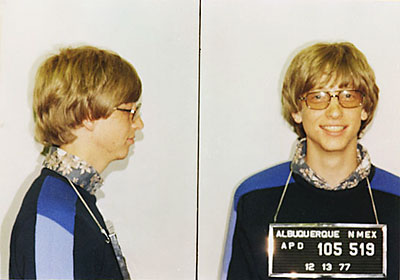
In cross-examination, Gates was forced to admit he was a criminal. Gates finally admitted to taking illegal actions against competitors like Apple, Netscape, and Sun. Microsoft must not be allowed to continue to profit from its prior illegal actions, and should be forced to distribute QuickTime, Java, and Netscape with all Microsoft OS products. Ultimately, Judge Jackson's original remedy was correct, nothing short of the "corporate death penalty" of breaking Microsoft into smaller companies will stop this monopoly. Microsoft should be forced to divest itself of assets in other crucial technologies, and prohibited from future investments that could allow it to create new monopolies in areas outside its core business. Microsoft must not be allowed to use its hoard of cash to control the future of the computing industry or any other industry. Microsoft's monopoly does nothing to promote innovation or economic growth, it stifles that innovation and growth until it can figure out how to make it profitable for Microsoft. The reason you don't have 100Mb Ethernet broadband to your home is that Microsoft hasn't figured out how to make a profit from it. The reason you don't have 3rd Generation portable phones is because Microsoft hasn't figured out how to profit from them. The reason you don't have TV on-demand via broadband is that Microsoft hasn't figured out how to monopolize and profit from it. Microsoft will attempt to monopolize every future technology unless the the Government stops them. Bill Gates once boasted he was more powerful than the US Government. It is time to teach him a lesson. Some have argued that divestiture is traditionally considered inappropriate for monopolies that were not created through mergers or acquisitions. But this is precisely how Microsoft gained its power, by assimilating smaller corporations and promoting their technologies as "Microsoft innovations." And this is precisely why Microsoft must be broken up and forced to divest.
I once won a contest that sought the best plan to break up Microsoft. I said that initially, I thought that Bill Gates, Steve Ballmer, and all Microsoft employees and properties should be broken down into subatomic particles with high-energy radiation beams. However, on second thought, I figured that Gates and Ballmer would absorb the energy and like the Borg, assimilate that energy and become even more powerful and indestructible. So I decided to consult Federal Regulations and see if they had any guidelines. And I found just what I wanted.

I proposed that in accordance with the regulations of the 1994 Federal Child Safety Protection Act, all Microsoft properties should be broken into the smallest possible pieces but no smaller than 1.75 inches in diameter, so that those pieces would not pose a choking hazard to children. For my proposal, I won the Grand Prize in the contest. The award was a t-shirt with the word "Microsoft" in graphics that looked like the Monopoly board game, with the little Monopoly man with the top hat and cigar poking out through the "o." I never received my prize. I would have worn it proudly.
I've just released instructions for setting up spam filters in MacOS X. It's free, and uses existing software already installed in MacOS X. All you have to do is configure the filters and your spam problems are over. I went from 50 to 100 spams a day, down to 1 spam every few days.
One of the perils of the tech industry is a little game of one-upsmanship that I call "King of the Geeks." Usually it's a friendly game, but sometimes it is a stupid battle of egos. I had an amusing example of it today while I was talking to a tech on the phone. I mentioned an ancient product, and made an offhand remark that it was from the early 80s and probably before his time. He responded, "oh I remember that product, I started programming back in the days of the VIC-20."
I said, "oh, two can play that game, I like this game, I usually win." I told him that my computer store sold VIC-20s, but I started long before that. I trumped his VIC-20 with my experience in IBM punch card sorters. He responded with his experience programming patchboard computers. Now that is old tech, the stuff they were replacing as obsolete when I started computing. I still could have won the game, but I did not play my ace-in-the-hole, the card that always beats everyone, the Digicomp 1.
So that is why I try to not even play this game. Sometimes I get swept up in it, then I always let the other geek win. But I make it a tough victory for them, so they get their ego strokes from defeating a worthy opponent.
I said, "oh, two can play that game, I like this game, I usually win." I told him that my computer store sold VIC-20s, but I started long before that. I trumped his VIC-20 with my experience in IBM punch card sorters. He responded with his experience programming patchboard computers. Now that is old tech, the stuff they were replacing as obsolete when I started computing. I still could have won the game, but I did not play my ace-in-the-hole, the card that always beats everyone, the Digicomp 1.

So that is why I try to not even play this game. Sometimes I get swept up in it, then I always let the other geek win. But I make it a tough victory for them, so they get their ego strokes from defeating a worthy opponent.
I finally got sick of 50 to 100 spams a day, so I set up email filtering with Procmail. If you can set up Procmail, you are a true Unix geek. I found a simple recipe for Fetchmail/Procmail on MacOS X, all the required programs are already installed, you merely need to configure them. I set up fetchmail to get mail from my ISP every 5 minutes, them Procmail filters the mail, and delivers it to MacOS X Mail.app. Any incoming spam has to run a gantlet of hundreds of filters, I'm using filtration rules from Spambouncer. I set it to reject all mail in languages I don't understand, like Chinese, Korean, Russian, Turkish, etc. I don't know why I get dozens of spams in Korean each week, but I do. And now it's all blocked. Goodbye spam. I set up a little monitor, it pops up to announce each time a spam is killed. It is almost more fun watching the spam die than getting real email.
I'm setting up a new "Quicksilver" Powermac for a friend of mine, the new top-end dual 1Ghz model. It is blindingly fast. It reminds of something my sister said when she upgraded from a Performa to an iMac, "it's like having a whole room full of computers at your fingertips!"
The best feature of this is the DVD recorder. I don't have much use for video, but I sure do like being able to back up 4.4Gb of data on a single disc. I put my huge 9Gb mp3 collection on two DVDs, now I don't have to waste all that hard disk space, I can just pop in the DVD, listen to a few tunes, or just copy a few tunes to my local hard drive. I finally have a good backup of my 2Gb Virtual PC disk images that I could never back up to CDRs. Now Dantz just needs to ship Retrospect so we can back up a live unix system. I think the new iMac will be a huge success once people discover the data storage abilities of the SuperDrive.
After years of searching, I have found a source for some rare parts to restore my rare Sol-20 microcomputer. It is in perfect operating condition except for the keyboard. The Sol keyboard used foam pad contacts, the pads decompose after about 20 years and the keyboard stops working. A fellow Sol owner located some spare pads for me, for only $5 yay!
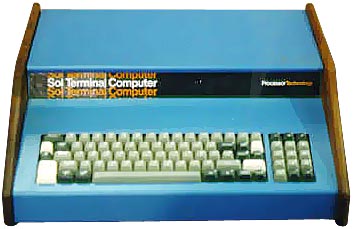
Update: My parts source informs me the parts he found are the wrong type and will not work. So I am still searching for some pads.
Update August 29, 2007: A generous donor supplied me with the correct pads and my Sol is now restored to working condition. You can view the results here.
I recently located a very old computer science paper (1MB PDF) from 1978, it was one of the most significant papers I ever read, it helped me understand the usefulness of computer applications in the arts, and it shaped my career path. With inspiration from this paper, I have always loved to apply modern computer technology to ancient technologies. So I decided to scan my old fading Thermofax copies and put them on the web.
This paper discusses an obscure area of Renaissance art, "anamorphosis." Early experimenters in perspective drawing discovered unique optical and geometrical tricks to distort images. The classic example is the painting "The Ambassadors" by Holbein, it has a distorted image near the bottom, when viewed from a certain angle the image is clearly visible as a skull.

Some images were painted for viewing in cylindrical or conical mirrors. Other artists used the technique on a massive architectural scale. Here is a grand fresco by Fra. Pozzo, it is painted on an arched roof but the architectural features seem to ascend to the sky. It is no wonder that anamorphic techniques were considered "miracles of art."

This little paper is one of the first attempts to convert these projective geometry techniques to computer graphics. I encountered this article when I was studying anamorphosis, back when I was a young Art student taking classes in mechanical drawing and perspective. I had some early computer programming and graphics experience with the primitive pen plotters and computer-output-microfilm of the day, but this paper opened up my eyes to new applications. But still, I could not envision the day, today, when I could do these tricks in Photoshop with a Free Distortion or Polar Coordinates filter.
In particular, I recommend you print out the last page, and cut out and assemble the little cone. Also notice the strange two-column word processing, which looks like it was done on an IBM Selectric terminal with multiple "golf ball" type elements for italic and regular. You don't see documents like this anymore!
So the interface issues are getting settled and now I'm starting to deal with the whole point of blogging. What got me interested was not an essay on blogging, but an essay on the iMac. Some editorialist said that the iMac should be a continuous record of your life. Your digital hub should be keeping track of the files you access through your days, storing your pictures, music, texts, etc.
My initial thoughts were that blogging would make it easier to keep track of disparate types of web links that I encounter. But now I'm thinking this is really headed towards "internal blogging." I don't want a public blab sheet of all my stupid random thoughts, I want to collect all my work, all the form letters I get about my student loan, my tax records, my bills, all scanned in so I don't have to deal with paper files. I want my phone book and records of my calls and faxes. I don't see anything like this happening without a software hub.
I see some possibilities for a personal blog hub in MacOS X, though. You can use MovableType with MySQL alongside other MySQL databases of personal records. If I could keep an local index database of archived records, scan and store them as they arrive, link Web-based record searches to .pdf files maybe, that would be a really useful thing.
On a whim, I grabbed a marathon of military shows from the History Channel to my Tivo, and oh boy did I get a bonanza of computer folklore. In the show "Silent Service: Attack Plans of WWII," the results of restoration and display of two historic military computer systems were on display. And oh yes the restoration is excellent.
One of the last remaining US WWII era submarines, the USS Pampanito, is moored in San Francisco at Fisherman's wharf. A group of history buffs and computer geeks in the bay area have restored the Pampanito's Torpedo Data Computer Mk 3 and ECM Mk2 cryptography machine.
I had heard in afc [alt.folklore.computers] in the past that a historic crypto system was on display near the Pampanito, I saw the sub back in about '91, and went inside it on the regular tourist thing, but this was before the restoration. According to the show, the ECM was only declassified in 1995, the unit on display is the only machine in civillian hands, and on loan from the NSA. I wonder if the NSA has other units.. Here's a link on techy details on the ECM Mark 2: http://www.maritime.org/ecm2.htm
Now that is one beauty of a piece of machinery, I wish you could have seen it in operation on video.
But more amazing were the details of the restoration of the Torpedo Battle Computer. The original TDC Mk 1 is credited to the Arma Corporation, E. Don Gittens of MIT produced the design, and is interviewed extensively on the program. He described redesigning the Mk 1 prototype unit for compactness and battle hardening, producing the Mk 3 units at Arma Corp, and going to sea to train crews on the complex TDC operations. The TDC is essentially a massively complex slide-rule, with motors and cranks that dynamically change the inputs over time. The output is displayed on cocentric rings with radial markings for compass heading, speed, etc. Here is a little paper by Terry Lindell, the restorer of the TDC: http://www.maritime.org/tdc.htm
They had a demonstration with crew of people in military garb, calling observations from the periscope, inputting them into the TDC, you could see the little black dials with ship's outline swinging as the Pampanito "turned" though it's maneuvers, and then a little red light marked "A" lights up, the attack solution has arrived, we're in position, Fire One!
As a bonus, it appears that some restoration has been done on the Pampanito radar system. They showed the radar antennae whirling around, little low-profile parabolic open-grid dishes about a foot or two across. But alas, it appears the radar display systems are as yet unrestored. The documentary provided much interesting coverage of how the TDC was used in night attacks. The TDC was originally designed for blind attacks with only sonar, but these were totally ineffective and the strategy was abandoned. With radar, accuracy was hugely improved. Subs could accurately attack from 4x the distance of previous sonar attacks, far beyond the range of enemy retaliation. Japanese maritime losses rose dramatically, the US subs could attack at night or in fog, attacking multiple targets in rapid succession.
Ah well, you really must make an effort to catch this show, I'm sure the History Channel will rerun it soon. "Silent Service" has many stirring submarine tales, but the last episode, "Attack Plans of WWII," ties all the tales together, into a battleground of technology and computing. We had advanced computers (albeit an analog system of cogs and gears) and radar and crypto, they did not, and it turned the tide of battle. The US Navy only had 2% of its fleet resources in the submarine service, but subs are credited with 55% of the tonnage sunk in the Pacific.
[I posted this message on Usenet in alt.folklore.computers]


